Local SEO Tools for 2026: Reviews, Features & Pricing Compared


Local SEO Tools for 2026 help businesses and agencies manage local listings, Google Business Profiles, customer reviews, citations, and location-based rankings without handling every task manually. Synup, BrightLocal, Semrush Local, Moz Local, Yext, Whitespark, and Uberall are among the main options worth comparing this year. The right choice depends on whether you manage one storefront, several branches, hundreds of franchise locations, or local SEO clients. This guide reviews Local SEO Tools for 2026 by features, pricing, usability, reporting, reputation management, and suitability so you can narrow down the platforms that fit your work.
Local SEO Tools for 2026: Quick Comparison
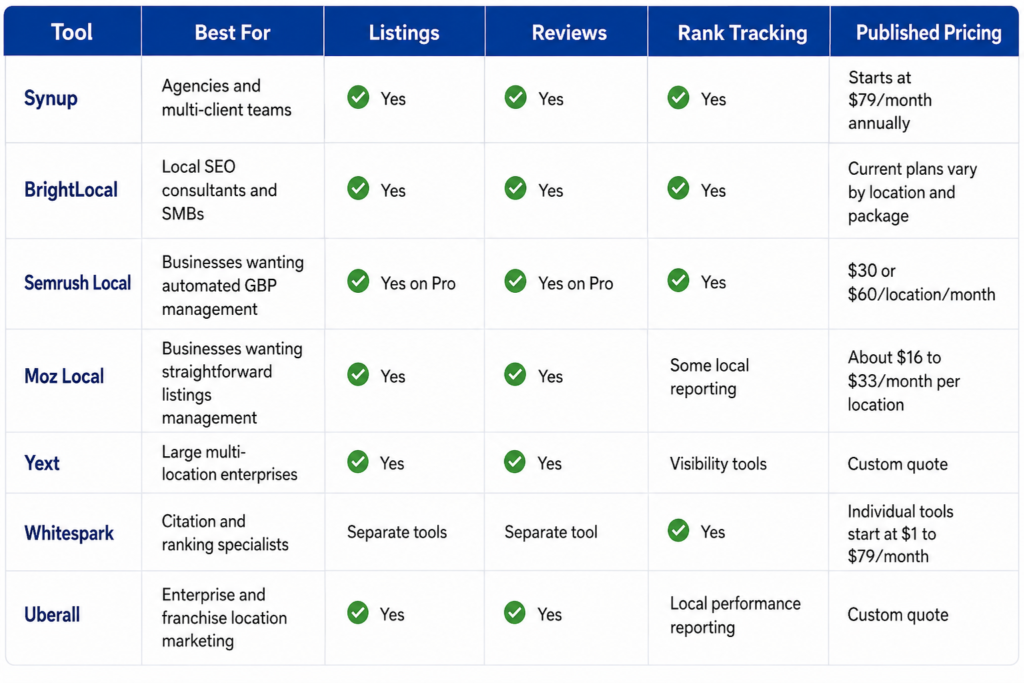
Pricing was checked against vendor pages and current software directories in August 2026. Synup lists plans starting at $79 per month when billed annually. Semrush Local lists Base at $30 and Pro at $60 per location each month. Whitespark publishes individual product pricing, while Yext and Uberall use request-based pricing for their main platforms.
What Should You Look for in Local SEO Tools for 2026?
A useful local SEO platform should help you keep business information accurate, monitor search visibility, manage customer feedback, and measure what changes after you update a listing or Google Business Profile.
Google says local results are mainly determined by relevance, distance, and prominence. It also notes that review volume and positive ratings can affect local prominence. That makes profile management, listings accuracy, review monitoring, and local rank tracking practical areas to consider when comparing software. Google’s local ranking documentation explains these factors directly.
Reviews deserve particular attention. BrightLocal’s 2026 Local Consumer Review Survey found that 97% of surveyed consumers read online reviews for local businesses, while 41% said they always read them when researching a business. BrightLocal’s 2026 consumer review research provides the full findings.
When evaluating Local SEO Tools for 2026, compare these areas:
- Business listing distribution and syncing
- Google Business Profile management
- Duplicate listing detection
- Review monitoring and responses
- Review request campaigns
- Local and map rank tracking
- Citation auditing
- Competitor tracking
- Multi-location management
- Agency reporting
- White-label client access
- APIs and integrations
- Pricing per account or location
A small business may only need listing accuracy, reviews, and ranking reports. An agency often needs client dashboards, reporting, bulk controls, and white-label options. A franchise with hundreds of locations has another problem entirely: keeping location data, permissions, reviews, and reporting consistent at scale.
1. Synup
Best for: Agencies, multi-client marketing teams, and businesses that want listings and reputation management in one system.
Synup takes the first position because its current platform goes beyond a basic listings dashboard. Synup OS combines agency management functions with client-facing local marketing tools. Its Startup plan supports up to 25 client accounts and includes listings and review management for up to 25 locations. Agency and Scale plans increase those limits to 100 and 500 locations respectively.
Main Synup Features
Synup provides centralized listing management, Google and Facebook local posts, profile analytics, Apple Business Connect support, review monitoring, agency reporting, APIs, client dashboards, and white-label controls. Its agency plans also include sales pipeline and account-management features, which makes the product somewhat different from tools focused only on rankings or citations.
The reputation product can monitor reviews across more than 20 sources. Reviews Pro costs $20 per location per month and includes AI-assisted responses and daily monitoring. Reviews Gold costs $50 per location per month and adds review generation, sentiment analysis, email credits, and text credits.
Synup Pricing
- Startup: $79/month billed annually or $99 monthly
- Agency: $199/month billed annually or $249 monthly
- Scale: $799/month billed annually or $999 monthly
Synup Review
Synup makes the most sense when listings and reviews are part of a service you sell to clients rather than a single internal SEO task. G2 reviewers commonly mention straightforward listing management, centralized review work, and responsive support. Some reviews note that the number of functions can take time to learn for a new user.
The main drawback is that businesses needing only one basic feature may find a specialist tool cheaper. Agencies that want a broader client platform have more reason to consider it.
2. BrightLocal
Best for: Local SEO consultants, agencies, and businesses that want detailed auditing, ranking, citation, and reputation tools.
BrightLocal has built its product around day-to-day local SEO work. The platform covers local search audits, local ranking reports, citation checks, Google Business Profile auditing, geo-grid tracking, listing management, review monitoring, and review generation. Its pricing structure now separates access into Track, Manage, and Grow packages, with pricing adjusted according to the number of locations.
Main BrightLocal Features
The Track package can monitor local rankings for up to 100 keywords and four competitors. It also includes geo-grid tracking for selected keywords, citation accuracy checks, and Google Business Profile audits. Manage adds business-information syncing and Google Business Profile posting. Grow adds review monitoring, responses, email and SMS review campaigns, and tools for publishing reviews on a website.
BrightLocal also sells citation building separately. Its current pricing page lists citation work starting at $2 per citation with bulk credits, so businesses can use this service without buying the full software subscription.
BrightLocal Pricing
BrightLocal’s current interactive pricing page calculates platform costs by package, billing schedule, and location count. The company offers a 14-day trial without requiring a credit card. Citation Builder is billed separately.
BrightLocal Review
BrightLocal is a practical option for teams that spend a lot of time auditing local visibility and producing client reports. Its pricing page currently displays ratings of 4.6/5 on G2, 4.8/5 on Capterra, and 4.6/5 on Trustpilot, though scores can change as new reviews are posted.
The main trade-off is product breadth. Businesses wanting sales CRM, invoicing, or broader agency operations would need other software beside BrightLocal.
3. Semrush Local
Best for: Businesses that want Google Business Profile automation and map rank tracking inside the wider Semrush product family.
Semrush Local has changed noticeably as automated Google Business Profile management has become more prominent. It can be purchased separately or added to another Semrush subscription. The current offering has two main tiers, Local Base and Local Pro, with a separate sales-led option for businesses managing 20 or more locations.
Main Semrush Local Features
Local Base includes a Google Business Profile AI Agent and Map Rank Tracker. The agent can create and schedule GBP posts, prepare review replies, post supplied photos, work on business descriptions, and provide an optimization plan. The map tracker includes geo-grid reporting and competitor comparisons.
Local Pro adds listing management across more than 70 directories, duplicate monitoring, centralized review management, review request campaigns, competitor review analysis, bulk Google Business Profile editing, historical profile data, and a larger allocation of geo-grid tracking credits.
Semrush Local Pricing
- Local Base: $30/month per location
- Local Pro: $60/month per location
- 20+ locations: Custom offer available through sales
Semrush Local Review
Semrush Local is easier to justify when Google Business Profile activity and map rankings consume a lot of staff time. Base is particularly focused on GBP automation rather than full listings distribution. Businesses that need directory management and broader review functions need Pro.
Per-location billing needs careful calculation. Ten locations on Local Pro, for example, means a much different budget than a one-location business. Teams should price their real location count before comparing the subscription with an account-based product.
4. Moz Local
Best for: Small and mid-sized businesses that want a simpler way to distribute and maintain location information.
Moz Local concentrates heavily on listings consistency and location-data management. Businesses can use it to distribute business information, monitor location data, deal with duplicate listings, and track customer feedback without buying a much broader marketing platform.
Main Moz Local Features
The product covers listing distribution, location data management, duplicate handling, review monitoring, reporting, and Google and Facebook-related local presence functions. Capterra describes Moz Local as a centralized platform for syncing and managing location data at scale.
This narrower focus can work well for companies that already have separate SEO analytics or content software. You are not paying for a large set of agency operations or general digital marketing functions simply to update a business address or monitor directory accuracy.
Moz Local Pricing
G2’s pricing record, updated in April 2026, lists three editions:
- Lite: $16/month
- Preferred: $24/month
- Elite: $33/month
Pricing is commonly presented per location, so multi-location businesses should calculate the total before comparing Moz Local with account-level plans.
Moz Local Review
GetApp currently shows Moz Local at 4.4/5 based on 33 reviews, with reviewers rating ease of use at 4.4/5 and features at 4.3/5. User comments on the site mention its straightforward citation and NAP management, while some users want broader citation coverage for particular location types.
Moz Local fits buyers who prefer a focused product. Agencies needing detailed geo-grid tracking or extensive white-label client controls may prefer another option.
5. Yext
Best for: Large brands, enterprise organizations, and companies managing hundreds or thousands of locations.
Yext is built around structured business information and large-scale distribution. Its Listings product manages business data across more than 200 online publishers and can distribute information to services including Google, Apple Maps, Yelp, Bing, and other search and discovery platforms. Yext also offers products for reviews, pages, social content, analytics, and AI-search visibility.
Main Yext Features
Listings management is the centre of the local offering. Teams can manage business information centrally rather than updating each publisher separately. The product also includes duplicate management, publisher integrations, analytics, and location-level controls. Yext’s broader platform can add review responses, local pages, social publishing, and its Scout visibility product.
For organizations with large location databases, this structure can reduce the amount of manual editing required when hours, services, phone numbers, or other location details change.
Yext Pricing
Yext does not publish a fixed self-service price for its main enterprise product. The company says pricing is custom and depends on the solution purchased, number of locations or providers, and contract length. Billing is generally annual, and there is no standard free tier or free trial.
Yext Review
Yext makes the most sense when distribution scale, enterprise controls, publisher coverage, and structured location data are the main buying requirements. G2 currently lists more than 1,100 Yext reviews, which gives prospective buyers a large pool of user experiences to examine.
Small businesses should compare the cost and contract structure carefully. Yext itself says its direct offering is aimed mainly at large multi-location enterprises and points smaller businesses toward reseller partners.
6. Whitespark
Best for: SEO professionals who want specialist local ranking, citation, and Google Business Profile tools without paying for one bundled suite.
Whitespark takes a different approach from most Local SEO Tools for 2026. Instead of putting every function into one subscription, it sells separate products for Google Business Profile management, geo-grid rankings, traditional local rank tracking, citation research, and reputation management.
Main Whitespark Features
Its Local Platform is designed for Google Business Profile management and bulk location editing. Local Ranking Grids measure map visibility across as many as 225 geographic points. Local Rank Tracker monitors local pack, maps, and organic positions. Local Citation Finder identifies citation opportunities and tracks existing listings. Reputation Builder handles review requests and review management.
The modular setup works well when you know exactly what you need. An SEO consultant focused on geo-grid tracking does not have to purchase reputation management at the same time.
Whitespark Pricing
Current published prices include:
- Local Platform: $1/month per location
- Local Ranking Grids: Starts at $10/month
- Local Rank Tracker: $14 to $200/month
- Local Citation Finder: $33 to $149/month
- Reputation Builder: $79/month per location
Whitespark Review
Whitespark is particularly useful when citation research or local ranking measurement is the central job. Its separate-product pricing also makes budgeting easier for specialists.
The trade-off is the same feature that makes it appealing. Teams wanting listings, reviews, ranking reports, social posting, client billing, and agency workflows in one dashboard would need several Whitespark products or other software alongside them.
7. Uberall
Best for: Franchises, retail chains, restaurant groups, and other multi-location brands.
Uberall focuses on location marketing at enterprise scale. Its packages combine location-data management, business listings, review management, local social publishing, analytics, and optional local pages or AI-search monitoring. The company currently offers Show Up, Stand Out, and Connect packages, with more functions added as businesses move up the range.
Main Uberall Features
The core location tools can manage addresses, phone numbers, opening hours, photos, scheduled updates, and bulk edits. Listings features include duplicate suppression, profile protection, recommendations, and publisher connections.
Higher packages add review inboxes, AI-assisted review replies, review request tools, Facebook and Instagram publishing, Google posts, Apple Showcase posting, local content calendars, and reporting. Add-ons cover sentiment analysis, competitive intelligence, workflow approvals, local pages, store locators, and GEO Studio for AI-search measurement.
Uberall Pricing
Uberall publishes its package structure but does not display a fixed dollar price for the main Show Up, Stand Out, and Connect subscriptions. Businesses must request pricing. Its separate GEO Studio product does publish some prices, but that should not be confused with the cost of the main local marketing platform.
Uberall Review
Uberall is better suited to organizations with enough locations to justify centralized permissions, bulk updates, review workflows, and brand-wide reporting. User comments displayed on Uberall’s site, including verified G2 feedback, frequently mention the convenience of controlling multiple locations and reviews in one system.
Single-location businesses may find the enterprise structure more than they require.
Which Local SEO Tool Is Best for Different Types of Businesses?
There is no single platform that fits every local SEO workflow. The best choice depends on the amount of work you need to centralize.
Best for Agencies: Synup
Synup fits agencies that need to manage client locations while also handling reporting, white-label access, account controls, and other agency operations. Its location allowances are built into the Startup, Agency, and Scale plans.
For more agency workflow ideas, see our local SEO checklist.
Best for Local SEO Reporting: BrightLocal
BrightLocal is particularly strong when audits, citation reports, geo-grid rankings, and client reporting make up most