Oak Engage Alternatives in 2026: 10 Best Intranet and Employee Engagement Platforms Compared

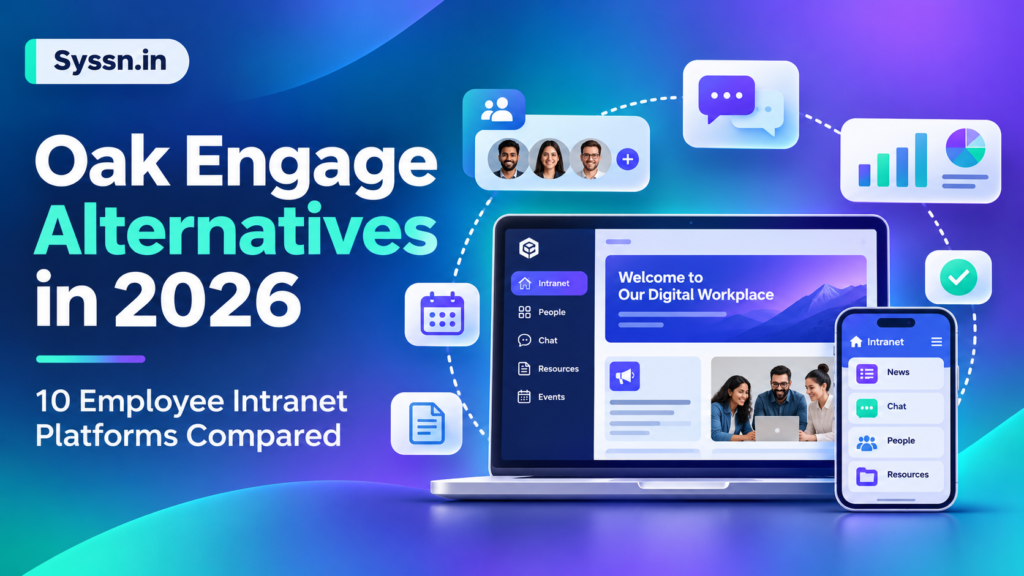
HubEngage, Workvivo, Simpplr, Staffbase, Blink, Unily, LumApps, Interact, MangoApps, and Haiilo are 10 Oak Engage alternatives worth comparing in 2026. The right choice depends on whether your organization prioritizes mobile employee communication, AI-powered knowledge search, employee recognition, enterprise integrations, or intranet customization.
HubEngage is worth evaluating for unified employee communications and engagement. Workvivo emphasizes social interaction and workplace culture, Simpplr focuses on AI-powered intranet experiences, and Staffbase specializes in enterprise communications across multiple channels.
Other alternatives address more specific requirements, including frontline employee access, sophisticated knowledge management, and digital workplace integration.
An effective replacement should do more than reproduce Oak Engage’s features. It should solve the communication, adoption, integration, or administrative challenges that prompted your organization to explore alternatives.
This guide compares 10 leading platforms using their documented capabilities, pricing models, integrations, strengths, limitations, and suitability for different organizations.
What Is Oak Engage?
Oak Engage is an employee intranet and internal communications platform designed to connect employees, centralize workplace information, and improve organizational communication.
The platform combines traditional intranet functionality with social collaboration, mobile access, employee recognition, personalized content delivery, and AI-assisted capabilities.
According to Oak Engage’s official product overview, its capabilities include employee messaging, Microsoft 365 integration, hubs and communities, mobile intranet access, employee notifications, and Oak AI.
Key Features of Oak Engage
- Employee intranet: Centralized access to workplace news, policies, documents, and resources.
- AI-powered capabilities: AI-assisted content creation, personalization, and knowledge discovery.
- Mobile intranet: Access for frontline, remote, hybrid, and office-based employees.
- Microsoft 365 integration: Connections with Microsoft Teams and workplace productivity tools.
- Employee engagement: Social communities, recognition, polls, and interactive content.
- Internal communications: Targeted announcements, notifications, and important-read acknowledgments.
- Analytics: Insights into employee engagement and communication performance.
Why Do Businesses Look for Oak Engage Alternatives?
Organizations may explore Oak Engage competitors when their needs change or when they want to benchmark available technology before renewing an existing contract.
Common reasons include:
- Different communication requirements: Some organizations need additional channels such as SMS, employee email, or digital signage.
- Frontline access: Employees without corporate email accounts may require simpler authentication and mobile-first workflows.
- Integration requirements: IT departments may need deeper connections with HR, Microsoft 365, Google Workspace, and operational systems.
- AI capabilities: Buyers may want advanced enterprise search, knowledge assistants, workflow automation, or AI governance.
- Cost considerations: Organizations may prefer transparent per-user pricing or a more modular licensing model.
- Customization and governance: Larger companies may need sophisticated branding, permissions, regional publishing, and multilingual content management.
These are reasons to compare vendors, not evidence that Oak Engage lacks every corresponding capability.
The goal should be to identify which platform provides the strongest fit for your specific requirements.
How We Evaluated the Best Oak Engage Alternatives
This comparison considers platforms that compete with Oak Engage in at least one major category: employee intranet software, internal communications, employee engagement, or digital workplace management.
The evaluation covers six areas:
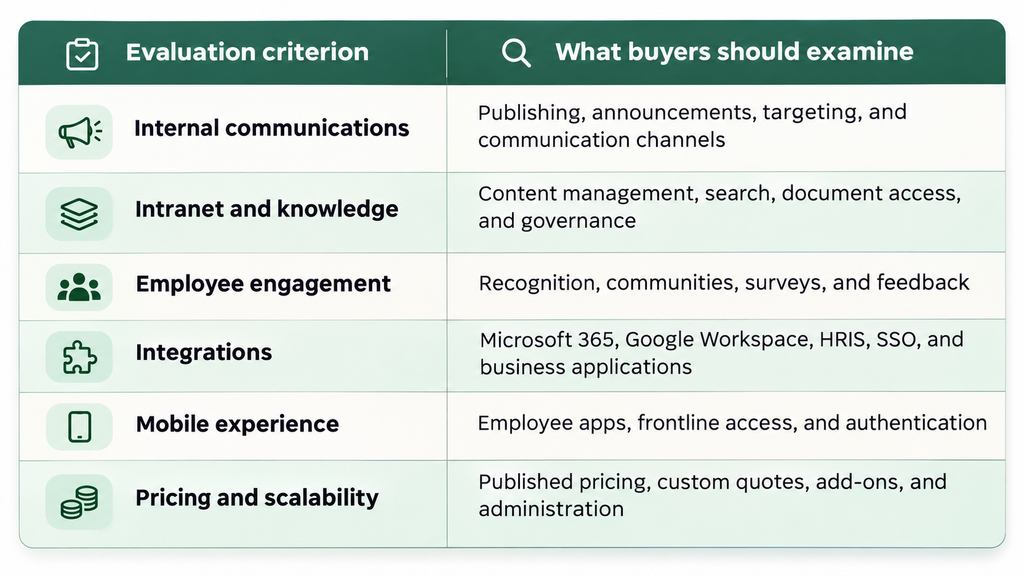
Product information was reviewed against publicly available vendor websites, pricing pages, product documentation, and integration resources in November 2026.
This is a desk-research comparison, not a claim of hands-on testing. “Best for” labels indicate recommended evaluation scenarios rather than independently certified product rankings.
For a structured buying process, see Syssn’s guide to evaluating employee experience platforms.
Oak Engage Competitors Comparison Table: Features and Pricing
The following table summarizes the 10 best Oak Engage alternatives in 2026.
| Platform | Best for | Main strength | Main consideration | Pricing |
|---|---|---|---|---|
| 1. HubEngage | Unified employee communication and engagement | Multichannel communications, recognition, surveys, and gamification | Module selection affects total cost | Custom quote |
| 2. Workvivo | Social intranet and employee culture | Communities, recognition, and AI-powered employee experiences | Several advanced tools are add-ons | Custom quote |
| 3. Simpplr | AI-powered enterprise intranet | Knowledge discovery, personalization, and integrations | Final pricing depends on complexity | Custom quote |
| 4. Staffbase | Enterprise internal communications | Multichannel publishing and enterprise governance | Licensing depends on channel mix | Custom quote |
| 5. Blink | Frontline and deskless teams | Mobile-first communication and access | Advanced capabilities vary by tier | From $3.75/user/month* |
| 6. Unily | Complex enterprise digital workplaces | Customizable intranet and integrated knowledge | Implementation requires planning | Custom quote |
| 7. LumApps | Connected enterprise employee hubs | AI agents, enterprise search, and productivity integrations | Costs and rollout scope require a proposal | Contact sales |
| 8. Interact | Knowledge-driven intranet modernization | Personalized intranet, search, and content governance | Some enhancements are optional | Custom quote |
| 9. MangoApps | Communications plus workforce applications | Modular workplace suites and employee resources | Minimum user requirements | From $9/employee/month** |
| 10. Haiilo | Multilingual employee communications | Intranet, newsletters, analytics, and AI | Modular packaging affects pricing | Custom quote |
Best Oak Engage Alternatives in 2026: Detailed Reviews
1. HubEngage
Best for: Organizations that want employee communications, recognition, feedback, and social engagement in a consolidated platform.
HubEngage is an employee experience platform that combines internal communications, employee recognition, social networking, surveys, messaging, and intranet resources.
Its modular structure allows organizations to select the functionality they need rather than deploying every capability simultaneously.
HubEngage supports communication across mobile applications, web-based intranets, email, SMS, and digital displays. This makes it relevant for organizations with both desk-based and frontline employees.
The platform also includes AI-supported content generation, translation, search, and analytics. Gamification features allow organizations to encourage participation through points, leaderboards, and rewards.
Key Features
- Multichannel employee communications and targeted notifications.
- Employee recognition, milestone celebrations, and gamification.
- AI-assisted content, surveys, employee messaging, and analytics.
- Branded mobile applications and intranet access.
- Integrations with Microsoft Teams, SharePoint, and HR systems.
Pros
- Combines several communication and engagement functions in one platform.
- Supports employee participation through recognition and rewards.
- Offers multiple channels for reaching distributed employees.
Cons
- Organizations need to evaluate which modules are included in the proposed package.
- Advanced intranet customization and knowledge workflows should be demonstrated against specific requirements.
Pricing: HubEngage provides custom pricing based on organization size, selected modules, and contract terms. Public standard per-user pricing is not listed.
Choose HubEngage if: Your priority is combining communication, recognition, surveys, and employee interaction without managing numerous separate engagement tools.
2. Workvivo
Best for: Organizations prioritizing employee participation, workplace communities, and recognition.
Workvivo is an employee experience platform owned by Zoom that combines internal communication, social interaction, recognition, and workplace resources.
Its interface emphasizes employee-generated content, company updates, celebrations, and community participation.
Workvivo HQ extends the platform toward knowledge management and AI-supported employee experiences. Additional products, including HQ Agent and Seer, address connected workplace tasks and employee listening.
The platform integrates with enterprise productivity systems. Workvivo’s official integration documentation describes connections with Microsoft 365, SharePoint, and Google Workspace.
Key Features
- Social feeds, employee communities, and workplace recognition.
- AI-assisted communication and workplace knowledge discovery.
- Mobile communication, newsletters, events, and employee surveys.
- Microsoft 365, Google Workspace, and enterprise application integrations.
- Additional options for chat, digital signage, and listening analytics.
Pros
- Strong emphasis on employee interaction and organizational culture.
- Supports social communication alongside traditional intranet content.
- Integrates with established workplace productivity systems.
Cons
- Some AI, analytics, and communications capabilities require additional products.
- Organizations must confirm which capabilities are included in their quote.
Pricing: Workvivo uses customized pricing based on licenses and organizational requirements. It does not publish a standard enterprise per-user rate.
Choose Workvivo if: Your organization wants employees to participate actively in workplace communication rather than primarily consume company announcements.
3. Simpplr
Best for: Organizations prioritizing workplace search, knowledge access, personalization, and employee self-service.
Simpplr is an AI-powered employee experience platform designed to centralize company information, communications, and workplace resources.
Its intranet capabilities focus on helping employees locate relevant information and access applications without navigating disconnected systems.
Simpplr supports enterprise search, personalized content, integrations, and AI-assisted employee experiences.
Its integration capabilities extend to Microsoft 365, Google Workspace, Workday, ServiceNow, and other enterprise applications.
The platform is relevant to organizations that consider knowledge accessibility and information governance central to their intranet strategy.
Key Features
- AI-supported knowledge search and content recommendations.
- Personalized employee intranet and mobile access.
- Content governance, employee communications, and analytics.
- Integration with productivity platforms and HR applications.
- APIs and extensibility options for enterprise workflows.
Pros
- Strong alignment with knowledge discovery and employee self-service.
- Integrates workplace content with existing business applications.
- Supports enterprise administration and content governance.
Cons
- Some advanced products and services may affect the final subscription.
- Pricing is customized rather than publicly standardized.
Pricing: Simpplr provides volume-based custom quotes reflecting organization size, complexity, and support requirements.
Choose Simpplr if: Employees regularly struggle to find policies, documents, applications, or internal knowledge, and the organization needs an intelligent intranet as its primary workplace destination.
4. Staffbase
Best for: Large organizations managing communications across regions, departments, and employee channels.
Staffbase is an employee communications platform supporting intranet publishing, mobile employee applications, email, digital signage, and other communication channels.
Its strength lies in helping communications teams coordinate messages for different employee populations.
Organizations can publish targeted content while maintaining central governance and allowing appropriate regional or departmental administration.
Staffbase also supports AI-assisted workplace knowledge through its Navigator capabilities.
For technical buyers, Microsoft’s Staffbase connector documentation describes how the platform can participate in Power Automate workflows.
Key Features
- Employee intranet, mobile app, email, and digital signage.
- Targeted internal communications and publishing workflows.
- AI-assisted workplace answers and content capabilities.
- Enterprise analytics and communication measurement.
- Microsoft ecosystem connections and administrative controls.
Pros
- Designed for complex enterprise communication environments.
- Supports both desk-based and frontline communication requirements.
- Offers governance for large and decentralized organizations.
Cons
- Multichannel deployment can increase implementation complexity.
- Final costs depend on workforce composition and selected channels.
Pricing: Staffbase provides customized quotes, including distinct commercial approaches for frontline and mixed workforces.
Choose Staffbase if: You need centralized control over communications distributed through several channels, business units, or geographic regions.
5. Blink
Best for: Businesses whose employees primarily access workplace information through smartphones.
Blink is a frontline employee platform combining communication, messaging, knowledge access, and operational tools.
Its mobile-first approach is particularly relevant for industries such as hospitality, retail, transportation, and healthcare.
The platform provides employee news feeds, secure chat, communities, documents, surveys, and workplace integrations.
Blink also supports access options designed for employees without traditional corporate email accounts.
Its broader functionality includes AI-assisted capabilities, employee journeys, forms, and operational integrations, although feature availability varies by plan.
Key Features
- Mobile employee news feeds and secure messaging.
- Knowledge hub, documents, forms, and employee communities.
- Passwordless and alternative employee onboarding methods.
- AI-supported assistance and communication analytics.
- Connections with Microsoft 365, HR systems, and workplace applications.
Pros
- Designed around frontline workforce access and adoption.
- Provides published entry-level pricing.
- Combines communication with practical employee resources.
Cons
- Advanced administration, APIs, and certain integrations depend on higher tiers.
- Complex enterprise deployments may require additional products or add-ons.
Pricing: Blink’s official pricing page lists Core from $3.75 per user/month and Pro from $5 per user/month when billed annually. Enterprise plans require a quote.
Choose Blink if: Your priority is giving mobile employees straightforward access to communication, colleagues, and essential workplace information.
6. Unily
Best for: Large enterprises needing a highly customizable intranet with extensive integrations and governance.
Unily is an enterprise employee experience platform that combines intranet content, internal communications, knowledge management, workplace search, and business application access.
The platform emphasizes configurable digital experiences that can reflect different business units, employee roles, and organizational structures.
Unily also supports Microsoft 365 and Google Workspace integrations, allowing organizations to connect existing productivity systems with their intranet.
Its AI capabilities include agent-assisted content workflows and additional options for connected enterprise search and actions.
Key Features
- Enterprise intranet CMS with sites, subsites, and knowledge bases.
- Advanced personalization, publishing, and governance.
- Microsoft 365, Google Workspace, and enterprise application integrations.
- AI-assisted content management and workplace discovery.
- Native mobile applications and communication notifications.
Pros
- Flexible architecture for complex enterprise requirements.
- Supports sophisticated content governance and customization.
- Combines intranet capabilities with workplace application access.
Cons
- Configuration and deployment require careful planning.
- Optional capabilities and professional services can affect total cost.
Pricing: Unily uses customized pricing based on organization size, selected capabilities, deployment requirements, and optional services.
Choose Unily if: Your enterprise needs extensive customization, sophisticated information architecture, and a unified employee experience across multiple business systems.
7. LumApps
Best for: Enterprises integrating communication, workplace knowledge, AI agents, and productivity applications.
LumApps is an employee hub and intranet platform designed to connect people, information, workplace applications, and AI-powered functionality.
The platform supports personalized employee experiences, enterprise search, targeted communications, and knowledge access.
LumApps integrates with Microsoft 365 and Google Workspace and offers connections to additional enterprise applications.
Its AI platform includes capabilities for knowledge discovery, employee assistance, and governed AI agents.
LumApps also addresses frontline scenarios through mobile access, employee services, and operational workflows.
Key Features
- AI-powered enterprise search and employee knowledge access.
- Agent Hub and AI-supported workplace workflows.
- Personalized intranet experiences and targeted communications.
- Microsoft 365, Google Workspace, and business application integrations.
- Mobile access, micro-apps, and workplace task automation.
Pros
- Strong focus on connecting enterprise knowledge and applications.
- Supports both Microsoft and Google productivity environments.
- Provides AI capabilities beyond basic content generation.
Cons
- AI governance and connected workflows require technical evaluation.
- Total cost depends on implementation scope and selected capabilities.
Pricing: LumApps does not publish a standard per-user price for its enterprise platform. Buyers should request a tailored proposal.
Choose LumApps if: Your organization wants an AI-powered employee hub connecting intranet content, productivity applications, and operational workflows.
8. Interact
Best for: Organizations seeking a structured, personalized intranet that improves information discovery and employee communication.
Interact is an enterprise intranet and employee experience platform focused on knowledge accessibility, communication, and employee engagement.
Its intranet combines company news, personalized content, workplace search, communities, employee recognition, and collaboration features.
Interact emphasizes administration that allows communications and HR teams to manage content without relying on developers for everyday publishing.
Its AI capabilities support workplace discovery and knowledge access, while governance tools help organizations maintain relevant employee information.
Key Features
- Personalized intranet homepages and intelligent search.
- News publishing, communications, and employee notifications.
- Employee communities, recognition, and surveys.
- Enterprise security, permissions, and content governance.
- Integrations with Microsoft 365, Google Workspace, and workplace tools.
Pros
- Strong combination of intranet publishing and knowledge discovery.
- Designed for business-team content administration.
- Supports employee engagement alongside information management.
Cons
- Some channels and branded mobile capabilities are optional enhancements.
- Buyers need a tailored quote to evaluate total costs.
Pricing: Interact provides customized enterprise pricing based on workforce size and selected capabilities.
Choose Interact if: Your main objective is modernizing an outdated intranet while improving content governance, employee navigation, and internal knowledge access.
9. MangoApps
Best for: Organizations that want to combine intranet communication with broader workforce applications.
MangoApps is a modular employee platform providing intranet, communications, collaboration, knowledge management, and workforce-related capabilities.
Organizations can select suites based on whether they need communications, frontline operations, HR operations, learning, or AI-powered productivity.
The Communications & Intranet suite brings together company news, sites, recognition, surveys, and employee resources.
This modular approach can suit organizations looking beyond a standalone intranet toward a wider workplace technology environment.
Key Features
- Employee intranet, news, knowledge bases, and communication.
- Surveys, recognition, communities, and personalized dashboards.
- Mobile access for desk-based and frontline employees.
- Additional workforce operations and learning suites.
- Enterprise administration and integration capabilities.
Pros
- Offers broader workplace functionality through modular suites.
- Publishes starting prices for several employee suites.
- Can consolidate communication and operational resources.
Cons
- Enterprise suites have a minimum employee requirement.
- Organizations must compare suite boundaries and additional costs carefully.
Pricing: MangoApps’ official pricing page lists Communications & Intranet at $9 per employee/month, with a minimum of 200 employees. Other suites have separate published rates.
Choose MangoApps if: You want a communications intranet that can expand into workforce operations, employee learning, or related enterprise applications.
10. Haiilo
Best for: Organizations with distributed teams that require targeted, multilingual communication and a modern employee intranet.
Haiilo combines employee intranet functionality, internal communications, analytics, and AI-assisted employee experiences.
The platform supports employee news, knowledge resources, communities, and personalized mobile access.
Its communications capabilities include audience targeting, content planning, newsletters, collaboration integrations, and analytics.
Haiilo also offers AVA, an AI assistant supporting content creation, summaries, and knowledge search.
These capabilities make the platform relevant to companies coordinating communication across locations, employee groups, and languages.
Key Features
- AI-powered intranet and employee knowledge resources.
- Targeted communication, newsletters, and digital signage.
- Multilingual publishing and automated translation.
- Employee communities, recognition, and mobile access.
- AI-supported search, content creation, and communication analytics.
Pros
- Combines knowledge management with multichannel communication.
- Supports multilingual and distributed workforce requirements.
- Offers audience-specific communication measurement.
Cons
- Pricing depends on the selected solution and organizational requirements.
- Buyers should confirm which AI and analytics capabilities are included.
Pricing: Haiilo uses customized pricing for its intranet and employee communications products. Its separate employee advocacy product follows a different pricing structure.
Choose Haiilo if: Your organization needs to coordinate multilingual communications, workplace knowledge, and employee engagement across different locations.
Also Worth Considering: Happeo
Happeo deserves consideration for organizations prioritizing a knowledge-centered intranet, particularly those using Google Workspace.
It provides pages, employee communities, workplace search, announcements, and knowledge management tools. Happeo also offers AI-assisted search and content lifecycle management.
Its pricing structure includes Starter, Growth, and Enterprise packages, but standard numeric subscription rates are not publicly listed.
Happeo is a useful additional candidate when knowledge organization and Google Workspace integration matter more than an extensive multichannel frontline communications suite.
Oak Engage vs Workvivo vs Simpplr vs Staffbase: Which Is Better?
These platforms overlap significantly but emphasize different areas of the employee experience.
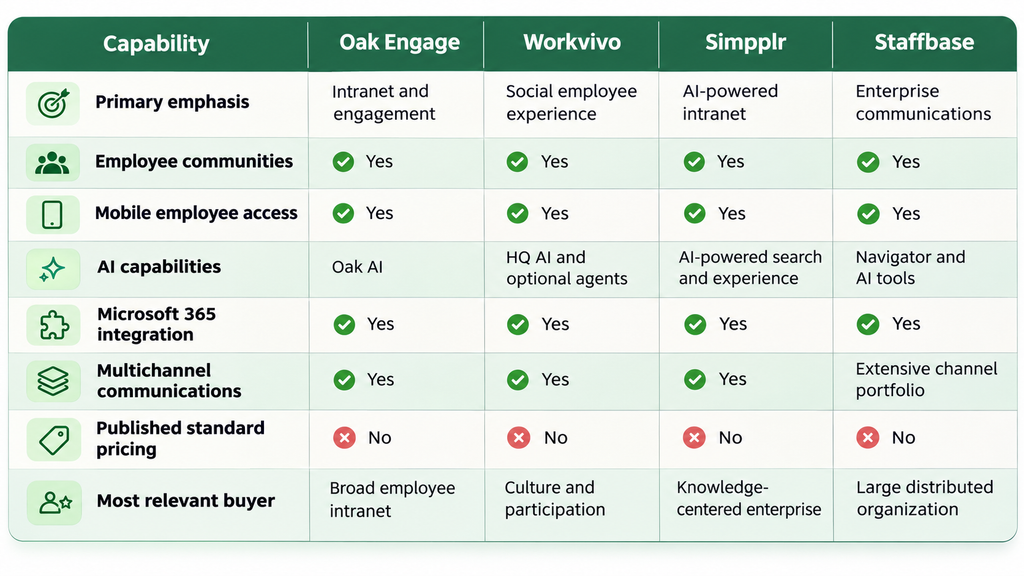
All four are worth considering, but not necessarily for the same reasons.
Oak Engage vs Workvivo: Workvivo deserves particular consideration when social participation, communities, and employee-generated communication are central priorities.
Oak Engage vs Simpplr: Simpplr is especially relevant when AI-powered knowledge discovery, information governance, and workplace integrations drive the replacement project.
Oak Engage vs Staffbase: Staffbase is worth evaluating for organizations managing structured communications across multiple channels, regions, and employee populations.
For a closer analysis of these three competitors, read Syssn’s Workvivo vs Staffbase vs Simpplr comparison.
Which Oak Engage Alternative Is Best for Your Organization?
The right replacement depends on your employee population, technology environment, and operational requirements.
Best for Small and Midsize Businesses
Shortlist: Blink, HubEngage, and MangoApps.
Blink is especially relevant to mobile-first SMBs because it publishes entry-level pricing and supports frontline communication.
HubEngage is worth considering when a smaller organization wants to combine communication, recognition, and employee feedback.
MangoApps may suit larger midsize organizations seeking modular intranet and workforce functionality, although its published suite minimums must be considered.
Best for Large Enterprises
Shortlist: Staffbase, Unily, Simpplr, and LumApps.
These platforms support enterprise-scale use cases involving multiple departments, complex integrations, governance, or advanced intranet requirements.
The best fit depends on whether the enterprise’s main challenge is communication delivery, knowledge management, personalization, or workplace application integration.
Best for Frontline Employees
Shortlist: Blink, HubEngage, and Staffbase.
Frontline workers need more than a mobile version of a desktop intranet.
Evaluate how each platform supports employees without corporate email accounts, urgent notifications, shift-based access, and mobile knowledge discovery.
Also compare device policies, multilingual communication, and employee authentication.
For implementation guidance, see Syssn’s article on reaching employees without company email accounts.
Best for AI-Powered Knowledge Management
Shortlist: Simpplr, LumApps, Unily, and Interact.
These platforms deserve attention when organizations need AI-supported information discovery or sophisticated intranet knowledge management.
However, the presence of AI features is not enough to establish suitability.
Buyers should test search accuracy, access permissions, source citations, content freshness, and administrative controls.
Best for Employee Recognition and Engagement
Shortlist: HubEngage, Workvivo, and MangoApps.
HubEngage supports recognition and gamified participation.
Workvivo places employee interaction and recognition within a social workplace experience.
MangoApps combines recognition and communication with broader employee applications.
The strongest choice depends on whether engagement means recognition, employee communities, rewards, surveys, or a combination.
Oak Engage Alternatives Pricing: What Should Buyers Expect in 2026?
Most enterprise intranet software platforms use customized pricing.
The final cost depends on factors such as employee count, selected modules, integrations, implementation services, and contractual commitments.
Public Pricing vs. Custom Quotes
| Platform | Pricing transparency | What to confirm |
|---|---|---|
| HubEngage | Custom quote | Modules, users, and channels |
| Workvivo | Custom quote | HQ package and add-ons |
| Simpplr | Custom quote | Employee volume and additional products |
| Staffbase | Custom quote | Workforce mix and channel selection |
| Blink | Published Core and Pro rates | Billing term and enterprise features |
| Unily | Custom quote | Base package, add-ons, and services |
| LumApps | Contact sales | Integrations and deployment scope |
| Interact | Custom quote | Optional channels and service tiers |
| MangoApps | Published suite starting rates | Minimum seats and suite combinations |
| Haiilo | Custom quote | Intranet, communications, analytics, and AI |
What Hidden or Additional Costs Should You Check?
Before committing to an Oak Engage replacement, request a complete breakdown of:
- Employee licenses and minimum seat commitments.
- Implementation and onboarding fees.
- Content and document migration costs.
- Custom integrations and API access.
- AI functionality and usage restrictions.
- Branded mobile applications.
- Training and customer support.
- Data storage, export, and retention.
- Contract renewal terms.
- Additional communication channels.
A lower initial subscription rate does not necessarily mean a lower total cost.
For example, a platform with inexpensive employee licenses may require additional implementation services, integrations, or modules to meet enterprise needs.
Example: Comparing Total Cost of Ownership
Consider an organization with 3,000 employees, including 1,200 frontline workers.
Instead of requesting a generic quote, ask every vendor to price the same requirements:
- 3,000 employee accounts.
- 1,200 frontline users without corporate email.
- Mobile and desktop access.
- Microsoft 365 integration.
- Multilingual company announcements.
- Employee recognition and surveys.
- AI-powered document search.
- Migration of existing intranet content.
- Three years of software and support.
Compare the three-year total rather than only monthly license fees.
This approach produces a more meaningful Oak Engage pricing alternatives comparison.
What Features Should You Compare Before Switching from Oak Engage?
An effective evaluation should focus on tasks employees must complete rather than the number of features listed in a product demonstration.
1. Employee Communication Channels
Determine whether employees need intranet posts, email, mobile push notifications, SMS, digital signage, or messaging.
Platforms differ in how they distribute and measure communication across these channels.
2. AI-Powered Search and Knowledge Access
Ask vendors to demonstrate how employees find company policies, procedures, and documents.
Test whether AI search respects permissions, identifies relevant information, and handles outdated or missing documents appropriately.
3. Microsoft 365 and Google Workspace Integration
Confirm the exact integration scope.
A platform may support Microsoft Teams notifications but offer a different level of integration with SharePoint, OneDrive, Outlook, or Microsoft Entra ID.
Ask whether employees can search, preview, edit, or take action on connected content.
4. Mobile and Frontline Experience
Test employee onboarding, authentication, push notifications, language settings, and document access from a mobile device.
A mobile application alone does not guarantee that frontline employees can use it effectively.
5. Analytics and Communication Effectiveness
Evaluate whether analytics measure only views and clicks or support deeper insights into audience reach, acknowledgments, participation, and employee feedback.
6. Security and Administration
Examine SSO, identity provisioning, administrative permissions, audit logs, data residency, and content governance.
Regulated organizations should validate current security evidence and contractual commitments rather than relying exclusively on marketing claims.
7. Implementation and Migration
Request a documented migration plan covering content ownership, employee accounts, redirects, archived information, and post-launch support.
The best Oak Engage replacement is one employees can adopt without losing access to essential workplace information.
How to Migrate from Oak Engage to Another Intranet Platform
Switching platforms should be managed as an employee experience project, not simply a software installation.
Step 1: Audit Existing Content and Usage
Identify important pages, frequently accessed documents, communications workflows, integrations, and inactive content.
Step 2: Define Replacement Requirements
Separate mandatory features from optional improvements.
Include requirements from HR, internal communications, IT, frontline operations, and representative employees.
Step 3: Shortlist Three Platforms
Select vendors matching your most important requirements.
For example, an organization prioritizing multichannel communication might shortlist HubEngage, Staffbase, and Blink.
An enterprise prioritizing knowledge discovery might compare Simpplr, LumApps, and Unily.
Step 4: Run Scenario-Based Demonstrations
Give each vendor identical tasks.
Ask them to demonstrate how a frontline employee receives an urgent message, finds a policy, completes a survey, and contacts a manager.
Step 5: Evaluate Security and Migration
Confirm identity integration, access controls, data migration capabilities, content governance, and support responsibilities.
Step 6: Run a Pilot
Launch with a representative employee group.
Measure sign-in success, task completion, content findability, and employee feedback before expanding the rollout.
Step 7: Plan the Full Launch
Assign content owners, train administrators, communicate changes, and establish a process for measuring adoption.
Do not retire the previous intranet until critical workflows have been validated.
Frequently Asked Questions About Oak Engage Alternatives
1. What are the best Oak Engage alternatives in 2026?
The best Oak Engage alternatives to compare include HubEngage, Workvivo, Simpplr, Staffbase, Blink, Unily, LumApps, Interact, MangoApps, and Haiilo.
Each addresses a different combination of employee communication, engagement, knowledge management, mobile access, and enterprise integration requirements.
2. Which Oak Engage competitor is best for large enterprises?
Staffbase, Unily, Simpplr, and LumApps are strong enterprise evaluation candidates.
Staffbase emphasizes multichannel communication, Unily offers configurable digital workplace experiences, Simpplr focuses on AI-powered intranet and knowledge access, and LumApps connects workplace applications with enterprise AI.
The final choice depends on workforce structure and technical requirements.
3. Which Oak Engage alternative is best for frontline employees?
Blink, HubEngage, and Staffbase are worth shortlisting for frontline communication.
These platforms support mobile employee experiences and address the challenge of reaching workers who may not regularly use desktop computers.
Organizations should independently test authentication, notifications, language support, and mobile usability.
4. Are there affordable alternatives to Oak Engage?
Yes, although affordability depends on organization size and requirements.
Blink publishes Core pricing starting at $3.75 per user/month with annual billing. MangoApps publishes Communications & Intranet pricing starting at $9 per employee/month, subject to a 200-employee minimum.
Other platforms generally require customized proposals.
5. Which Oak Engage alternatives offer AI-powered features?
HubEngage, Workvivo, Simpplr, Staffbase, Unily, LumApps, Interact, Blink, MangoApps, and Haiilo offer various AI-assisted capabilities.
These can include content generation, translation, knowledge search, personalization, summarization, analytics, and employee assistance.
Feature availability differs by vendor and subscription.
6. Which Oak Engage alternatives integrate with Microsoft 365?
Several alternatives support Microsoft ecosystem integrations, including HubEngage, Workvivo, Simpplr, Staffbase, Unily, LumApps, Interact, Blink, and Haiilo.
However, Microsoft 365 integration can mean different things, from single sign-on or Teams publishing to SharePoint search and workflow automation.
Verify the exact functions your organization needs.
7. Is Workvivo better than Oak Engage?
Workvivo may be a better fit when employee communities, social communication, and recognition are the primary requirements.
Oak Engage remains relevant for organizations seeking a broader intranet and engagement environment with personalized content, mobile access, and workplace information management.
A final decision should follow practical demonstrations and commercial comparisons.
8. Is Simpplr a good replacement for Oak Engage?
Simpplr is a credible alternative when the organization needs an AI-powered intranet centered on knowledge accessibility, workplace search, personalization, and integrations.
Buyers should compare content governance, AI performance, mobile access, and the cost of any additional products.
9. What is the best Oak Engage alternative for small businesses?
Blink and HubEngage are sensible starting points for different SMB requirements.
Blink offers published entry-level pricing and mobile-first communication, while HubEngage combines communication with recognition and engagement modules.
Smaller organizations should confirm minimum contracts and avoid purchasing features they do not need.
10. Should an organization replace Oak Engage in 2026?
An organization should consider replacing Oak Engage only when a competing platform better meets its verified requirements at an acceptable total cost.
Reasons could include changing integration needs, new frontline communication requirements, different AI capabilities, or administrative constraints.
Switching platforms without a measurable business objective may introduce unnecessary migration costs and employee disruption.
Final Verdict: Which Oak Engage Alternative Should You Choose in 2026?
There is no single Oak Engage replacement that is best for every organization.
The strongest choice depends on how employees communicate, find information, collaborate, and access essential workplace systems.
Here are the recommended starting points:
| Your priority | Platforms to shortlist |
|---|---|
| Unified communication and engagement | HubEngage |
| Social interaction and workplace culture | Workvivo |
| AI-powered intranet and knowledge | Simpplr |
| Enterprise multichannel communication | Staffbase |
| Mobile-first frontline workforce | Blink |
| Sophisticated enterprise customization | Unily |
| Connected AI employee hub | LumApps |
| Knowledge-centered intranet modernization | Interact |
| Modular communication and workforce tools | MangoApps |
| Multilingual communication and analytics | Haiilo |
HubEngage is a practical starting point when communication, recognition, feedback, and employee participation need to work together. However, organizations with more specialized requirements may find Workvivo, Simpplr, Staffbase, or another competitor better suited to their needs.
Before making a purchasing decision, shortlist two or three products, request comparable quotations, and test the same real employee workflows in every demonstration.
The best Oak Engage alternative is not necessarily the platform with the most features. It is the one that helps employees find information, communicate effectively, complete everyday tasks, and stay connected without creating unnecessary complexity.