8 Best Employee Announcement Software Tools in 2026 for Time-Sensitive Company Updates

The best employee announcement software depends on what you need employees to do after receiving a message. HubEngage is a useful option for multichannel announcements and acknowledgment tracking. Staffbase and Firstup fit structured enterprise communications. Poppulo connects digital and physical workplace channels, while Workvivo combines company updates with employee engagement. Blink and Connecteam make particular sense for frontline teams. AlertMedia is designed for emergency notifications and employee safety responses.
These eight platforms do not solve exactly the same problem. Sending a monthly company update is different from confirming that warehouse workers have seen a new safety procedure, or checking whether employees are safe during a severe-weather event. This guide compares the tools on those practical differences, not on unverified claims about which one sends messages fastest.
Key takeaways
- For everyday announcements: Start with the channels your employees already use, then look at targeting, scheduling, and reporting.
- For required notices: Check whether the platform records explicit acknowledgments, identifies nonresponders, and supports reminders.
- For frontline staff: Mobile access and alternatives to corporate email matter more than an elaborate desktop intranet.
- For emergencies: Two-way responses, voice and SMS channels, escalation procedures, and backup warning systems deserve separate evaluation.
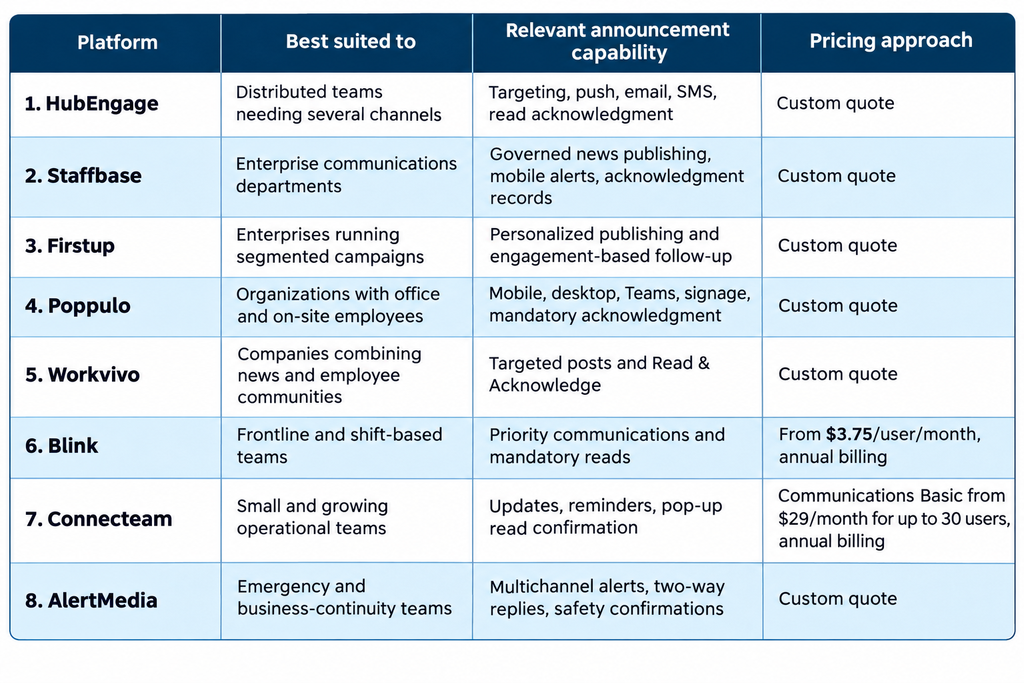
- For pricing: Blink and Connecteam publish entry prices. Most other platforms require a tailored quote, and add-on channels may increase the total cost.
What is employee announcement software?
Employee announcement software helps an organization publish an update, deliver it to a defined group of workers, and see what happened afterward. Depending on the product, announcements can appear in an employee app, email, text message, intranet, desktop notification, Microsoft Teams, or a workplace display.
Consider a retailer with 80 stores. A new return policy cannot sit in the head office inbox and somehow reach every shift. Store managers need the policy, employees need an accessible explanation, and the communications team may need evidence that the update was acknowledged.
That is where audience targeting, mobile delivery, and acknowledgment reports become useful. But software alone will not reach someone whose contact details are outdated or whose phone notifications are switched off. The communication procedure still matters.
For practical channel options, read Syssn’s guide on reaching employees without company email.
The eight platforms at a glance
How this comparison was prepared
The shortlist reflects eight different buying situations, not a measured performance ranking. Features and published prices were checked against vendor product pages, help centers, and pricing pages. No hands-on delivery-speed, uptime, or customer-satisfaction test was conducted. A feature described by a vendor may also be limited to a particular subscription or configuration.
The same questions guide each review: Who is it for? What announcement workflows does it support? What should a buyer verify? How is it priced?
1. HubEngage
Best for: Organizations with employees spread across offices, stores, warehouses, and remote locations.
HubEngage’s employee communications platform brings announcements into mobile and web experiences while supporting push notifications, email, and SMS. Communications teams can schedule content and target employee groups using location, department, and other organizational attributes. For important notices, the platform documents read acknowledgments and reminders.
This combination is useful when one announcement must reach people through different channels. An HR team, for example, could send a benefits deadline to a particular employee group and follow up with those who have not acknowledged it. It can also connect regular announcements with broader employee engagement features.
What stands out: Multichannel publishing, audience segmentation, scheduled communications, and acknowledgment workflows are available within a broader employee communication system.
What to check: Confirm which modules are included, the price of SMS and digital displays, and how nonresponders appear in reports. The vendor notes that some of these channels can carry additional charges. HubEngage should not be assumed to replace a specialist emergency-response system without a specific assessment.
Pricing: Custom proposals; the vendor describes monthly, annual, and multiyear arrangements.
Choose it when: Your priority is one place to manage everyday announcements across a mixed workforce.
2. Staffbase
Best for: Large organizations with multiple business units, communication owners, and publishing controls.
Staffbase combines an employee app with enterprise news and intranet experiences. Editors can publish targeted posts and send push or email notifications. Its acknowledgment documentation describes a formal read-confirmation button, statistics, CSV exports, and the option to notify people who have not acknowledged a post.
The benefit is structure. A global organization may need local teams to publish site-specific notices while central communications retains control over sensitive company-wide messages. Staffbase is designed for this kind of editorial coordination, rather than just sending a quick alert from one manager’s phone.
What stands out: Centralized publishing, audience-specific news, employee-app alerts, and acknowledgment reporting help teams maintain a clearer record of important updates.
What to check: Assess permissions, authentication, intranet implementation effort, and the packaging of additional channels. Staffbase support notes that app push notifications are affected by individual notification settings, so publication is not proof of receipt.
Pricing: Quote-based; there is no standard public license price for a directly comparable deployment.
Choose it when: You need a governed communication environment across a large or complex organization.
3. Firstup
Best for: Enterprise teams that want to tailor announcements using workforce data and follow up based on engagement.
Firstup supports publishing across email, web, and branded mobile apps. Its Essential offering describes audience construction from HR and people-system data, a shared content calendar, campaign analytics, and automated retargeting for employees who have not engaged or acted.
That makes Firstup particularly relevant to repeated communication programs. Think of an organization announcing an annual benefits enrollment window: one reminder may be sufficient for some groups, while others need a follow-up through another channel. A data-driven campaign workflow helps avoid treating every employee as if they have the same information needs.
What stands out: Audience profiles, coordinated campaigns, and engagement-based follow-ups can make high-volume employee communication more relevant.
What to check: Accurate employee data is essential. Ask how profiles are synchronized, which automations belong to each tier, and whether an engagement event counts as formal acknowledgment. Opening an email and accepting a policy are not interchangeable records.
Pricing: Tiered offerings, including Essential, Professional, and Premier, with prices supplied through sales.
Choose it when: You run recurring, segmented campaigns and need more than a company-wide news feed.
4. Poppulo
Best for: Organizations using mobile apps, desktop alerts, Microsoft Teams, email, and workplace screens.
Poppulo’s alert and notification offering supports employee targeting and messages through multiple workplace touchpoints. It also describes must-read and must-watch content, custom acknowledgment actions, and reporting by audience, location, channel, and device. Its wider platform includes email communications and digital signage.
This matters in workplaces where the same message needs different forms. A factory employee may notice a screen at the start of a shift, while an office employee sees a Teams notification and a mobile worker receives an app alert. The content and urgency should remain consistent even when the delivery method changes.
What stands out: Channel variety, mandatory-content workflows, and visibility reporting are useful where not everyone works at a desk.
What to check: A multichannel system needs coordinated administration. Ask which components are native, which require separate implementation, and what an acknowledgment means across channels. Not every buyer will need digital signage or desktop takeover-style notifications.
Pricing: Custom proposal, depending on platform scope and selected capabilities.
Choose it when: You need announcements to appear both on employees’ devices and in their physical workplaces.
5. Workvivo
Best for: Organizations wanting formal announcements and day-to-day employee interaction in one experience.
Workvivo brings company news, employee posts, recognition, and workplace conversations into a social-style communication environment. Its Read & Acknowledge feature lets administrators designate selected posts and articles as mandatory, view who has acknowledged them, and remind those who have not.
The distinction is useful: employees may open Workvivo for ordinary news and conversations, then encounter an official policy notice in the same place. For teams trying to increase participation as well as reach, that can be more appropriate than an alert-only tool.
What stands out: News feeds and employee participation sit alongside formal acknowledgment reporting. Administrators can export acknowledgment results through the documented management tools.
What to check: Employee adoption and push settings still matter. Confirm the permissions required to create mandatory-read posts and send reminders. Workvivo is not primarily a dedicated emergency mass-notification service.
Pricing: Tailored sales quote based on organization and requirements.
Choose it when: You want employees to receive updates in the same environment where they share news and recognize colleagues.
6. Blink
Best for: Shift-based and deskless employees who do not regularly use corporate email.
Blink is designed around mobile employee access, workplace feeds, and critical communications. Its Mandatory Reads documentation describes employee acknowledgment prompts, outstanding items, and app notifications. This can help a site manager distribute a revised safety instruction without relying on paper sign-off sheets or informal messages.
Frontline workers often have limited time to read company information. A clear mobile experience and visible required-action notices may be more valuable than a sophisticated desktop publishing system. Blink also offers everyday messaging and knowledge access, making it useful beyond announcements alone.
What stands out: Mobile access, priority notices, and mandatory acknowledgment records reflect the needs of operational workplaces.
What to check: Determine which feature permissions, language options, identity requirements, and administrative reports are included. As with any mobile-first platform, adoption and device access will influence real-world reach.
Pricing: Core starts at $3.75 per user per month, billed annually; Pro starts at $5. Enterprise pricing is tailored.
Choose it when: Your communications problem centers on workers who spend most of their day away from computers.
7. Connecteam
Best for: Small and growing companies that want staff announcements alongside scheduling, chat, and workforce coordination.
Connecteam provides a Communications Hub with employee updates, chat, a directory, surveys, and knowledge resources. Its notification guidance describes push or SMS reminders and pop-up updates. The pop-up option prompts employees to confirm they have read a message or ask to be reminded later.
For a field service business, that can be a practical way to share a change in tomorrow’s reporting location or a new operating procedure. Because the app can also support everyday workforce activities, managers may not need to introduce a separate communication tool just for news.
What stands out: Public entry-level pricing and a mobile operational workflow make the platform comparatively straightforward for smaller teams to budget and pilot.
What to check: Pop-up read confirmation requires Communications Expert or above, not the Basic tier. SMS can also require a separate text-message budget. Compare the plan that includes the functionality you actually need.
Pricing: Communications Basic starts at $29 per month for up to 30 users, billed annually; Communications Expert starts at $99 per month for up to 30 users, billed annually.
Choose it when: You want workplace updates as part of a broader tool for managing an operational team.
8. AlertMedia
Best for: Safety, security, operations, and business-continuity teams responsible for critical incidents.
AlertMedia focuses on mass notifications and employee responses during disruptive events. Its documented channels include SMS, email, voice, desktop, mobile app, Slack, and Microsoft Teams. Administrators can target relevant groups, use notification templates, track responses, and support two-way communication.
Imagine a severe-weather warning affecting two facilities. A routine company news post might explain the closure, but the immediate question is whether people have received instructions and can confirm their status. AlertMedia is designed around that kind of incident-driven workflow.
What stands out: Several alert channels, response collection, contact-data integration, and incident-oriented reporting support communication when timeliness and employee safety are central.
What to check: Determine how the platform handles stale contact data, failed channels, escalation, local calling coverage, and your emergency plans. Everyday newsletters, recognition, and social engagement are not its primary purpose.
Pricing: Custom quote based on organizational requirements.
Choose it when: The primary need is critical-event communication, not routine internal news.
How do you choose employee announcement software?
Start with a real message your organization sends. Then ask how it would reach an employee on a normal working day, not just how it looks in a product demonstration.
1. Decide how urgent the announcement is
| Message type | What the workflow needs | Example |
|---|---|---|
| Routine news | Scheduling, readable content, employee feed or email | Leadership update |
| Operational change | Location or team targeting, push reminders | Shift handover change |
| Mandatory notice | Explicit acknowledgment, nonresponder list, reporting | Revised safety procedure |
| Emergency alert | Multiple channels, two-way status, escalation and backup systems | Facility closure during severe weather |
A single platform may cover several rows, but the presence of a push-notification feature does not make it a complete emergency response solution.
2. Check who can actually receive it
If a large share of your workforce has no company email, begin with mobile access, phone-number coverage, shared-device policies, and alternatives such as workplace screens. For a broader people-management view, see Syssn’s frontline employee engagement strategies.
Also ask whether employees can read a notice in a language they understand. Translation features should be reviewed for accuracy on safety-critical instructions. Syssn’s employee communication translation tools comparison explains where dedicated translation and in-platform options differ.
3. Separate delivery, reading, and acknowledgment
These signals answer different questions:
- Delivered: Did the communication reach the destination supported by the channel?
- Opened: Did someone access the notification or content?
- Acknowledged: Did the employee actively confirm receipt or reading?
- Completed: Did the employee take the required action?
An acknowledgment creates a useful record, but it does not prove that a person understood the instructions. For significant policy changes, a manager briefing, short comprehension check, or follow-up task may be necessary.
4. Ask the vendor to demonstrate the difficult case
Give each shortlisted vendor the same scenario: Send a new site-safety instruction to 400 employees at three locations, including night-shift workers without company email. Identify nonresponders after two hours and export the acknowledgment record.
Watch how the system handles audience selection, contact-data gaps, mobile access, reminders, exports, permission controls, and employees who do not have the app installed. That demonstration will tell you more than a long list of features.
For a larger procurement checklist, use Syssn’s guide to evaluating an employee experience platform.
5. Calculate the cost of the whole workflow
In addition to subscription charges, ask about:
- SMS and voice-message allowances and overage rates
- Employee minimums and contract duration
- HRIS, single sign-on, and data integration work
- Implementation, training, and administrator time
- Analytics, acknowledgment features, and module restrictions
- Multilingual support and accessibility requirements
If important instructions also live in a knowledge base, consider the cost and usability of that system alongside announcements. Syssn’s employee knowledge base software comparison covers this adjacent need.
How should companies send time-sensitive employee announcements?
Use a simple, repeatable process. A logistics company closing one depot because of severe weather could do the following:
- Select the affected people. Use current site, shift, and employee contact records.
- Write an actionable message. State what changed, who is affected, what to do now, and when the next update will arrive.
- Choose channels by urgency. A routine update may use the employee app; a critical notice may require approved SMS, voice, and other backup channels.
- Request a response when needed. Acknowledge a policy change, or confirm safety status during an incident.
- Follow up with nonresponders. Use named escalation owners and a clear timeframe.
- Close the loop. Communicate the resolution, record the outcome, and review any delivery gaps.
Emergency messaging must fit the organization’s wider safety plan. The US Occupational Safety and Health Administration’s employee alarm guidance explains that workers need recognizable warnings and clear instructions. Digital announcement apps can support those procedures, but should not be treated as a substitute for required workplace alarms or evacuation arrangements.
Which platform should you shortlist?
There is no universal winner. Use the first purchase decision to narrow the field:
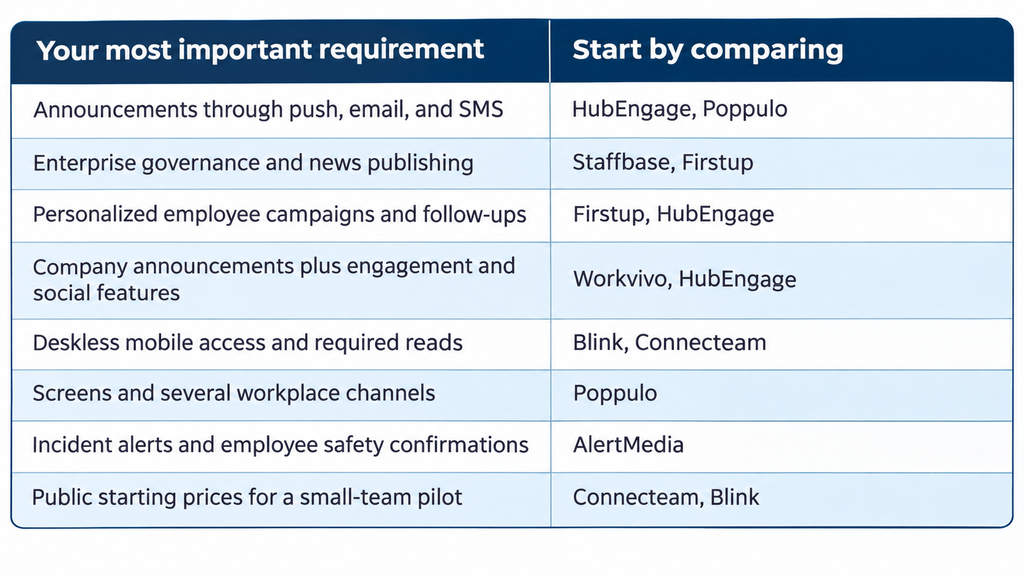
Treat this as a shortlist, not a substitute for testing. Features and prices change, and a product that looks perfect in an overview may need a more expensive plan for your most important workflow.
Frequently asked questions
What is the best employee announcement software in 2026?
HubEngage, Staffbase, Firstup, Poppulo, Workvivo, Blink, Connecteam, and AlertMedia are eight relevant options. The best fit depends on whether you need regular announcements, formal acknowledgment tracking, or emergency communication.
Can employee announcement software reach people without company email?
Yes. Depending on the vendor and plan, organizations can use employee apps, SMS, mobile push notifications, shared workplace screens, and other channels. Check onboarding and access requirements before choosing a product.
Does a read receipt mean an employee understood a notice?
No. A read acknowledgment records an employee’s confirmation. It does not independently show comprehension or completion of a required action.
Which tools have transparent starting prices?
Blink publicly lists plans starting at $3.75 per user per month with annual billing. Connecteam lists Communications Basic at $29 per month for up to 30 users with annual billing, but pop-up read confirmations require its higher Expert plan.
Are urgent push notifications the same as emergency alerts?
No. Emergency response may require multiple warning channels, two-way status checks, escalation, backup alarms, and procedures governed by workplace safety requirements. An app notification is only one part of that system.
Can these platforms work with Teams or Slack?
Some can. Poppulo documents Microsoft Teams notification capabilities, and AlertMedia lists both Teams and Slack among its mass-notification channels. The exact integration and its availability should be checked with the vendor.
Final recommendation
Choose employee announcement software by the action you need after a message is sent. HubEngage is a good starting point for multichannel everyday communication; Staffbase and Firstup address more structured enterprise requirements; Poppulo spans several workplace channels; Workvivo ties announcements to community participation; Blink and Connecteam focus on operational accessibility; and AlertMedia serves emergency response.
Before signing a contract, run the same urgent-announcement scenario through two or three shortlisted products. Check who receives it, who can acknowledge it, who is missed, and what the administrator can do next. The best system is the one that makes that chain of communication dependable for your workforce.