
What Gen AI Adds to a Software Testing Course

Generative AI adds practical capabilities to a software testing course, including AI-assisted test case generation, automation scripting, API testing, synthetic test data creation, defect analysis, and QA documentation. Students learn to use AI tools to support testing workflows while verifying their accuracy against software requirements.
Unlike traditional software testing training, a course incorporating generative AI teaches learners how to combine established testing techniques with large language models (LLMs) and AI coding assistants.
Training providers such as StarAgile, Simplilearn, Great Learning, and Intellipaat offer different approaches to developing these skills. Some advertise integrated GenAI modules, while others provide conventional testing foundations or supplementary AI lessons.
For beginners, fresh graduates, and working QA professionals, the value lies in understanding when AI can assist, when manual verification is essential, and how both approaches fit into software quality assurance.
What Is Generative AI in a Software Testing Course?
Generative AI in software testing education involves using AI-powered tools to assist with activities such as requirement analysis, test design, automation, debugging, and reporting.
A conventional software testing course generally introduces testing principles, test case design, manual testing, defect management, programming fundamentals, API testing, and automation frameworks.
An AI-integrated course builds on these subjects by introducing prompt engineering, LLM-based assistants, AI-assisted scripting, synthetic test data, and methods for evaluating AI-generated outputs.
For example, instead of manually brainstorming every login scenario, a student can ask an AI assistant to suggest positive, negative, and boundary-value test cases.
The student must then check whether those suggestions match the application’s requirements and identify any unsupported assumptions.
Generative AI supports testing activities. It does not independently guarantee that software is correct, secure, or ready for release.
Using AI for Testing vs Testing AI-Based Software
These are related but distinct areas of software testing education.
Using AI for software testing involves applying AI tools to conventional QA activities, such as generating test cases, drafting automation scripts, analyzing defects, and preparing documentation.
Testing AI-based software involves evaluating applications that contain AI models, chatbots, recommendation systems, or generative AI features.
The second area may require additional techniques for assessing model behavior, output quality, robustness, bias, and other AI-specific risks.
The International Software Testing Qualifications Board (ISTQB) addresses these areas through separate qualifications:
- Certified Tester – Testing with Generative AI (CT-GenAI), which focuses on applying generative AI throughout the testing lifecycle.
- Certified Tester AI Testing (CT-AI), whose version 2.0 syllabus focuses on testing AI-based systems.
The CT-GenAI certification requires candidates to hold the ISTQB Certified Tester Foundation Level (CTFL) certification.
Students should understand this distinction before selecting a specialized AI testing course or certification.
What Does Gen AI Add to Traditional Software Testing?
The main difference is that generative AI introduces new ways to prepare, analyze, and improve testing work.
Traditional testing techniques establish what should be tested and why. Generative AI can help students explore additional possibilities and produce initial drafts more efficiently, but it cannot establish correctness without reliable requirements and validation.
Traditional Software Testing vs AI-Integrated Software Testing
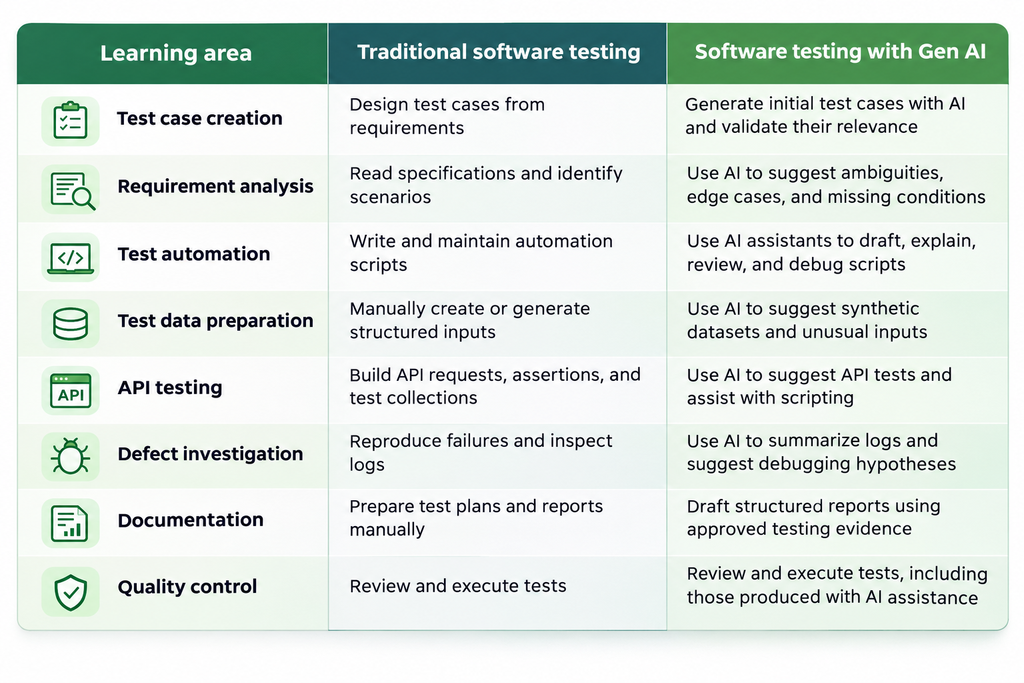
A course incorporating GenAI should teach both approaches rather than replacing testing fundamentals with instructions for prompting AI tools.
6 Practical Applications of Gen AI in Software Testing Training
The educational value of generative AI becomes clearer when learners apply it to realistic testing activities.
A useful course should include practical exercises where students can compare AI-generated suggestions with actual requirements, execute tests, investigate failures, and document their findings.
1. AI-Assisted Test Case Generation
Test case generation is one of the most accessible applications of generative AI.
Consider an e-commerce website where customers can add products to a shopping cart and complete purchases.
Students can provide the documented requirements to an AI assistant and request scenarios involving successful checkout, invalid coupon codes, empty carts, failed payments, and expired sessions.
The AI may identify useful scenarios that the learner initially overlooked.
However, students must confirm whether each scenario is supported by the application’s business rules.
For instance, an AI assistant might suggest testing guest checkout when the application only allows registered customers to purchase products.
That suggestion should not become a mandatory test without confirming the requirement.
Students should also check whether the generated cases adequately cover input boundaries, invalid conditions, and important business workflows.
Skills developed: Requirement interpretation, test case design, equivalence partitioning, boundary-value analysis, and AI-output evaluation.
2. AI in Test Automation
Generative AI can assist students learning automation frameworks such as Selenium and Playwright.
Suppose a learner wants to automate a login workflow.
An AI coding assistant can draft a script containing browser navigation, element locators, user inputs, assertions, and test execution logic.
The student must then run the script and confirm that it interacts with the application correctly.
Generated code may contain incorrect locators, unsupported methods, missing waits, weak assertions, or outdated framework syntax.
A script that executes without throwing an error is not necessarily a reliable test. It must verify the behavior that matters.
Students should understand the programming language and automation framework well enough to inspect and improve generated code.
Skills developed: Automation scripting, debugging, assertion design, code review, and framework maintenance.
For a closer examination of automation technologies and learning requirements, see this Selenium automation testing course guide.
3. AI-Generated Test Data
Software testers need representative inputs to verify how applications behave under different conditions.
For example, a customer-registration form may require sample names, email addresses, phone numbers, and other profile information.
Generative AI can help students create synthetic examples containing missing fields, unusual characters, duplicate identifiers, long strings, and invalid formats.
These inputs can support both positive and negative testing.
However, students must evaluate the quality of the generated data.
A synthetic dataset should satisfy relevant constraints, include meaningful variations, and avoid exposing real customer information.
AI-generated sample data is not automatically representative of production workloads or suitable for every privacy-sensitive use case.
Skills developed: Test data design, boundary testing, data validation, and privacy awareness.
4. AI-Assisted API Testing
API testing evaluates how software components communicate and handle requests.
Students working with REST APIs can use AI assistants to suggest test scenarios based on API specifications.
For a customer-registration endpoint, an AI tool might propose testing missing mandatory fields, duplicate email addresses, invalid authentication, unsupported HTTP methods, and unexpected input types.
Learners can implement these scenarios using tools such as Postman.
Postman’s AI-powered Agent Mode can also assist with creating requests, debugging errors, and writing or updating tests.
However, students still need to understand HTTP methods, status codes, JSON structures, authentication, API contracts, and assertions.
For example, receiving an HTTP 200 response does not necessarily mean an operation was successful according to its business requirements.
Skills developed: API test design, request validation, response assertions, and integration testing.
5. Defect Analysis and Debugging
Finding a test failure is only the beginning of defect investigation.
Testers must reproduce the issue, collect relevant evidence, evaluate possible causes, and communicate the problem clearly.
Generative AI can help summarize lengthy logs, explain unfamiliar error messages, and suggest possible debugging paths.
Suppose a payment automation test fails.
An AI assistant might recommend checking whether the failure resulted from an element locator, a timeout, invalid test data, an unavailable service, or an application defect.
These are investigation hypotheses, not established facts.
Students must use logs, application behavior, relevant environment information, and reproducible steps to determine the actual cause.
They should also distinguish a defect in the application from a problem in the automated test itself.
Skills developed: Log interpretation, defect reproduction, debugging, and root-cause investigation.
6. Test Documentation and Reporting
Software testing involves communicating results to developers, project managers, and other stakeholders.
Testers prepare test plans, execution summaries, defect reports, and release-related documentation.
Generative AI can help turn verified testing notes into structured drafts.
For example, a learner might ask an AI assistant to organize a testing summary containing completed scenarios, failed tests, unresolved defects, and known risks.
The final report must accurately represent the evidence.
AI should not invent test execution results, defect severity, root causes, or release readiness assessments.
Students should learn to separate confirmed findings from assumptions and recommendations.
Skills developed: Technical documentation, evidence-based reporting, stakeholder communication, and QA governance.
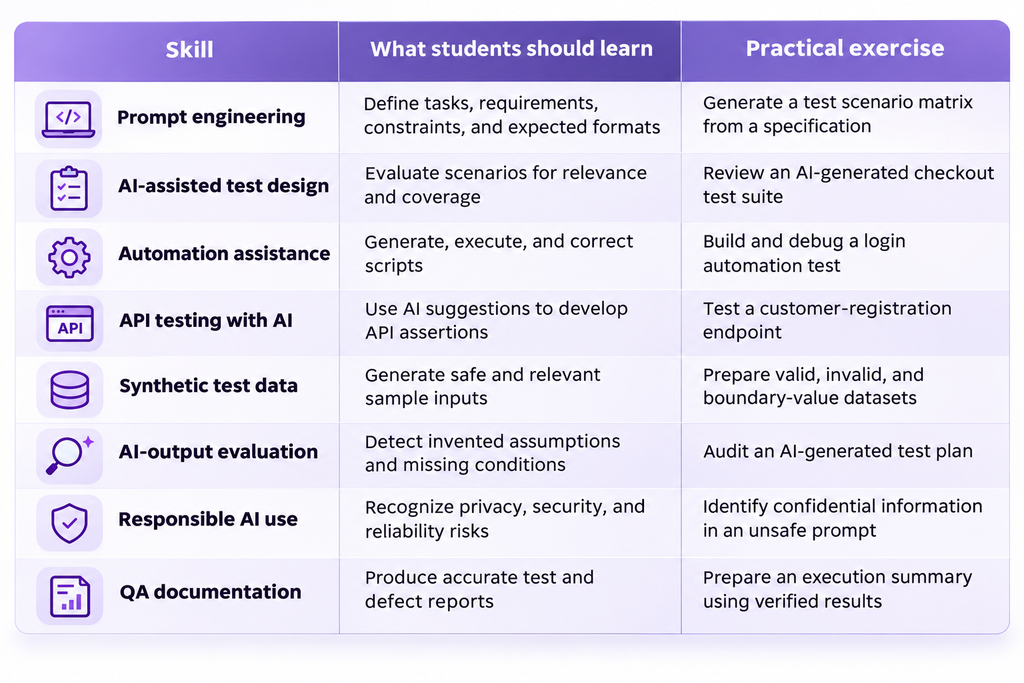
Which Gen AI Skills Should Software Testing Students Learn?
Students benefit most from a combination of technical testing knowledge and the ability to evaluate AI-generated work critically.
A strong curriculum should teach learners to supply accurate context, generate useful suggestions, inspect the results, and apply testing judgment.
Why Prompt Engineering Matters for QA
Prompt engineering involves giving an AI system enough relevant information to understand the testing task.
A vague prompt such as:
Write login test cases.
may produce generic scenarios based on assumptions about how login systems normally work.
A more useful prompt would be:
Act as a QA engineer. Review the following login requirements and generate positive, negative, and boundary-value test cases. Include test IDs, input conditions, expected results, and requirement references. Identify ambiguities separately. Do not invent application behavior that is not specified.
This gives the model clearer constraints.
Even a detailed prompt cannot guarantee correct outputs. The student must still verify the suggested test cases.
Which Generative AI Testing Tools Are Useful for Beginners?
Software testing students can learn from both general-purpose AI assistants and dedicated testing frameworks.
These tools have different roles, so they should not be treated as interchangeable.
| Tool | Primary testing application | Important limitation |
|---|---|---|
| ChatGPT | Test ideas, code explanation, requirements analysis, and reporting drafts | May generate inaccurate scenarios or unsupported assumptions |
| GitHub Copilot | Test code generation, code explanation, and debugging assistance | Suggested code needs review and execution |
| Postman Agent Mode | AI-assisted API requests, scripts, and debugging | Requires understanding of API behavior and assertions |
| Playwright | Browser automation and recorded test generation | Its built-in Codegen is not equivalent to LLM-based generation |
| Selenium | Browser automation that can be combined with AI coding assistants | Selenium itself is not a generative AI model |
ChatGPT for Software Testing
ChatGPT can help learners generate initial test cases, understand QA terminology, explain code, organize defect reports, and explore test-design alternatives.
For example, a learner can provide a sanitized requirement specification and ask ChatGPT to identify possible edge cases.
The response can serve as a review aid, but the learner must decide which scenarios are relevant.
Students should avoid treating ChatGPT as an authoritative source for undocumented application behavior.
GitHub Copilot for Automation Testing
GitHub Copilot assists developers with writing, explaining, and modifying code in supported environments.
For software testing students, it can help draft unit tests, propose assertions, and explain unfamiliar testing code.
GitHub’s official documentation includes a unit-test generation example for Copilot.
Students can use such examples to learn how testing instructions are structured.
However, generated test code must be reviewed for correctness, maintainability, and alignment with existing project conventions.
Postman for AI-Assisted API Testing
Postman provides AI-assisted workflows through Agent Mode.
According to the official Postman documentation, Agent Mode can help create and manage requests, debug errors, and write or update tests.
Students can use it to explore API testing workflows while checking actual requests and responses.
They should verify feature availability and applicable access conditions for their accounts or training environments.
AI-generated assertions should be checked against the documented API contract rather than accepted solely because they match an observed response.
Playwright and Selenium for Automation Practice
Playwright and Selenium remain useful technologies for developing browser automation skills.
Playwright includes a test generator called Codegen, which records browser interactions and generates automation code.
This recorded-test functionality should not be confused with prompting a generative AI model to produce scripts.
Selenium provides browser automation capabilities that can be used alongside AI coding assistants.
Students should understand how locators, waits, assertions, test runners, and browser sessions work.
The objective is to develop the ability to create and maintain reliable automation tests, regardless of whether AI helped draft the code.
Practical Example: Using Gen AI to Generate Login Test Cases
Consider a learner testing a simple login application.
The documented requirements are:
- Users must enter a registered email address and password.
- Passwords must contain at least eight characters.
- Invalid credentials must produce an error message.
- Five consecutive failed login attempts must temporarily lock the account.
The student wants to use generative AI to propose test cases.
Step 1: Write a Clear AI Prompt
The student can submit the following instruction:
Act as a software QA engineer. Based only on the login requirements provided, generate positive, negative, and boundary-value test cases. Include test ID, scenario, test input, expected result, and requirement reference. Identify any missing requirements separately. Do not invent unspecified application behavior.
Step 2: Evaluate the Suggested Test Cases
A useful initial review might look like this:
| Test ID | Scenario | Expected result or review decision |
|---|---|---|
| TC01 | Login using valid registered credentials | User successfully signs in |
| TC02 | Login using a registered email and incorrect password | Login fails and an error message appears |
| TC03 | Login using an unregistered email | Authentication is unsuccessful; exact error wording is unspecified |
| TC04 | Submit five consecutive failed login attempts | Account becomes temporarily locked |
| TC05 | Attempt login while the account is locked | Requires clarification of the lockout behavior before defining a precise expected result |
| TC06 | Enter a password containing fewer than eight characters on the login form | Requires clarification of whether password-length validation applies at login or during password creation |
The distinction between the first four and the final two scenarios is important.
TC05 and TC06 may be valuable testing ideas, but the documented requirements do not provide enough information to define reliable expected behavior.
Step 3: Identify Missing Requirements
The student should recognize several unanswered questions.
For example:
- Does the eight-character password rule apply during registration, password changes, login, or all three?
- How long does the temporary account lock last?
- Does a successful login reset the failed-attempt counter?
- Is the failed-attempt counter maintained per account or according to another rule?
- What should happen when a locked account receives valid credentials?
- Are the error messages for unregistered emails and incorrect passwords identical?
These questions are not evidence that the application is defective.
They identify specification gaps that should be clarified with the appropriate stakeholders.
Step 4: Execute and Review
After clarifying the requirements, the learner can prepare the necessary test data, execute applicable scenarios, and record the observed results.
The final test record should distinguish:
- Confirmed expected behavior.
- Actual observed behavior.
- Passed and failed tests.
- Defects supported by evidence.
- Questions requiring further clarification.
This example demonstrates an essential benefit of GenAI training: students learn not simply to generate more test cases, but to evaluate whether those cases are justified, executable, and useful.
Software Testing Course Providers Students Can Compare
Learners in India can compare training providers based on software testing fundamentals, explicit GenAI coverage, practical projects, coding instruction, and learner support.
The following comparison is based on the providers’ published course descriptions reviewed in November 2026. It is not a ranking based on independently audited classroom quality, placement results, or student outcomes.
1. StarAgile
Best suited for: Learners seeking instructor-led software and automation testing education with advertised GenAI integration.
StarAgile offers a Software and Automation Testing program that advertises generative AI alongside conventional testing and automation technologies.
Its published course information includes tools such as Selenium, Cypress, Maven, and Zephyr, along with practical assignments, capstone projects, and career-assistance services.
The provider also advertises live instructor-led learning and mentoring.
These are provider-published offerings rather than independently verified measures of teaching quality or employment outcomes.
The course may appeal to learners who want testing fundamentals, automation practice, and AI-related instruction within one training pathway.
What to verify: Students should request a current module-by-module syllabus showing exactly how generative AI is taught. Important questions include which AI tools are used, how much supervised practice is provided, whether students execute AI-generated tests, and how project work is assessed.
They should also confirm training hours, fees, certificate conditions, and placement-assistance terms in writing.
2. Simplilearn
Best suited for: Learners looking for an automation-focused curriculum with explicitly identified generative AI learning phases.
Simplilearn’s Automation Testing Master’s Program combines testing fundamentals with programming, browser automation, API testing, performance testing, and generative AI.
Its published learning path identifies dedicated phases for Generative AI Fundamentals and GenAI-Powered Test Automation.
These cover areas such as LLM concepts, prompt engineering, AI-assisted test creation, and testing workflows.
The program also describes portfolio-oriented project work involving automation technologies.
This makes it relevant for learners who want generative AI instruction connected to a broader automation curriculum.
What to verify: Students should examine the current program structure and determine how much practical AI testing work is included, which projects require hands-on execution, and how the training balances conventional automation with AI-assisted techniques.
Delivery format, instructor support, fees, and credential terms should also be confirmed.
3. Great Learning
Best suited for: Beginners who want a short introduction to generative AI in software development before selecting a comprehensive QA program.
Great Learning offers introductory learning resources covering software testing and generative AI.
Its GenAI Essentials for Software Development course introduces AI-assisted coding, debugging, testing, and software development workflows.
The published syllabus includes test generation, software development lifecycle concepts, and AI tools.
This can help students understand how generative AI supports software engineering activities, including testing-related tasks.
However, the course is a short introductory module rather than a complete manual and automation testing program.
Great Learning’s published information also distinguishes free access to course content from a completion certificate for which a fee applies.
What to verify: Learners should examine the exercises, depth of test automation instruction, certificate fee, and whether separate training is needed to develop programming and QA project skills.
4. Intellipaat
Best suited for: Learners prioritizing Java, Selenium, and conventional automation testing foundations.
Intellipaat offers Selenium training covering Java programming concepts, Selenium WebDriver, browser interactions, locators, TestNG, Maven, and testing frameworks.
Its published curriculum emphasizes automation scripting, practical exercises, and framework-related concepts.
This may be appropriate for students who want to establish programming and browser automation skills before adding AI-assisted testing workflows.
However, a dedicated generative AI software testing module is not clearly established in the reviewed Selenium course syllabus.
Students should not assume that the program includes comprehensive GenAI instruction without direct confirmation.
What to verify: Learners should request the latest syllabus and ask whether AI-assisted test creation, LLM prompting, and AI-script validation are included in instructor-led exercises.
They should also check prerequisites, project requirements, fees, and certification terms.
How to Choose a Software Testing Course With Gen AI
A useful course should help students independently understand requirements, design tests, write or maintain automation, and evaluate AI-generated suggestions.
Simply advertising ChatGPT, AI automation, or prompt engineering is not enough to establish practical training quality.
1. Confirm the Core Testing Curriculum
Students should examine whether the course covers software testing fundamentals, software development lifecycle (SDLC), software testing lifecycle (STLC), test design, defect management, functional testing, regression testing, and relevant automation concepts.
AI should build on these foundations.
Without them, learners may be able to generate testing materials but lack the knowledge required to evaluate those materials.
2. Look for Hands-On AI Exercises
Ask the provider for an example of a completed GenAI-assisted testing exercise.
A meaningful assignment should include the original requirements, AI-generated suggestions, student corrections, executed tests, and final observations.
An exercise limited to watching a demonstration or copying an AI-generated script may provide less opportunity to develop independent testing judgment.
3. Evaluate Programming and Automation Coverage
Learners targeting automation roles should confirm which programming languages, browser automation frameworks, API testing methods, and debugging techniques are taught.
The course should explain how scripts are structured and maintained rather than focusing only on code generation.
4. Compare Training Hours and Practical Projects
Course duration alone does not reveal the amount of useful instruction.
Advertised hours may include live classes, recorded lessons, assignments, mentoring, and project work.
These categories should be compared separately.
Students can use this software testing course hours and projects comparison to evaluate training commitments more carefully.
5. Verify Assessment and Certification Requirements
Ask how students are assessed.
Useful evidence may include instructor-reviewed code, completed automation projects, API test collections, defect reports, and practical examinations.
Also distinguish a training-provider completion certificate from an independent professional certification.
For example, ISTQB’s CT-GenAI is a separate qualification with its own prerequisites and examination requirements. Completing a provider’s GenAI module should not automatically be interpreted as earning that certification.
6. Check Fees and Career-Assistance Terms
Students should request written information covering total course fees, taxes, certificate charges, access periods, refund conditions, and any separately priced features.
If placement assistance is advertised, confirm what the provider actually offers and whether eligibility conditions apply.
Career assistance can be useful, but it should not be treated as proof of guaranteed employment.
What Should a Good GenAI Testing Project Portfolio Include?
A portfolio is more informative when it demonstrates how students applied testing principles than when it contains only AI-generated documents.
For example, an e-commerce QA project could show the complete workflow from interpreting requirements to reporting defects.
A useful portfolio might include:
- A requirements summary with identified ambiguities.
- Manually designed positive, negative, and boundary-value test scenarios.
- AI-generated scenarios with corrections and rejected assumptions documented.
- Executable Selenium or Playwright automation tests.
- API test cases with meaningful assertions.
- A defect report containing reproducible evidence.
- A test execution summary explaining coverage, outcomes, and limitations.
The learner should be able to explain why each test was selected and how its expected result was established.
They should also be prepared to discuss which AI suggestions were accepted, revised, or rejected.
This demonstrates independent QA reasoning rather than dependence on generated outputs.
What Career Benefits Can Gen AI Offer Software Testing Students?
Learning generative AI alongside conventional testing can broaden the range of QA tasks students understand and practice.
However, career value depends on the quality of their technical foundations and practical work.
Broader QA Workflow Skills
Students familiar with manual testing, automation, and AI-assisted tools can approach testing tasks using different methods.
They may use manual techniques for exploratory testing, automation frameworks for repeatable checks, and AI assistants for drafting or reviewing supporting materials.
The important ability is choosing an appropriate method for the task.
Support While Learning Automation
AI coding assistants can help explain syntax, identify possible errors, and suggest alternative script structures.
This may be useful for manual testers transitioning toward automation.
However, learners must continue practicing independent programming, debugging, and test design.
Stronger Practical Portfolios
A well-documented project can show how the learner evaluates requirements, executes tests, reviews AI-generated work, and communicates defects.
Showing the reasoning behind a correction may be more informative than presenting a large collection of generated test cases.
Preparation for Different QA Roles
Relevant career paths include manual QA tester, automation test engineer, API tester, QA engineer, and software development engineer in test (SDET).
These positions have different technical expectations. Advanced automation and SDET roles generally demand stronger programming and software engineering skills.
Professionals may also pursue specialized work involving AI-assisted testing or testing AI-based applications.
However, learning GenAI does not guarantee employment, salary increases, or qualification for advanced AI engineering positions.
Beginners can compare broader training pathways in this guide to software testing courses for freshers in India.
What Are the Limitations and Risks of Gen AI in Software Testing?
Generative AI introduces useful capabilities, but students must understand its limitations before applying it to real projects.
Hallucinations and Incorrect Assumptions
AI-generated test cases may contain invented features, incorrect expected results, or assumptions that are not supported by the specification.
For example, a model might assume that an application supports passwordless login when no such feature exists.
Students should compare generated outputs with approved requirements and identify unsupported assumptions.
Incomplete Test Coverage
Producing a large number of test cases does not guarantee adequate coverage.
AI may overlook important edge cases, system interactions, business-specific rules, or security-sensitive behavior.
Test coverage must be evaluated against the application’s actual risks and requirements.
Unreliable Automation Code
AI-generated scripts can include incorrect locators, weak assertions, outdated syntax, inappropriate waits, and unsupported dependencies.
Such scripts may fail unexpectedly or pass without checking the intended behavior.
Students should execute and review generated tests rather than assuming that syntactically valid code is correct.
Privacy and Security Risks
Learners should avoid submitting confidential requirements, customer data, passwords, API keys, production logs, or proprietary source code to AI tools without appropriate authorization.
The OWASP Top 10 for LLM and Generative AI Applications describes security concerns including prompt injection, sensitive information disclosure, and improper output handling.
Training should explain how to work with sanitized data, approved tools, and organizational policies.
Overdependence on AI
Students who rely on AI for every decision may struggle to design tests independently or investigate failures without assistance.
A useful learning approach is to complete a testing exercise manually, ask an AI assistant for additional suggestions, and compare both results.
This helps students evaluate whether the AI contribution is meaningful.
For organizations adopting generative AI, the NIST Generative AI Risk Management Profile provides additional guidance on identifying and managing related risks.
Does Gen AI Replace Manual Software Testers?
Generative AI can assist with or automate parts of software testing, but it is not a complete substitute for the judgment involved in QA work.
Software testers still need to interpret business requirements, investigate unexpected behavior, prioritize testing risks, and evaluate whether an application meets its intended purpose.
An AI model can suggest test scenarios, but someone must determine whether those scenarios are relevant.
It can produce an automation script, but the script’s assertions must be verified.
It can summarize a failure, but a defect report must be supported by observed evidence.
The extent to which individual testing tasks become automated may change, but students should focus on developing transferable skills in test design, programming, debugging, analysis, and responsible AI use.
The most valuable skill is not generating testing content. It is knowing how to evaluate and apply that content correctly.
Frequently Asked Questions
1. What does Gen AI add to a software testing course?
Generative AI adds AI-assisted test case design, automation support, synthetic test data, API testing, defect analysis, and reporting workflows. It also introduces prompt engineering and methods for evaluating AI-generated outputs.
2. Is generative AI useful for software testing beginners?
Yes. Generative AI can help beginners understand concepts, explore testing scenarios, and learn from code explanations. However, students still need software testing fundamentals, requirements analysis, defect management, and relevant programming skills.
3. Can ChatGPT generate software test cases?
Yes. ChatGPT can draft positive, negative, and boundary-value test scenarios from supplied requirements. Learners must verify the expected results, identify missing cases, and remove unsupported assumptions before using the output.
4. Can generative AI help with Selenium automation testing?
Yes. AI coding assistants can draft Selenium scripts, explain errors, suggest assertions, and assist with debugging. Selenium itself is a browser automation framework rather than a generative AI model.
5. Can students learn GenAI-assisted testing without coding?
Students can begin with requirement analysis, manual test case design, AI-assisted documentation, and other non-programming activities. However, automation testing and advanced QA engineering generally require programming knowledge and technical debugging skills.
6. What is the difference between an AI testing course and a GenAI software testing course?
An AI testing course may teach students to evaluate applications that use AI models. A GenAI software testing course may focus on applying AI assistants to conventional testing activities. Some programs cover both, so students should verify the syllabus.
7. Does a GenAI software testing course guarantee a job?
No. Completing a course does not guarantee employment. Outcomes depend on practical skills, programming ability, project experience, interview performance, and hiring opportunities.
8. How can students check whether AI-generated test cases are reliable?
Students should compare the cases with approved requirements, validate expected results, identify missing scenarios, inspect boundary conditions, remove duplicates, and execute applicable tests. Any unclear or unsupported assumptions should be documented and resolved.
Final Verdict
Generative AI adds another practical dimension to software testing education by helping learners prepare, analyze, and improve testing work.
Students can use AI-assisted tools for test case design, automation, API testing, defect investigation, synthetic test data, and reporting.
However, a strong learning pathway still begins with software testing fundamentals.
For learners in India, StarAgile and Simplilearn advertise GenAI-related instruction within broader automation programs. Great Learning provides supplementary introductory GenAI education, while Intellipaat’s reviewed Selenium course emphasizes traditional automation foundations.
The appropriate course depends on the actual syllabus, practical projects, instructor support, technical requirements, and expected learning outcomes.
A good software testing course with Gen AI should teach students not only how to generate testing materials, but also how to question, correct, execute, and validate them.



[…] For further reading on AI-assisted quality assurance, see what generative AI adds to software testing. […]