How Do You Reconcile Conflicting Google Business Profile Edits Across Regional Managers?

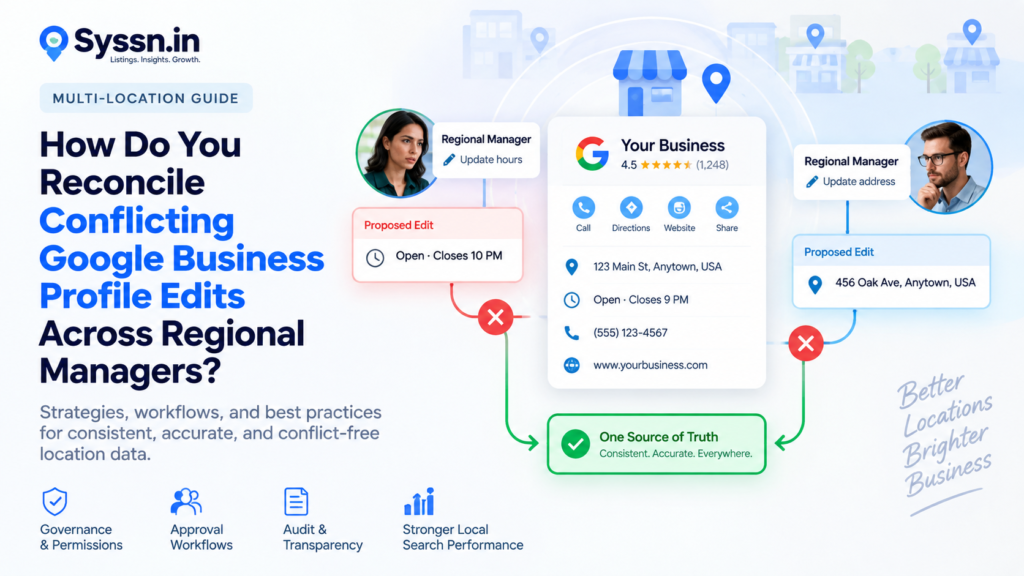
Conflicting Google Business Profile edits should be resolved against one approved source of truth, not by deciding which manager submitted the change last. For a multi-location company, corporate should own sensitive fields such as business name, address, primary category, phone structure, website URLs, openings, and closures. Regional managers can control genuinely local fields such as special hours, selected photos, and approved local attributes. Every disputed edit should pass through validation, approval, publication, and verification before the master location record is changed.
The goal is simple: Google Business Profile should publish approved location data. It should not become the place where your organization decides what the correct data is.
Key Takeaways
- Keep one authoritative location record outside Google Business Profile for every store, branch, office, clinic, restaurant, or franchise location.
- Assign ownership at the field level. Corporate should control high-risk identity fields, while regional teams can manage approved local information.
- Do not give additional Google access simply because someone occasionally needs to request a change. Google owners and managers can both edit substantial profile information.
- Route disputed changes through evidence, approval, publication, and post-publication verification instead of letting managers repeatedly overwrite one another.
- Monitor Google-generated updates as part of the same workflow. Google may use user reports and other public information to change profile data, and some suggested edits receive a four-day review window.
- At larger scales, use bulk tools, APIs, notifications, or a listings-management platform to turn GBP management into a controlled operating process rather than a collection of individual logins.
Quick Comparison Table
| Governance question | Recommended approach |
|---|---|
| Where should the final location data live? | Internal location master, MDM, CMS, database, or controlled listings platform |
| Who should own the Google profiles? | The business should retain ownership; outside partners should receive appropriate delegated access |
| Should regional managers edit core information directly? | Usually no for high-risk fields |
| Who controls holiday or emergency hours? | Regional operations can propose or approve them under defined rules |
| What happens when two managers disagree? | Freeze the disputed field, collect evidence, assign one approver, then publish one approved value |
| How should Google-generated edits be handled? | Monitor, verify against the source of truth, accept or reassert approved information |
| What should happen after an edit? | Confirm Google accepted it and check that the live profile matches the approved value |
| Best platform model for hundreds of locations | Central database + permissions + approval workflow + publisher monitoring |
What Is Google Business Profile Edit Reconciliation?
Google Business Profile edit reconciliation is the process of deciding which version of a disputed location field is correct, documenting that decision, publishing the approved value, and making sure the public profile stays aligned with the organization’s authoritative records.(Google Support)
The important word is deciding.
Imagine a 180-location retailer.
Corporate operations says Store 147 closes at 8 PM. A regional manager changes Google to 9 PM because that was the schedule last month. The store manager then changes it to 7 PM because staffing is short this week. Google receives another signal from the company website showing 8 PM.
You now have four possible answers.
The technical act of editing Google takes seconds. Determining which time customers should actually see is the real work.
This is why multi-location Google Business Profile management needs governance rather than more administrators.
A mature process answers five questions before anyone edits Google:
- Who owns this field?
- Which internal system establishes the correct value?
- What evidence is required to change it?
- Who approves the exception?
- Who checks that the publisher ultimately displays it correctly?
For a wider explanation of the systems behind this process, Syssn’s guide to local listings management covers how approved business data flows across Google, Apple, Bing, directories, and other discovery services. Local Listings Management: Complete Guide for 2026
Why Do Conflicting Google Business Profile Edits Happen?
Most edit conflicts do not begin with Google.
They begin inside the organization.
One department knows something another department does not. A new store schedule exists in the workforce system but has not reached marketing. A franchisee changes a phone number before corporate approves the replacement. A regional manager updates a category based on a local promotion. An agency works from a spreadsheet exported two weeks earlier.
Then everyone edits the same external profile.
Google’s permissions model makes this especially important.
Google currently distinguishes between owners and managers, but managers still have broad editing capabilities. Both can manage a Business Profile through Search and Maps and update information such as the business name, category, website, and other location settings. Owners additionally control users and certain ownership functions.
That means “make regional managers managers instead of owners” is useful security practice, but it is not a complete data-governance strategy.
A manager can still make an incorrect business-information change.
The organization therefore needs controls outside Google’s basic role model.
Direct regional edits
A manager believes the information is wrong and changes it directly.
Corporate bulk updates
Headquarters uploads a revised dataset that conflicts with a local change.
Google’s bulk documentation says organizations with 10 or more eligible locations can manage profiles in bulk, including through spreadsheets and Business Profile Manager.
Agency or vendor changes
An agency works from its own customer dataset, while an internal manager works from another source.
Google-generated updates
Google also receives information from users and other sources.
For some suggested edits requiring review, Google says the business may receive an email or in-product notification and has four days to accept or reject the suggestion. If no action is taken, Google may publish the update when it is supported by other public information. Google also states that some suggested user edits may be applied without prior review.
Inconsistent internal systems
The website, store locator, CRM, ERP, operations database, franchise portal, call-center system, and Google Business Profile may all contain different versions of the same field.
At that point, the GBP conflict is only the visible symptom.
Establish a Single Source of Truth Before Fixing the Edit
The first rule of conflicting Google Business Profile edits is that Google should not be the source of truth.
Treat Google as a publishing destination.
Your authoritative information should come from a controlled internal location database or another clearly identified system.
For each location, maintain a stable internal identifier as well.
Google recommends unique store codes for bulk-managed profiles because store codes distinguish locations and help updates apply to the correct business.
A practical location master might contain:
| Field | Example source of truth |
|---|---|
| Store ID | ERP or operations database |
| Business name | Corporate brand/legal operations |
| Address | Real estate or facilities |
| Primary phone | Telecom/operations |
| Website URL | Web/CMS team |
| Regular hours | Operations |
| Holiday hours | Regional operations |
| Primary category | Local SEO/corporate marketing |
| Additional categories | Marketing with local review |
| Opening date | Real estate/operations |
| Closure status | Operations/legal |
| Services | Product or service operations |
| Photos | Brand team plus approved regional submissions |
| Accessibility attributes | Facilities/local operations |
The exact systems will differ.
What matters is that employees know where the correct answer comes from.
If three systems disagree before the information reaches Google, publishing software will only distribute the disagreement faster.
Divide Corporate and Regional Ownership by Field
Centralized control of every field sounds tidy but can become slow.
Completely decentralized control creates another problem: every regional manager effectively develops a different version of the brand.
The better model is field-level ownership.
Corporate-controlled fields
These normally include information that affects business identity, eligibility, brand structure, or broad customer routing:
- Business name
- Primary category
- Street address
- Location identity
- Website domain and location URL structure
- Primary phone-number architecture
- Permanent closures
- Relocations
- Opening dates
- Major service classifications
Google’s guidelines require businesses and authorized representatives to maintain accurate information and state that the business’s phone number and website should be authoritative and verifiable by the business owner.
These are good candidates for tight central control.
Regionally managed fields
Regional teams often know more about:
- Emergency closures
- Holiday hours
- Temporary operating changes
- Local amenities
- Approved local photos
- Certain location-specific services
- Accessibility information
- Local appointment or ordering details
Regional input is valuable because local teams often learn about changes first.
The governance mistake is treating “the regional team knows first” as “the regional team should be able to permanently change every field.”
Those are different things.
Create a GBP Change Approval Matrix
A good approval matrix makes routine changes easy and unusual changes difficult.
For example:
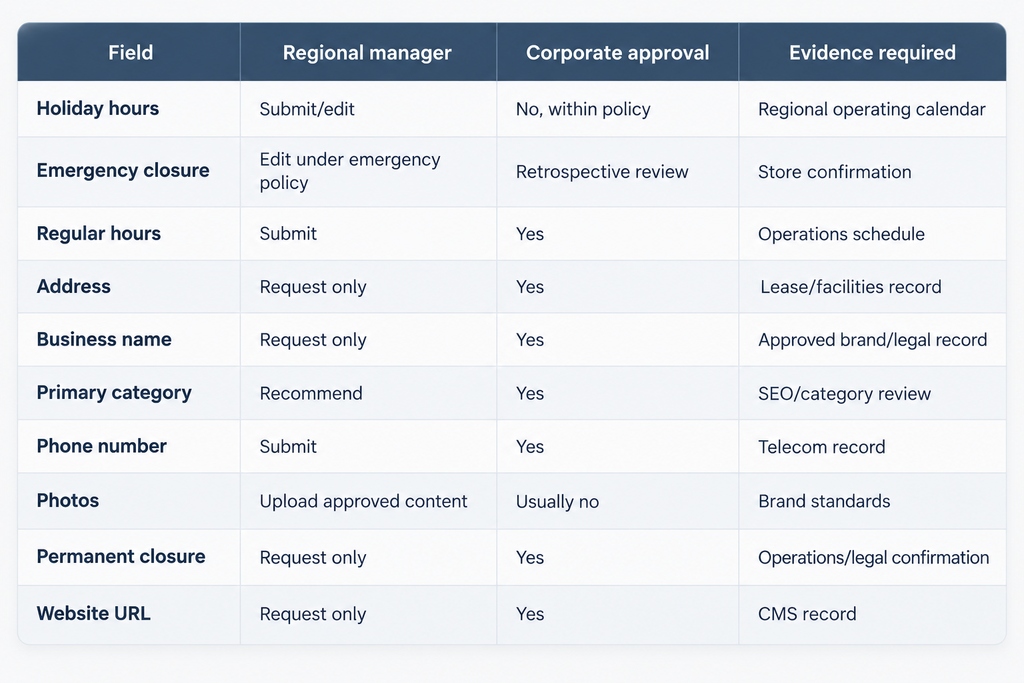
Do not make every change wait three days for corporate approval.
That encourages people to bypass the system.
Instead, separate ordinary operational changes from identity-changing edits.
The 7-Step Workflow for Reconciling Conflicting GBP Edits
Step 1: Stop repeated changes
When a disputed field is detected, stop multiple people from editing it while the issue is being investigated.
Changing 8 PM to 9 PM, back to 8 PM, then to 7 PM does not create useful evidence.
It creates more states to investigate.
Record:
- Location ID
- Field
- Current live value
- Corporate value
- Regional proposed value
- Person submitting the change
- Time submitted
- Reason
- Supporting evidence
Step 2: Identify the authoritative owner
Do not decide based on job seniority alone.
Decide based on field ownership.
If the disagreement concerns an address, facilities or real estate may be authoritative.
If it concerns regular opening hours, operations may own the answer.
If it concerns the primary GBP category, the local SEO team may be responsible.
Step 3: Validate evidence
Ask for a source that exists independently of the Google profile.
For example, do not accept a screenshot of Google showing 7 PM as proof that 7 PM is correct.
That only proves Google currently says 7 PM.
Better evidence might include:
- Approved operating schedule
- Lease or property record
- Telecom assignment
- Corporate CMS record
- Store-opening documentation
- Regional emergency notice
- Approved service catalog
Step 4: Approve one final value
One person or function should make the final call.
Do not allow both managers to keep separate “approved” versions.
The resolved field should have:
Old value: 8 PM
Proposed value: 7 PM
Approved value: 7 PM
Effective date: September 28
Approver: Regional operations
Reason: Seasonal staffing schedule
Revert date: October 12, if applicable
This creates an actual change record.
Step 5: Update the source of truth first
This is the step many organizations skip.
They fix Google and leave the internal database unchanged.
Two weeks later, an automated sync pushes the old value back.
If the change is legitimate, update the master record first.
Then publish from that source.
Step 6: Publish the approved GBP change
For an individual profile, authorized users can edit through Search or Maps. Google says edits to verified profiles are reviewed, usually within around 10 minutes, although some can remain under review for up to 30 days.
Larger organizations can use bulk spreadsheets, Business Profile Manager, the Business Profile APIs, or a third-party listings platform.
For API-based systems, Google’s Business Information API supports location updates using locations.patch.
Step 7: Verify the result
“Submitted” is not the same as “correctly published.”
Your workflow should check:
- Was the edit accepted?
- Is it still pending?
- Was it rejected?
- Does Google now display the expected value?
- Did another update overwrite it?
- Does the website show the same information?
- Do other important listing platforms also need the change?
This final verification closes the ticket.
Without it, your team knows what it attempted, not what customers actually see.
How Should You Handle Google-Generated Profile Changes?
Treat Google updates as incoming change requests from an external system.
Do not automatically accept every suggestion.
Do not automatically reject every suggestion either.
Google may have discovered a genuine discrepancy.
Compare the proposed update with your approved location master.
If Google says the phone number should change and your telecom system confirms the new number, update your master data and accept the correction.
If your approved number remains correct, reassert the approved value.
Google’s API documentation explicitly supports reviewing Google-updated fields. Businesses can retrieve an updated version of a location, inspect which fields differ, and use a patch request either to accept Google’s value or reassert the business’s preferred value.
For larger technical teams, Google also supports real-time Business Profile notifications through Cloud Pub/Sub, including notifications for Google updates and location-state changes.
That makes automated monitoring possible without manually opening every profile.
How Should Google Business Profile Permissions Be Structured?
Start with the smallest number of people who genuinely need direct access.
Google itself recommends limiting Business Profile access and removing former employees who no longer require it. It also warns businesses to add owners carefully because owners have greater control over the profile.
For a large company, a reasonable model is:
Corporate owners: Very small group responsible for account continuity and access.
Central listings team: Managers or platform-controlled access responsible for approved publishing.
Regional managers: Direct GBP access only when their role genuinely requires it. Otherwise, give them access to an internal request or listings-management workflow.
Store managers: Usually submit information rather than own the publishing process.
Agencies: Receive delegated access needed to perform contracted work. The business should retain primary control.
Google’s policies state that only business owners or authorized representatives may verify and manage profiles, and authorized representatives should keep the business owner informed and transfer ownership to the business when requested.
For franchise networks, ownership can become especially complicated because local operators have legitimate local knowledge while the franchisor must protect network-wide consistency. Syssn’s franchise local listing management guide covers that operating model in more detail. How to Run Franchise Local Listing Management in 2026
Best Google Business Profile Governance Platforms at a Glance
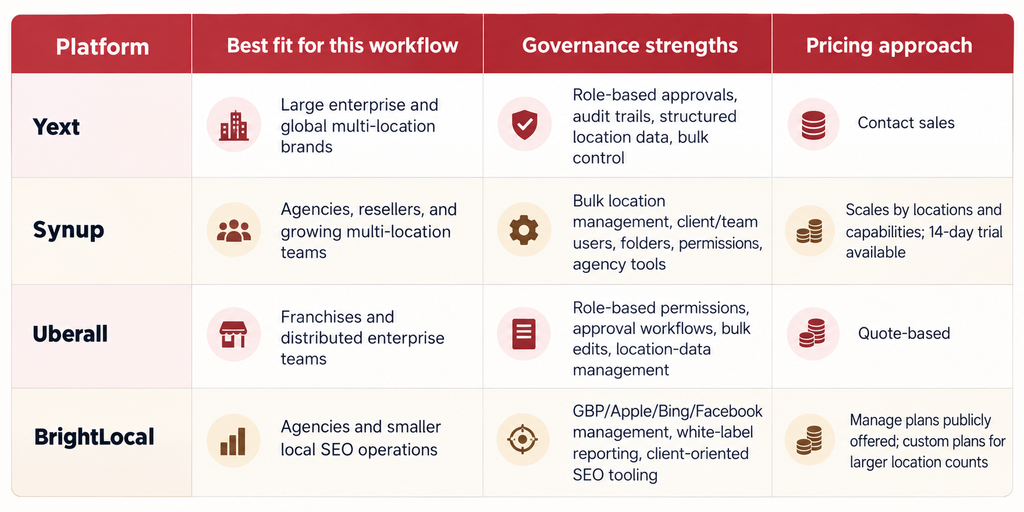
These are not ranked as universal “best” products. The order reflects their fit for the specific edit-governance problem covered in this article.
Best Google Business Profile Management Platforms in 2026
1. Yext

Overview: Yext is particularly relevant when Google Business Profile governance is part of a larger enterprise location-data program. Its Listings product distributes structured business information across Google and a global publisher network that Yext currently describes as 200+ publishers.
Best for: Large multi-location brands that need formal controls across many regions, business units, and publishing destinations.
Key features: Yext’s current Listings materials specifically document role-based approvals and audit trails, which are directly relevant when corporate, regional, and local teams share responsibility for location data. It also provides publisher monitoring, APIs, bulk-management capabilities, and a central structured-data layer. Yext’s Google integration supports publisher suggestions so teams can review changes affecting GBP data.
Strengths: The governance model fits businesses that want location edits to behave like controlled data changes rather than independent profile edits. Its Management API also makes integration with internal data systems possible.
Limitations: Smaller businesses may find the enterprise operating model more than they require. Buyers should also evaluate relevant publisher coverage rather than assuming a large network count means every destination matters to their business.
Pricing: Yext generally requires buyers to contact sales for enterprise pricing.
Assessment: Yext is a strong fit where approval controls, auditability, integrations, and large-scale data distribution are central requirements.
2. Synup
Overview: Synup combines local listings management with reviews, reporting, local SEO tools, social management, and agency-oriented controls. Its Google Business Profile integration supports connecting profiles and managing listing information from Synup’s Listings environment.
Best for: Agencies, resellers, growing multi-location brands, and teams that need location management without adopting a heavily enterprise-oriented stack.
Key features: Synup’s current help documentation shows administrators can manage locations, organize them into folders, perform bulk actions, add client and internal team users, configure permissions, connect Google and Facebook accounts in bulk, and use API integrations. Its white-label environment also allows client users to receive read-only or write access to selected locations or folders.
Strengths: That folder-and-permission structure is useful when a regional manager should manage one group of locations without receiving unrestricted access to the entire network. Agencies can also separate client work while retaining central administration.
Limitations: Organizations with very complex enterprise approval chains should verify during implementation exactly how their required field-level approval process maps into Synup’s current permissions and workflows rather than assuming every internal governance rule is built in.
Pricing: Synup says pricing scales with location count and selected capabilities. Its current site also advertises a 14-day free trial.
Assessment: Synup is especially relevant where multi-client or multi-location administration, controlled access, bulk changes, and agency workflows need to exist in the same system.
3. Uberall
Overview: Uberall’s listings and location-data products are designed for multi-location organizations managing profiles across Google, Apple Maps, Bing, Yelp, and a network the company currently describes as 150+ directories and discovery platforms.
Best for: Franchises, distributed brands, international multi-location organizations, and companies where headquarters must share controlled responsibility with local operators.
Key features: Uberall supports bulk editing, centralized location data, directory synchronization, APIs, duplicate suppression, and role-based permissions. Its current product information also says corporate teams can use approval controls to review changes from regional managers or franchisees before information synchronizes to directories.
Strengths: The division between headquarters and local users maps closely to the governance problem in this article. Its Google integration documentation also covers profile connections, verification states, and workflows for profiles that are already claimed.
Limitations: Buyers should establish which capabilities are included in their proposed package and which require additional products or services. The platform is designed around multi-location operations, so very small businesses may not need its broader architecture.
Pricing: Uberall uses a sales-led pricing model rather than publishing a simple universal per-location rate.
Assessment: Uberall makes the most sense when the company wants local participation but needs headquarters to maintain structured oversight across a large distributed network.
4. BrightLocal
Overview: BrightLocal approaches the problem through a local SEO and listings-management model. Its current Listings Management product focuses ongoing synchronization on major destinations such as Google Business Profile, Apple Maps, Bing Places, and other important listing networks, while also offering citation-building services.
Best for: Agencies, local SEO teams, and smaller or mid-sized location portfolios that want listings management combined with ranking, audit, reporting, and citation tools.
Key features: BrightLocal’s Management APIs can create, update, and organize business locations and work with Google Business Profile, Apple, Bing, and Facebook. Its subscription structure also includes white-label capabilities on several plans, which can be useful for agency reporting and client-facing workflows.
Strengths: Teams already performing local SEO may prefer having GBP audits, local ranking tools, citation tracking, and listing maintenance in one environment. BrightLocal also separates ongoing Active Sync from pay-as-you-go citation work, giving buyers a different model from broad-network subscription platforms.
Limitations: Organizations managing highly complex regional approval chains should evaluate whether its governance controls match their needs. BrightLocal notes that organizations managing more than 100 locations require a custom plan.
Pricing: BrightLocal’s current platform page advertises Manage plans starting from $40 per month, with pricing increasing according to location requirements.
Assessment: BrightLocal fits teams that see GBP governance as part of day-to-day local SEO rather than a large enterprise master-data project.
Yext vs Synup for GBP Edit Governance
Yext and Synup can both centralize Google Business Profile management, but they approach the organizational problem from somewhat different directions.
Yext makes the most sense when your workflow requires formal enterprise controls, structured approvals, audit trails, APIs, and distribution across a large publisher network.
Synup becomes particularly relevant when an agency or growing multi-location organization needs a central location manager, folders, client and team permissions, bulk operations, and white-label access without making listings management a separate enterprise data project.
The useful buying question is therefore not “Which one edits Google?”
Both can participate in GBP management.
Ask instead:
How closely can the platform reproduce our actual corporate-to-regional approval chain?
During a demo, give the vendor a real scenario:
A regional manager wants to change the phone number for six locations, but headquarters has approved the change for only four.
Then watch how the product handles it.
That reveals much more than a feature checklist.
Synup vs Uberall for Distributed Teams
Synup and Uberall both support multi-location operations, bulk management, and controlled user access.
Synup’s structure is particularly relevant to agencies, resellers, and businesses organizing locations into folders or client groups.
Uberall’s published materials put more explicit emphasis on large distributed and franchise organizations where headquarters and local operators share responsibility.
For a 40-location agency client portfolio, Synup’s account structure may map naturally to the way the agency already works.
For a 1,000-location franchise in which hundreds of franchisees require restricted local participation, Uberall’s distributed-brand model deserves close evaluation.
The platform choice still does not eliminate the need for a field-ownership matrix.
Software can enforce rules only after your company defines them.
How We Evaluated These Platforms
For this article, the relevant issue was not which vendor has the longest feature list.
The evaluation focused on six operational criteria:
- Centralized location-data management
- Multi-location and bulk editing
- User or role controls
- Approval or governance capabilities
- GBP connectivity and monitoring
- API, agency, franchise, or distributed-management fit
Current vendor pages and current help or technical documentation were prioritized over old comparison articles.
Pricing was included only where current public information was available.
This same research principle should guide your own vendor selection.
Give each platform the same five disputed-edit scenarios and see how each handles them.
How to Choose the Right Google Business Profile Governance Model
Consideration 1: Location Count
Ten locations and 2,000 locations create different governance requirements.
Google says eligible organizations with 10 or more locations can use bulk-management capabilities.
At 15 locations, a disciplined spreadsheet and clear permissions may be workable.
At 1,500, API connections, automated monitoring, role controls, and exception reporting become much more useful.
Consideration 2: Change Frequency
A business with stable office information has a different risk profile from a restaurant chain changing holiday hours, menus, delivery links, and temporary closures every week.
The more often data changes, the more important a structured approval workflow becomes.
Consideration 3: Organizational Structure
A centrally owned retailer may require less local control than a franchise organization.
A healthcare network may require different responsibilities again because location data can involve facilities, departments, and individual practitioners.
Map the workflow to your real organizational structure.
Do not force the organization to imitate the software.
Consideration 4: Integration Requirements
If location information already lives in an ERP, CMS, franchise-management system, HR platform, or custom database, investigate whether the listings system can receive approved updates from that source.
Otherwise, employees may have to maintain two databases manually.
That is exactly how conflicting records begin.
For agencies designing this type of operating model for multiple customers, Syssn’s guide to building a local listings management workflow for agencies goes further into onboarding, permissions, publishing, monitoring, and offboarding. How to Build a Local Listings Management Workflow for Agencies
Best GBP Governance Approach by Use Case
| Organization | Practical starting model |
|---|---|
| 5-location business | Corporate ownership + limited manager access + shared approved data sheet |
| 25-location regional chain | Central location master + documented edit matrix + regional request workflow |
| 100-location retailer | Bulk management + central publishing + regional change submissions |
| 500-location franchise | Field-level rules + restricted local access + approval workflow + listings platform |
| 1,000+ location enterprise | Master-data integration + API publishing + notifications + audit trail + exception management |
| Marketing agency | Client-owned profiles + agency access + per-client location groups + documented approval rules |
Frequently Asked Questions
How do you manage conflicting Google Business Profile edits?
Compare every proposed change against a defined source of truth and field owner. Freeze the disputed field, collect supporting evidence, have one designated approver choose the correct value, update the internal master record, publish the approved change, and verify that Google accepted it.
Do not solve a disagreement by allowing managers to keep editing the profile until one version remains.
Can multiple people manage the same Google Business Profile?
Yes.
Google allows profiles to have owners and managers. Both roles can perform many profile-management actions, while owners have additional access-management powers.
Because managers can still edit substantial business information, companies should combine Google permissions with their own internal governance rules.
Which Google Business Profile fields should regional managers be allowed to change?
Regional managers can reasonably manage information that changes locally and can be independently verified, such as special hours, temporary closures under an approved policy, selected local photos, and certain location-specific attributes.
Business name, permanent address changes, primary category, ownership, major URLs, permanent closure, and other identity-sensitive fields normally deserve corporate approval.
The exact division should follow how your organization operates.
How do you prevent unauthorized Google Business Profile changes?
Reduce direct access, remove former employees promptly, keep profile ownership with the business, establish field-level rules, monitor Google updates, and publish from an approved master record.
Google itself recommends limiting owners and managers to people who genuinely need access.
What should you do when Google automatically changes business information?
First check whether Google’s proposed or published information is actually correct.
Compare it with your master location record and supporting evidence.
If Google identified a legitimate internal error, correct your source data and accept the change.
If your existing value remains authoritative, reassert it.
Google’s API provides a specific process for reviewing Google-updated fields and accepting or rejecting them.
Can multi-location businesses manage Google Business Profiles in bulk?
Yes.
Google states that businesses with 10 or more eligible locations can add, verify, and manage profiles in bulk. Business Profile Manager, spreadsheets, and APIs can support larger portfolios.
Bulk tools improve efficiency, but they also make bad source data more dangerous because an incorrect value can be distributed across many locations quickly.
Who should own Google Business Profiles in a multi-location company?
The business itself should normally retain ownership.
Google’s authorized-representative guidance says representatives should work with the business owner, keep the owner informed, and transfer ownership to the business owner when requested.
Agencies, regional teams, and vendors should receive the access required for their role without creating unnecessary ownership risk.
How do you audit Google Business Profile changes?
Use a change log that records the location, field, old value, proposed value, approved value, requester, approver, effective date, evidence, publishing status, and final verification.
For larger systems, combine internal audit records with publisher monitoring and API notifications.
Google’s Notifications API can send event notifications for Google updates and several location-status events through Cloud Pub/Sub.
A Practical GBP Conflict Escalation Process
Not every disagreement deserves executive attention.
Use three levels.
Level 1: Routine local update
Example: Thanksgiving hours.
The regional manager submits the approved hours. The change is published under the normal workflow.
Level 2: Conflicting operational data
Example: corporate records show 8 PM while regional operations says 7 PM.
The field is temporarily locked. The location manager and operations owner provide evidence. One authorized approver chooses the final value.
Level 3: Identity, ownership, eligibility, or legal conflict
Example: store relocation, brand-name change, permanent closure, ownership dispute, or profile access dispute.
Central operations, legal, real estate, franchise management, or another relevant corporate function becomes the authority.
This tiered approach keeps routine edits fast without letting high-risk changes happen casually.
Final Recommendation
The most reliable way to reconcile conflicting Google Business Profile edits is to separate data ownership, approval, and publishing.
Your company should maintain one authoritative record for every location. Corporate teams should own identity-sensitive fields. Regional managers should have meaningful control over genuinely local information, but within documented rules. When two people disagree, the organization should resolve the underlying business fact before anyone edits Google again.
For smaller portfolios, Google Business Profile Manager and a disciplined approval process may be enough. For hundreds or thousands of locations, use a system that can centralize location data, limit access, process bulk changes, monitor Google-generated updates, maintain an audit trail, and connect to your internal systems.
Among the platforms reviewed here, Yext is particularly suited to enterprise governance requirements; Synup fits agencies, resellers, and growing multi-location teams that need bulk management and controlled client or regional access; Uberall is built around large distributed and franchise networks; and BrightLocal offers a more local-SEO-oriented model for agencies and smaller location portfolios.
Whatever software you choose, establish the operating rules first.
A platform can publish the correct answer quickly.
Your organization still has to decide what the correct answer is.