How to Detect Ghost Locations After a Retail Chain Rebrand

A retail rebrand can look finished long before it is actually finished.
The signs above the stores have changed. The website has the new logo. Employees wear the new uniforms. Google searches for the new brand return the right locations.
Then someone searches the old brand name and finds three stores that supposedly still exist.
One closed two years ago. Another moved across town. The third is the same store under its previous name.
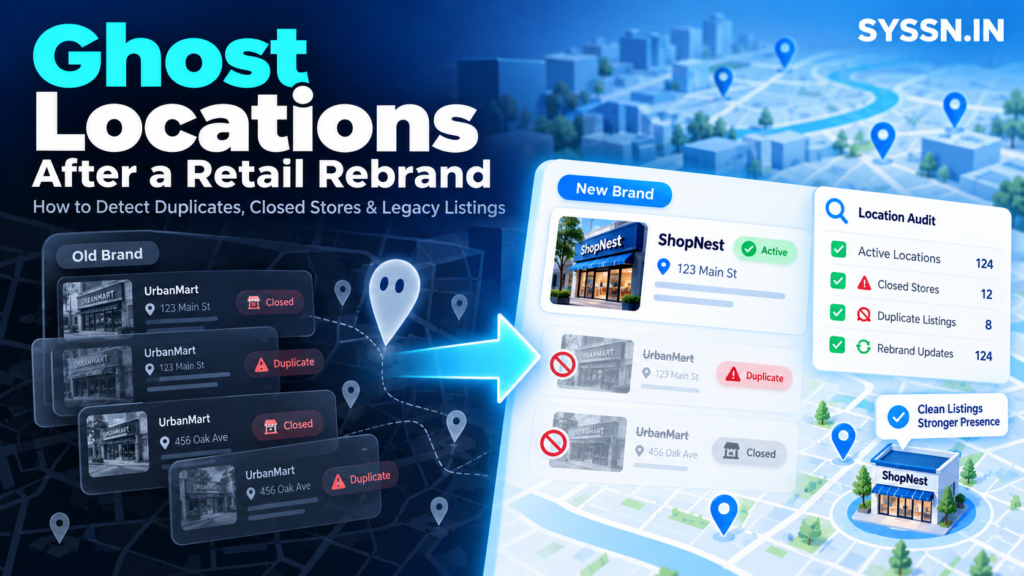
Those are ghost locations: old, duplicated, relocated, closed, or incorrectly retained digital store records that no longer match the retailer’s real physical network.
The practical way to detect them is to build a verified store master, preserve historical location data, search for both current and former identities, compare every discovered listing with the master, classify the mismatch, and only then decide whether it needs updating, rebranding, merging, suppression, relocation, or closure.
For a retailer with hundreds of locations, this becomes less of an SEO cleanup project and more of a location-data problem.
Key Takeaways
- Build one verified source of truth before touching publisher listings.
- Preserve former brand names, phone numbers, URLs, addresses, and store IDs because old data helps uncover ghost records.
- Do not assume every old-brand listing should be deleted. Google and Apple both support situations where an existing location can be updated to reflect a rebrand.
- Search by phone number, address, store code, previous URL, and former brand name rather than relying on name-only searches.
- Separate duplicates, closures, relocations, rebrands, ownership conflicts, and unrelated businesses. They require different actions.
- Continue monitoring after the rebrand because stale upstream data can recreate listings you already corrected.
- Synup, Yext, Uberall, and Rio SEO all support large location portfolios, but they approach duplicate detection, publishing, and managed cleanup differently.
What Are Ghost Locations After a Retail Rebrand?
“Ghost location” isn’t an official Google or Apple status.
It is a useful operational term for a digital record that suggests a store exists under the wrong identity, address, status, or ownership.
Imagine a 300-store furniture retailer called Northway Home being rebranded as Alder Home.
Store 118 stays in exactly the same building. Its staff, products, phone number, and opening hours remain unchanged. Only the brand changes.
Store 62, however, closed three months before the rebrand.
Store 207 moved to another shopping centre.
And Store 94 somehow has two Alder Home profiles plus the old Northway Home listing.
All four situations can look like “old listings” in a spreadsheet. They are not the same problem.
Google’s current guidelines say a Business Profile can qualify for rebranding when the change meets its criteria. It specifically says multi-location businesses may be eligible when the business name changes. If the change falls outside those criteria, Google can treat it as a new business instead. Google’s guidelines for representing businesses and rebrands
That distinction matters.
Closing every profile containing the old brand name could destroy continuity where the correct action was simply to update an existing location.
Ghost Location vs Duplicate vs Closed Store
I find it useful to separate three concepts early.
A ghost location is the broad category. Something about the digital store record no longer matches reality.
A duplicate means two or more records represent the same legitimate store.
A closed location represents a real store that existed but no longer operates.
Google says businesses should generally have only one Business Profile for each eligible business. Its duplicate guidance also provides workflows for ownership problems, accidental duplicates, and merge requests. Google guidance on duplicate Business Profiles
The classification determines what happens next.
| What you find | What it probably means | Likely action |
|---|---|---|
| Old brand, same operating store | Rebrand candidate | Update/rebrand |
| Old profile plus identical new profile | Duplicate | Merge or suppress |
| Store no longer trades | Closed location | Mark permanently closed |
| Same store at previous address | Relocation issue | Review publisher-specific move process |
| Record controlled by former agency | Ownership problem | Recover or transfer access |
| Different business at same address | Possibly legitimate | Investigate before suppressing |
| Profile that never represented a real store | Invalid record | Request removal |
This is why a column labelled “delete?” is rarely enough for a large rebrand audit.
Why Do Old Retail Locations Survive a Rebrand?
Retail location data does not live in one database.
Your website may say one thing. Google may say another. Apple may have a record created years ago. A data provider may still contain a former phone number. Yelp may retain an old page. Navigation systems can ingest information through completely different paths.
And sometimes the retailer itself is the source of the contradiction.
An old location page remains indexed.
A franchisee created a profile using a personal email account.
A previous agency still controls publisher access.
The ERP was updated, but the store locator pulls from another database.
A store changed phone number twice before the rebrand.
A rebrand tends to expose years of accumulated location-data debt.
Google makes one particularly important point: removing a Business Profile from your management account does not guarantee that the underlying business disappears from Search or Maps. A genuinely closed business should be marked appropriately rather than simply removed from your account. Google guidance on removing Business Profiles
Apple follows a similar logic. Removing a location from Apple Business can remove it from your organization while the place may still appear across Apple. If you select “permanently closed,” Apple says the location is also marked permanently closed on Maps. Apple guidance for editing or removing locations
So “we deleted the old profile” isn’t really a cleanup strategy.
How to Detect Ghost Locations After a Retail Rebrand
1. Build Your Location Source of Truth First
I would not begin with Google Maps.
I would begin with the retailer’s own store data.
For every location, record the current name, previous name, internal store code, current and former addresses, current and former phone numbers, current and former URLs, coordinates, operational status, rebrand date, opening date, closure date, and publisher IDs where available.
The historical fields matter more than people initially expect.
Suppose Store 417 used (312) 555-0182 before the brand changed its phone system.
A directory might still display that number while using neither the old nor the new official brand name.
Searching the old phone number may find a listing that a brand-name search misses completely.
Stable store identifiers matter too. Google supports unique business codes for bulk location management, and businesses managing 10 or more qualifying locations can use its bulk workflows. Google’s bulk location management documentation
Your internal store ID should ideally survive changes in branding.
The store’s name can change. The identifier connecting its history should not.
2. Define What Should Exist
Once you know what physically exists, define the expected digital state.
| Physical situation | Expected online state |
|---|---|
| Active rebranded store | One correct current-brand location |
| Permanently closed store | Closed, not represented as operating |
| Relocated store | Correct current location with old-address issue resolved |
| Acquired and converted store | Correct identity under applicable publisher rules |
| Temporarily closed store | Existing profile with appropriate status |
| Store within another store | Separate profile only where eligibility permits |
This sounds obvious.
It becomes less obvious when 400 locations are spread across several legacy brands and each market has its own history.
Without the expected-state table, your cleanup team starts deciding what the physical world looks like based on whatever Google happens to show.
That is backwards.
3. Search the Old Identity, Not Only the New One
After launch, everyone naturally searches for the new brand.
Ghost-location detection requires the opposite instinct.
Search for the identity you’re trying to retire.
For each important market, test the old brand with the city, ZIP code, street address, store number, previous phone number, current phone number, and old location-page URL.
Search the address without any business name at all.
Try common misspellings.
Search the former phone number in quotation marks.
Repeat this across major discovery services.
If you’re dealing with hundreds of stores, Syssn’s guide to business listing management services for multi-location brands explains why this becomes an operational workflow rather than a series of one-off profile edits.
4. Match Records by Identity, Not Name
Names are surprisingly weak identifiers.
A rebrand changes the name by definition.
Instead, compare several signals together:
business name, street address, phone number, coordinates, URL, store number, categories, photos, operating status, and publisher identifiers where available.
Imagine you find “Northway Home” and “Alder Home” at exactly the same coordinates, using the same telephone number and linking to different generations of the same store page.
That is strong evidence that you are looking at one business across two digital identities.
Now imagine two businesses share an address but have different names, signage, phones, categories, and operating hours.
That could be completely legitimate.
Google explicitly allows multiple eligible businesses at the same address when they are genuinely distinct.
This is one of the reasons fully automatic duplicate deletion makes me uncomfortable.
Software is excellent at finding suspicious similarities.
It is not always the right tool for deciding what exists in the physical world.
5. Give Every Suspect Record a Cleanup Type
Do not create one enormous spreadsheet column called “duplicate.”
Classify every suspicious record.
You might use categories such as current and correct, rebrand candidate, duplicate, permanent closure, relocated store, unauthorized legacy profile, ownership conflict, unrelated business, publisher error, or manual investigation required.
This gives everyone the same language.
Marketing can understand it.
Store operations can understand it.
The agency can understand it.
Legal can understand it if an acquisition gets complicated.
And most importantly, the remediation action follows the classification rather than someone’s guess.
6. Audit Your Own Website
Sometimes the ghost is coming from inside the house.
A store closes, but its landing page remains live.
The sitemap still includes it.
Structured data says the location is open.
The store locator API contains the old address.
Internal links still point to a former brand URL.
Then the listings team spends weeks asking external platforms to stop believing information the retailer itself continues publishing.
Run your store master against your own location pages.
Check the HTML, structured data, XML sitemaps, store-locator feed, canonical URLs, redirects, and indexed legacy pages.
The brand’s website should reinforce the physical truth, not compete with it.
For teams still deciding how to structure the software side of this work, Syssn’s comparison of local listings management software for 2026 covers the different synchronization and citation-management models available.
7. Audit Publisher Ownership Before the Cleanup Gets Difficult
Finding the correct profile is only useful if someone can change it.
Large chains commonly discover important profiles controlled by former employees, franchisees, agencies, acquired companies, or accounts nobody recognizes.
Document ownership while you audit.
Apple provides a transfer workflow for locations that are already managed by another organization. Its current documentation says organizations can request management transfer and provide supporting documentation for review. Apple’s location transfer process
Ownership recovery may be slower than creating another listing.
Creating another listing can leave you with a second problem after the first one is finally recovered.
8. Recheck Everything After Remediation
Submitting a suppression request and resolving a ghost location are not the same event.
Record at least the submission date, publisher, requested action, status, resolution date, and final verification date.
Then search again.
Some corrections take time.
Some fail.
Some profiles reappear because another source continues feeding stale information into the publisher.
This is why I think of a rebrand as having two launch dates.
The first is when the new brand becomes visible.
The second is when the old digital identity stops causing confusion.
A Note About Relocated Stores
This deserves its own section because Google’s published guidance is currently not perfectly aligned.
Google’s duplicate-profile help says that if a business relocates, you should update the existing profile rather than create a new one.
Another Google policy overview says a relocated business should mark the existing profile permanently closed and create a new Business Profile at the new location.
Because those first-party instructions conflict, I would not turn either statement into an automatic bulk rule for hundreds of stores.
Treat relocation as a special workflow. Review the specific profile situation and confirm the current Google process before changing a large batch.
That is less satisfying than a neat universal rule.
It is also safer.
Apple Gives Retailers a Useful Rebrand Workflow
Apple’s 2026 business-management system has a particularly useful feature for retail rebrands.
Apple says you can change the brand associated with an existing location, including when one brand purchases another and wants the acquired location associated with the new brand. The change has to remain within the same country or region, and certain location content can change or be removed in the process. Apple’s current location rebrand guidance
That means an old-brand Apple Maps location is not automatically something to destroy.
It may be something to transfer into the new identity.
This distinction between continuity and recreation appears repeatedly in good rebrand cleanup.
Local Listings Platforms for Ghost Location Cleanup
No software knows whether Store 144 physically closed last Tuesday unless someone gives it reliable data.
The source of truth still belongs to the retailer.
What software can do is make the comparison, distribution, duplicate detection, and exception management far easier at scale.
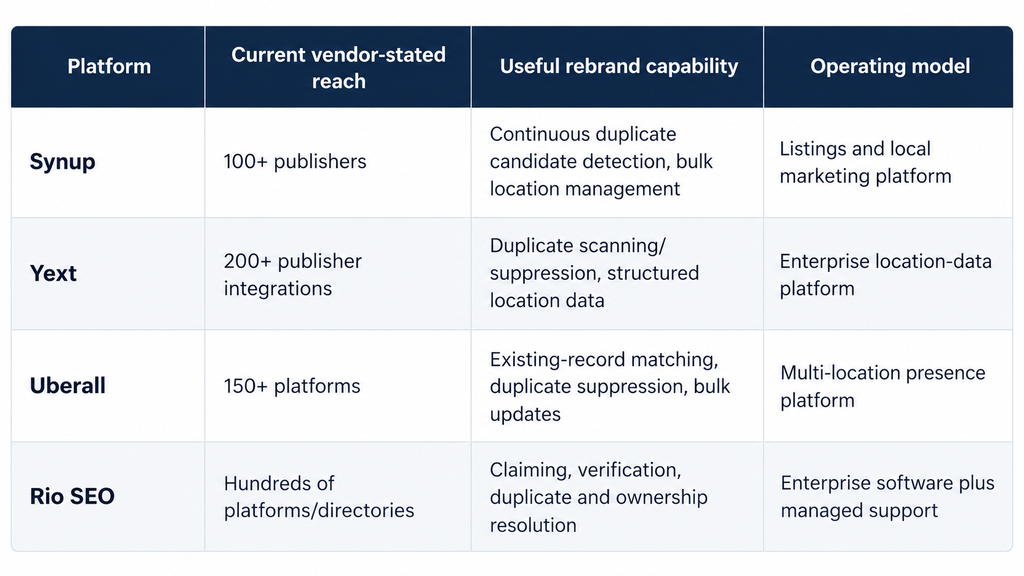
These figures are vendor-stated and don’t mean every publisher is available for every country, category, product plan, or business type.
Synup
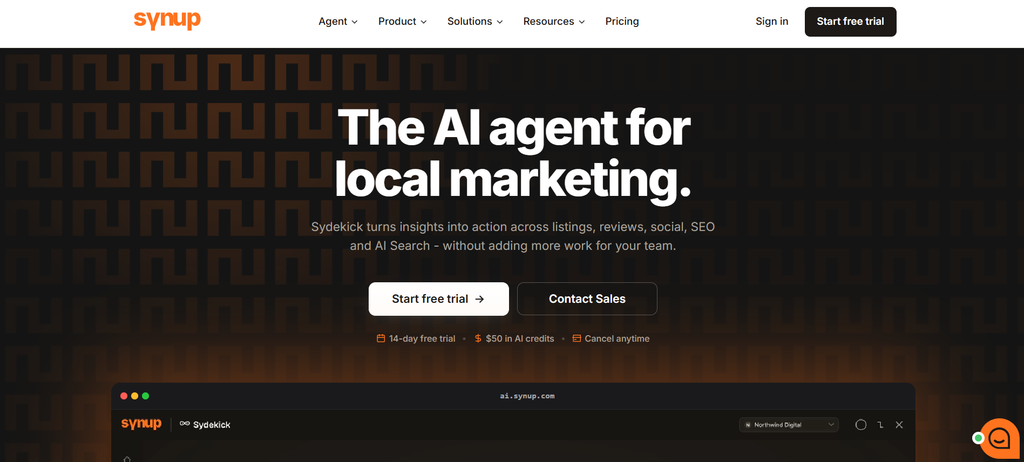
Synup’s current listings system is built around managing business information across a network of more than 100 publishers and can handle portfolios ranging from a few locations to thousands. Synup Listings Management
For ghost-location cleanup, its duplicate workflow is particularly relevant.
Synup says duplicate candidates are detected continuously. Each candidate is grouped by publisher and compared against the location’s own business name, address, and phone information.
The team then chooses whether the candidate is actually a duplicate.
If it is, flagging it submits a removal request to the publisher. The workflow progresses through Potential, Flagged, Deleted, or Failed states. Importantly, Synup says flagging does not itself delete the listing. Synup’s duplicate-listing workflow
I like that distinction for a rebrand project.
“Requested” and “resolved” should never be the same spreadsheet status.
Synup also supports bulk location work, publisher connections, citation monitoring, and health alerts. For a large chain, that makes it possible to move between portfolio-wide problems and individual exceptions without treating every store as an isolated project.
The limitation is the same one that applies to every listings platform: the publisher ultimately controls the public record. Your internal audit still needs to verify the outcome.
Yext

Yext takes a broader enterprise-data approach.
Its current Listings product says it distributes verified location information directly to more than 200 publishers. Its Knowledge Graph acts as the structured source underlying those updates. Yext Listings
Duplicate suppression is a mature part of the platform.
Yext’s current help documentation says it scans publisher sites monthly for potential duplicate listings. Users can review them, suppress them, or mark them as not duplicates, subject to publisher support. Enterprise accounts with the relevant managed service can also have suppression work handled by Yext’s professional-services team. Yext duplicate suppression documentation
For a retailer with a large internal master-data system, the attraction is fairly clear.
Ghost-location cleanup can sit inside a wider system of location governance rather than exist as a standalone spreadsheet project.
Yext also provides APIs around publishers and duplicate workflows, which can matter when location status needs to feed internal analytics or business systems.
The tradeoff is scope. A retailer that needs a one-time cleanup may be solving a smaller problem than the platform is designed to address.
Uberall
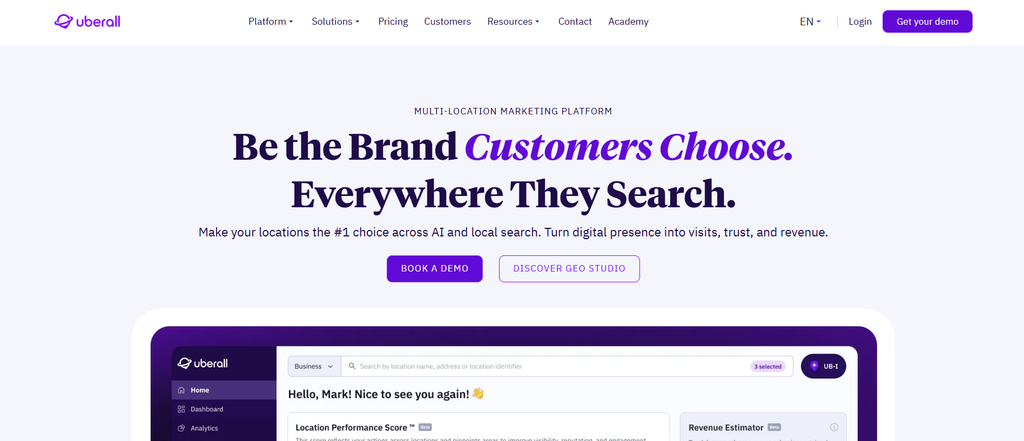
Uberall sits firmly in the multi-location category.
The company currently states that its listings platform covers more than 150 directories and discovery platforms. It supports centralized publishing, bulk updates, duplicate suppression, and profile monitoring. Uberall Listings
One feature is especially relevant to rebranding: PreSync.
Uberall describes PreSync as identifying existing listings and claiming them before creating new records, specifically to reduce unnecessary duplicate creation. Its product documentation also includes listing duplication suppression and closed-location management.
That addresses one of the easiest mistakes to make during a chain-wide rollout.
You upload a clean file containing 700 newly branded locations.
The software sees “new” business names.
And suddenly your cleanup project becomes a duplicate-creation project.
Existing-record matching should therefore be one of the questions you ask any listings vendor before a rebrand migration.
Uberall also supports bulk changes and API-driven operations, which makes it better suited to large portfolios than manual location-by-location maintenance.
Rio SEO

Rio SEO takes a more service-oriented enterprise approach.
Its current Local Listings product says it distributes data across hundreds of directories, applications, and platforms, including Google, Apple, Bing, Yelp, and Facebook. Rio SEO local listings management
Its positioning becomes more interesting when the rebrand contains a lot of exceptions.
Rio SEO says its team claims, verifies, and updates listings for clients while also addressing rogue listings, duplicates, and ownership conflicts.
That operational support can matter in a messy acquisition.
Imagine several hundred stores spread across franchisees, legacy brands, old agencies, former addresses, and profiles controlled through personal email accounts.
The problem isn’t simply publishing a corrected CSV.
Someone has to work through exceptions.
Rio SEO also connects listings with local pages and location reporting, which can help when the corporate website itself needs to be reconciled with third-party publisher data.
The obvious tradeoff is that pricing and product scope are less self-service than some alternatives. Enterprise buyers generally need a proposal.
How Should You Choose Between These Platforms?
The directory count would not be my first criterion.
For a retail rebrand, I would care more about what the system does when it encounters ambiguity.
Suppose a new-brand record shares an address and coordinates with an old-brand listing but has a different telephone number.
Does the platform match them?
Does it create another listing?
Does it flag the situation for review?
Can your team see the original publisher record before taking action?
What happens if suppression fails?
Can you distinguish an unresolved publisher request from a successfully removed duplicate?
Those questions tell you more about rebrand risk than whether one platform claims 150 publishers and another claims 200.
Syssn’s comparison of local listing management software options for multi-location businesses provides a broader look at the different platform models if you are evaluating vendors beyond these four.
Common Ghost Location Cleanup Mistakes
The most common mistake is assuming “old brand” means “delete.”
Sometimes it means rebrand.
Another mistake is trusting a name-only match. Retailers often discover ghost profiles only when they search old phone numbers and addresses.
Deleting profiles from management accounts creates another false sense of completion. Google and Apple both make clear that removing your access does not necessarily remove the underlying public record.
Then there is the portfolio-wide automation problem.
A bad rule tested on one store creates one headache.
The same rule applied to 1,500 locations creates a project.
I would always test difficult stores first: locations that moved, locations with ownership conflicts, stores inside other stores, recently closed branches, converted acquisitions, and locations already known to have duplicates.
Clean stores tell you whether the software works when life is easy.
Messy stores tell you whether you should trust it.
How to Prevent Ghost Locations After the Rebrand
The most effective cleanup process eventually becomes a prevention process.
Give every location a stable internal identifier.
Keep historical names, addresses, phones, and URLs.
Maintain one system that owns the authoritative location record.
Make openings, closures, relocations, acquisitions, and rebrands controlled lifecycle events rather than emails sent between departments.
Keep corporate ownership or documented administrative access to important publisher profiles.
Align the store locator, structured data, local landing pages, and publisher feeds with the same underlying store status.
And keep searching the old brand after everyone else has stopped thinking about it.
That last step is surprisingly useful.
Searching the new brand tells you whether the rebrand exists.
Searching the old brand tells you whether the previous version is still competing with it.
Frequently Asked Questions
What is a ghost location after a retail rebrand?
A ghost location is an outdated, duplicated, closed, relocated, or incorrectly retained digital store record that no longer accurately represents the retailer’s physical location network.
It can appear on search engines, maps, navigation systems, directories, review platforms, or the retailer’s own website.
How do you find ghost locations?
Start with a verified store master containing current and historical information.
Then search using former brand names, old phone numbers, addresses, store codes, old URLs, ZIP codes, and current location details.
Compare discovered records with the store master and classify the mismatch before changing anything.
Should I delete old Google profiles after a rebrand?
Not automatically.
Google currently allows qualifying rebrands to update existing Business Profiles, including some multi-location name changes. A business that does not meet Google’s rebranding criteria can be treated differently.
Determine whether the profile represents the same continuing business before deciding to close or replace it.
Can two businesses legitimately have profiles at the same address?
Yes.
Google allows separate profiles when they represent distinct, eligible businesses with clear differences in identity. Shared addresses alone are therefore not enough evidence to call something a duplicate.
Can Apple locations be transferred to a new brand after an acquisition?
Apple currently allows an existing location to be associated with another verified brand in the same country or region, including acquisition scenarios.
That can make updating the existing location more appropriate than creating another one.
Does deleting a Google Business Profile remove it from Maps?
No guarantee exists.
Google explicitly says removing profile content and managers from your account does not guarantee that the business stops appearing on Search or Maps.
How long should ghost locations be monitored after a rebrand?
There is no universal period that applies to every publisher.
For a large retail chain, monitoring should continue until important publishers consistently show the expected location network and recurring checks no longer uncover legacy records.
A rebrand is not finished because a removal request was submitted.
It is finished when customers stop being sent to the wrong store.
Conclusion
The strange thing about a retail rebrand is that the physical world can change faster than the digital one.
A sign comes down in an afternoon.
A listing created seven years ago may continue surfacing long after everyone involved has forgotten who created it.
That is why ghost-location cleanup works better when you stop thinking of it as deleting old directories.
Start with the physical truth.
Which stores actually exist?
Which moved?
Which closed?
Which simply changed their name?
Once that is clear, the publisher decisions become much easier.
For a small chain, a disciplined location master and careful manual audit may be enough. At hundreds or thousands of stores, platforms such as Synup, Yext, Uberall, and Rio SEO can reduce a lot of repetitive work, especially around duplicate discovery, publishing, exception handling, and monitoring.
But the software still needs something trustworthy to compare the internet against.
Perhaps that is the useful test of a rebrand.
Not whether people can find the new name.
Whether, after enough time has passed, the internet finally agrees with the company about which stores actually exist.