How Multi-Location Brands Should Prepare Local Listings Before a Store Opens

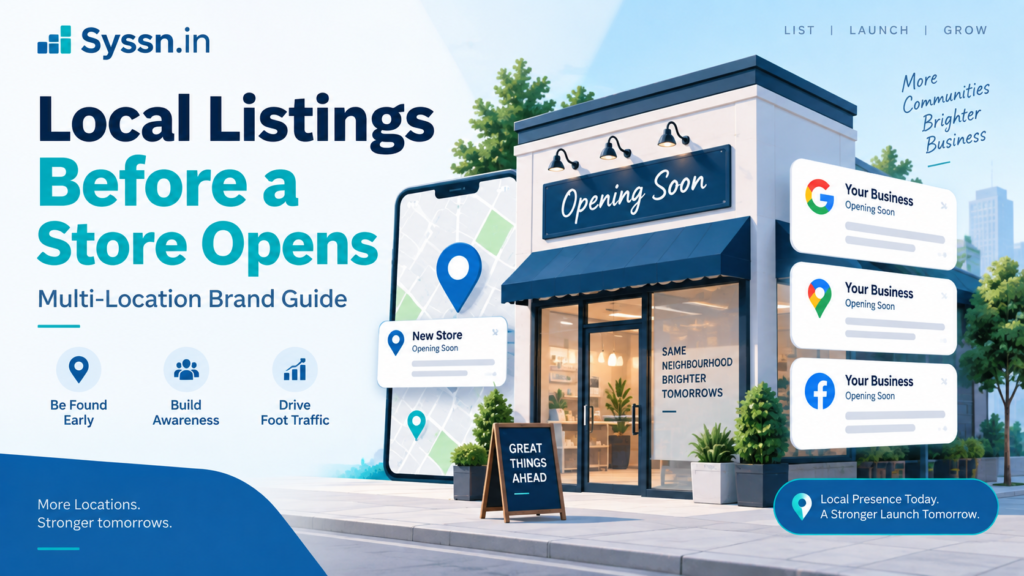
A new store can exist online before it exists for customers.
The address appears on a shopping center website. Someone notices the construction and adds the place to a map. Recruitment ads mention the neighborhood. A franchisee creates a Google profile because opening day is getting close.
Then marketing arrives and discovers three versions of the same location.
That is why local listings work should start well before the doors open.
For a multi-location brand, the safest approach is to create one approved location record, check whether profiles already exist, establish account ownership, and then publish the information gradually as the opening date becomes reliable.
Google lets an unopened business set a future opening date up to one year ahead. Once the profile is verified, it can appear 90 days before opening. Apple Business allows a location to be marked Opening Soon when its opening date is within six months.
The interesting part is that publishing early is not always the goal.
Publishing correctly is.
Key Takeaways
- Create one approved master record before distributing a new location.
- Check Google, Apple, Bing, and other platforms for existing profiles before creating new ones.
- Give every location a permanent internal store code.
- Google can display a verified future location 90 days before opening.
- Apple Business supports an Opening Soon status for dates up to six months away.
- Keep lower-priority directories on hold while the phone number, address, hours, or opening date could still change.
- For frequent openings, centralized listings software can reduce repetitive work and improve ownership controls.
For a broader explanation of how location data gets distributed and maintained, see Syssn’s guide to local listings management.
What Is Pre-Opening Local Listings Management?
Pre-opening local listings management is the work involved in preparing, verifying, publishing, and monitoring the online information for a physical location before customers can actually visit it.
For one location, this can be fairly simple.
You confirm the address, build the Google profile, add the Apple location, check the map pin, and make sure the phone works.
Now imagine doing it for 40 stores scheduled to open over six months.
Suddenly you need to know which locations are approved, which are still waiting for permits, which profiles are verified, who owns each account, which opening dates changed, and whether an enthusiastic local manager created another Google profile last Thursday.
The problem becomes less about entering data and more about controlling it.
That distinction appears throughout Syssn’s overview of business listing management services. Software can distribute location information, but somebody still needs to decide which version of that information is correct.
A Practical Pre-Opening Listings Timeline
There is no universal publishing schedule because every platform treats future locations differently.
Still, this is a useful operating model.
| Timing | Recommended work |
|---|---|
| 90+ days before opening | Finalize location identity, store code, address format, ownership and website page |
| 60-90 days before opening | Create Google Business Profile, start verification and prepare Apple Business |
| 30-60 days before opening | Review Apple, Bing and important industry directories; check for duplicates |
| 14-30 days before opening | Reconfirm phone, URL, categories, map pin, opening date and hours |
| Opening week | Verify open status, directions, phone routing, website link and special hours |
| First 30 days after opening | Fix mismatches, investigate duplicates and replace temporary information |
I would treat the first dates in that table as preparation dates, rather than deadlines to publish everywhere.
Construction schedules change.
Permits arrive late.
Telecom providers assign different numbers.
A soft opening becomes a public opening.
The earlier incorrect information spreads, the more places someone eventually has to correct it.
Build One Location Record Before You Build Listings
The most useful document in a store-opening listings project may be a spreadsheet that customers never see.
Before creating profiles, establish one approved record containing:
- Public business name
- Street address
- Suite or unit number
- Primary phone number
- Primary business category
- Secondary categories
- Location webpage URL
- Latitude and longitude
- Planned opening date
- Normal operating hours
- Opening-week or special hours
- Internal store code
- Profile owner
- Current launch status
Google’s guidelines say a business name should reflect the name used consistently in the real world, including signage and branding. Google also expects accurate address information.
See Google’s official Business Profile guidelines.
This sounds obvious until three internal systems disagree.
Operations says “Unit 14.”
The website says “Suite 14.”
The lease database says “#14.”
Which version gets distributed?
These small differences are much cheaper to settle before hundreds of publisher records exist.
Give Every Store a Permanent Code
Store codes are especially useful once several locations are moving through the process simultaneously.
Google requires a unique business or store code for each location in bulk-upload spreadsheets.
See Google’s guide to store codes.
Your own code does not need to be complicated.
Something such as:
TX-AUS-017
is usually more useful than:
New Store
The first tells your team which market and location it refers to. The second will become confusing roughly five minutes after somebody creates another “New Store.”
Use the same identifier in your listings system, CMS, analytics tools and internal location database where practical.
Search for Existing Listings Before Creating Anything
A new store may already have an online footprint.
Customers sometimes create map entries. Data providers import information. Franchisees create profiles. Previous tenants remain attached to an address.
Search by:
- Brand name + address
- Exact street address
- Phone number
- Shopping center or development name
- Previous business at the unit
Spend extra time on locations that are:
- Relocations
- Franchise operations
- Inside malls or airports
- Store-within-a-store concepts
- Taking over another retailer’s unit
- Moving only a short distance from an existing branch
Google specifically advises businesses not to create multiple profiles for the same physical location.
Duplicate prevention is boring right up until reviews, directions and customer activity start splitting between two profiles.
Then it becomes everybody’s problem.
Set Up Google Business Profile Before Opening
Google has a relatively clear process for unopened businesses.
You can enter an opening date as much as one year into the future. Once Google verifies the profile, the listing can begin appearing 90 days before that date.
Read Google’s official future-opening guidance.
During the pre-opening period, businesses can add information such as descriptions, posts and photos. Google restricts certain user contributions until the location actually opens.
This creates a useful window.
Customers may already know the store is coming because they have seen:
- Construction signs
- Recruitment ads
- Shopping-center announcements
- Social posts
- Local news
- A coming-soon page on the brand website
A controlled Google profile gives those searches somewhere accurate to land.
Start Verification Before the Final Week
Verification does not always go exactly the way you expect.
Google may require different verification methods depending on the business and profile.
That makes opening week a poor time to discover that your location still needs additional verification.
It also raises an ownership question that businesses sometimes overlook.
Who actually controls the profile?
Ideally, the brand or an approved corporate account should retain appropriate access. A new branch should not depend permanently on an employee’s personal login, an old agency account, or a temporary contractor email address.
Opening locations is already complicated enough without adding an account-recovery project.
Use Bulk Tools When Store Counts Increase
Google Business Profile Manager supports spreadsheet-based management for multiple locations.
See Google’s official bulk-upload documentation.
Google’s bulk-verification guidance also refers to feeds containing at least 10 eligible locations.
See Google’s bulk-verification guidance.
For a company opening stores regularly, I would build the workflow around:
- Permanent store codes
- Central account ownership
- Standard categories
- Location groups
- Approved upload templates
- Verification status
- Publication status
- Change history
The aim is simple: a new location should become another record moving through an established process, rather than a completely new marketing project every time.
Prepare Apple Business Before Launch
Apple gives businesses another useful future-location option.
When adding a location in Apple Business, you can choose Open or Opening Soon. If you select Opening Soon, Apple says the opening date cannot be more than six months away.
See Apple’s official location setup instructions.
Apple also lets organizations provide information including:
- Display name
- Category
- Phone
- Website
- Opening status
- Hours
- Brand
- Map position
Pay attention to coordinates.
Apple’s documentation says location coordinates should accurately identify the building rather than simply sitting on a nearby road or intersection.
See Apple’s guidance on location attributes and coordinates.
This deserves a manual check for stores inside malls, hospitals, campuses and large shopping developments.
An address can be technically correct while the map point is still unhelpful.
Do Not Forget Bing and Other Important Publishers
Google and Apple usually deserve the most attention, but they should not become the entire local listings strategy.
Prepare Bing and any directories that matter to your category, geography or customer base.
The temptation is to ask:
“How many directories can we publish to?”
A more useful question is:
“Which places could realistically send a customer to this store?”
The distinction becomes important when evaluating listings software.
A network containing 200 publishers sounds larger than one containing 100. That number tells you very little if most of the extra publishers are irrelevant to your market.
Best Local Listings Platforms for Multi-Location Store Openings
Listings software becomes much more useful when store launches are recurring rather than occasional.
If you are opening one or two locations a year, you may be able to manage Google, Apple, Bing, and a few important directories manually. Once you are coordinating dozens or hundreds of locations, the job changes. You need bulk updates, controlled access, duplicate monitoring, reporting, and a reliable way to move approved location data into multiple publishers.
Yext, Synup, Uberall, and Rio SEO all address that problem, although their products are built around slightly different operating models.
1. Yext
Best for: Large enterprises that need direct publisher integrations, detailed governance, and centralized control across hundreds or thousands of locations.
Yext is one of the more enterprise-focused platforms in this group. Its Listings product currently advertises more than 200 direct publisher integrations and says it manages data for more than 12 million locations. The network includes major services such as Google Business Profile, Apple Maps, Bing, Facebook, Yelp, Tripadvisor, and other search, map, social, and directory platforms.
For a brand opening stores regularly, the main advantage is the combination of distribution and governance. Location information can be maintained in Yext’s Knowledge Graph and then distributed to supported publishers. Teams can manage more than 50 listing fields, including categories, descriptions, photos, hours, URLs, and other location attributes. Yext also supports bulk changes across large location portfolios.
The platform includes role-based controls, approval workflows, audit trails, and tools for identifying listing errors. Its Listings Verifier compares publisher information against the business data stored in Yext and can identify problems such as inconsistent information, duplicate records, or publisher overwrites.
Those controls can become valuable during a large opening program. Corporate teams can maintain the approved source data while regional or local employees receive limited permissions for specific tasks.
Yext has also continued expanding its operational monitoring. Its 2026 releases added publisher-disruption monitoring, linked-account alerts for Google Business Profile and Facebook, and clearer classifications for issues that block synchronization.
For store openings, Yext can help with:
- Centralizing approved location records
- Updating many locations at once
- Distributing information across 200+ publishers
- Monitoring listing synchronization
- Controlling access by team or role
- Identifying duplicate or conflicting records
- Tracking listing impressions, calls, clicks, and direction requests
- Maintaining audit trails for enterprise teams
One point to check carefully is publisher eligibility. A headline network size does not mean every publisher applies to every country, industry, or location type. Yext’s own API documentation shows that available publishers can depend on subscriptions, supported countries, and entity types.
Pricing: Yext does not currently present a simple standard Listings price on its main product page. Enterprise buyers are directed toward a demo and commercial discussion.
Best fit: Yext deserves consideration when your company operates a large location network and needs strong corporate governance alongside broad publisher distribution.
2. Synup
Best for: Multi-location businesses and agencies that want listings management, bulk operations, automation, duplicate monitoring, and separate client or location workspaces.
Synup takes a slightly broader operations-oriented approach. Its current listings product supports syndication to Google Business Profile, Apple Maps, Bing, Facebook, Yellow Pages, and a wider network of publishers. Synup says its platform supports more than 100 location-data fields and can manage businesses ranging from individual storefronts to thousands of locations.
For a store-opening program, one useful feature is the distinction between saving location information and publishing it. Synup’s current documentation explains that teams can update a master location record and control when those changes are sent to publishers. This is useful when a future store exists internally but its public information is not ready for broad distribution.
The platform also includes bulk tools and automation. Synup says teams can segment multi-location programs by brand or region and run repeatable tasks across multiple locations. For an organization opening stores in launch waves, that can make it easier to separate locations that are still being prepared from those ready for publication.
Duplicate monitoring is another relevant part of the product. Synup continuously looks for possible duplicate records and presents candidates for review. Users can compare business name, address, and phone information, decide whether the record is actually a duplicate, and submit valid duplicates for suppression. The publisher ultimately determines whether the record is removed.
That distinction is worth understanding. Duplicate management is rarely a one-click deletion process because the listings platform does not control every external directory.
Synup also tracks listing health and connection problems. Its current Listings Overview can show which directories are synchronized, which need attention, where publisher connections have failed, and whether duplicates require review.
For store openings, Synup can help with:
- Managing a master location record
- Distributing data to major maps and directories
- Running bulk updates across many locations
- Organizing locations by brand or region
- Scheduling repeatable listings tasks
- Finding potential duplicate records
- Tracking publisher connection problems
- Monitoring clicks, calls, impressions, and direction requests
- Supporting agency and white-label workflows
The agency side can be relevant for franchise networks or businesses whose local presence is managed by an outside partner. Synup supports separate client workspaces and white-labeled reporting, while still allowing larger location groups to be managed centrally.
Pricing: Synup currently says pricing scales according to the number of locations and capabilities selected. Its current website also advertises a 14-day free trial for one location with no long-term contract required for that trial.
Best fit: Synup can make sense when you need multi-location listings controls but also want automation, agency workflows, location segmentation, and duplicate handling in the same system.
3. Uberall
Best for: Enterprise and international brands managing large location portfolios across multiple countries, business units, or location types.
Uberall’s Listings Management product is built specifically around multi-location businesses. The company currently states that it distributes business information across 150+ platforms, including Google, Apple Maps, Yelp, Bing, Facebook, Instagram, Waze, TomTom, voice assistants, and other local discovery services.
For new-store programs, bulk management is one of the more relevant capabilities. Uberall says teams can update locations through Excel uploads or APIs and apply changes across anything from tens to thousands of locations.
That can matter when location information originates somewhere else in the business. A national retailer may already maintain store addresses and operating information in an internal database. An API-based workflow can reduce the amount of manual re-entry needed before that information reaches listings platforms.
Uberall also focuses on data preparation before distribution. Its current materials describe processes for validating and formatting business data before sending it to publishers, including address normalization and map-position management.
The platform includes duplicate detection and verification tracking. Uberall says it can flag duplicate listings and track verification status, which can help corporate teams see whether a new location is actually ready rather than assuming every publisher accepted the record correctly.
Role-based permissions are also part of Uberall’s location-data management approach. Headquarters can maintain central control while providing local teams with access to specific information.
For store openings, Uberall can help with:
- Bulk location creation and updates
- Excel and API-based data management
- Distribution across 150+ platforms
- Address and location-data validation
- Map-position management
- Duplicate detection
- Verification-status monitoring
- Controlled access for local teams
- Managing international location portfolios
- Connecting listings with reviews, social publishing, and local pages
Its wider product suite also includes reviews, local social publishing, local pages, analytics, and AI-search visibility tools. That makes Uberall more relevant when listings are part of a broader multi-location marketing program rather than a standalone citation-management task.
Pricing: Uberall currently uses packaged plans such as Show Up, Stand Out, and Connect, with Listings included in its location-marketing plans. Public pages describe the packages, while buyers are directed to request pricing for commercial terms.
Best fit: Uberall is most relevant for larger brands that need listings operations across many locations, especially when multiple countries, local teams, and additional local marketing functions are involved.
4. Rio SEO

Best for: Enterprise brands that want local listings closely connected with local landing pages, store locators, reviews, and centralized governance.
Rio SEO approaches listings as part of a wider local experience platform. Its Local Listings product distributes business information to hundreds of directories, applications, maps, and other platforms, including direct connections with Google, Apple, Yelp, Bing, and Facebook.
One difference is the amount of managed support built into the product positioning. Rio SEO says its team helps claim, verify, and update listings on behalf of customers while keeping the listings in the brand’s name. It also addresses rogue listings, duplicate records, and ownership conflicts.
That can be useful for a multi-location company inheriting a messy location portfolio. A store-opening project does not always begin with clean data. Existing profiles may have been created by franchisees, previous agencies, former store managers, or directory data feeds.
Rio SEO combines distribution with centralized controls. Its platform materials describe a governance layer that can require corporate approval before certain content is published. Rio SEO also discusses role-based access for organizations that need corporate teams to protect core business information while allowing local managers to make selected updates.
For franchise networks, that ownership model is particularly relevant. Rio SEO recommends that brands retain ownership of franchise listings so profiles do not become inaccessible when local managers or franchise operators change.
The other notable part of Rio SEO is its Local Pages product. Brands can pair listings with individual landing pages and store locators, including localized content, schema markup, multilingual pages, and pages for products, services, or events.
For a store launch, this means the listings and website experience can be planned together. A new Google or Apple profile can point directly to a location-specific page instead of a generic corporate homepage.
For store openings, Rio SEO can help with:
- Claiming and verifying listings
- Publishing location information to hundreds of platforms
- Resolving duplicate and rogue listings
- Managing ownership conflicts
- Applying corporate governance controls
- Giving local teams controlled permissions
- Building local landing pages
- Creating store and service locators
- Managing reviews alongside listings
- Supporting international enterprise location programs
Rio SEO’s positioning is clearly enterprise-oriented. A small business opening three stores may not need the wider platform and managed-service structure.
Pricing: Rio SEO does not publish standardized Local Listings rates on its main product pages. Prospective customers are directed to request a demonstration and discuss requirements.
Best fit: Rio SEO is particularly relevant when location listings, local website pages, franchise governance, and enterprise support need to operate as one program.
Yext vs Synup vs Uberall vs Rio SEO for New Store Openings
These four products solve many of the same problems, so the differences become clearer when you look at how the organization operates.
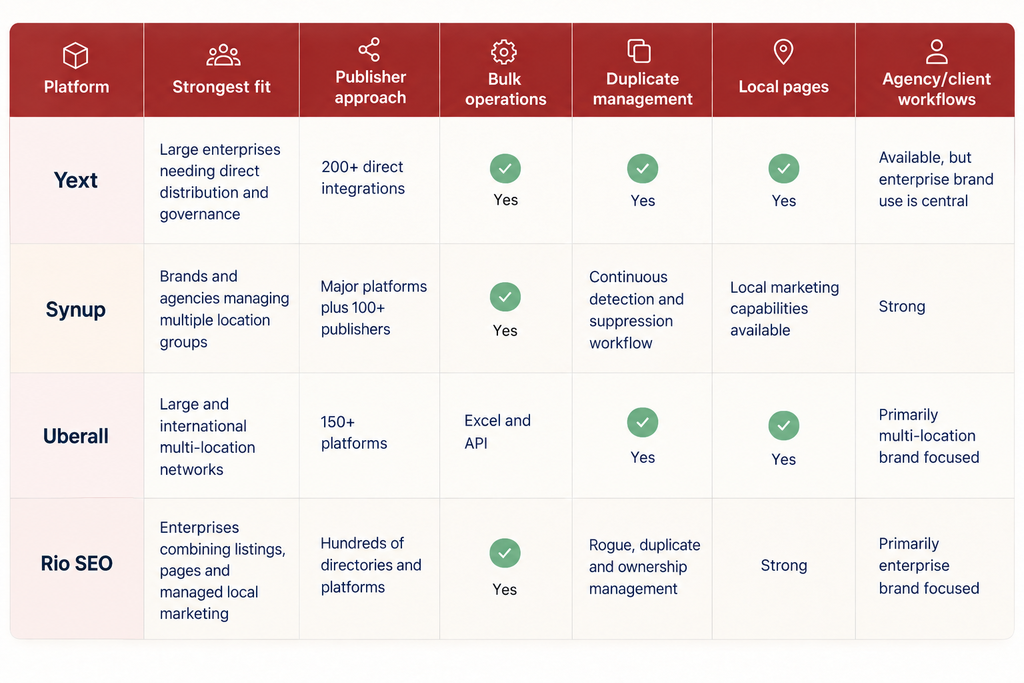
I would not choose between these products using publisher count alone.
For a store-opening program, I would pay closer attention to six practical questions:
- Can you load 50 new locations without entering each one manually?
- Can you keep a planned store inside the system without publishing it prematurely?
- Can corporate teams control which fields local employees are allowed to change?
- Can the platform show which listings failed, duplicated, or need verification?
- Can your brand retain control of the accounts if you change agencies or software providers?
- Can your internal location database feed the listings platform through an API or reliable bulk process?
Those questions tell you far more about how the platform will behave during an actual rollout than a directory-count comparison.
A company opening two stores this year and a company opening 150 stores across six countries technically need the same thing: accurate public location information.
Operationally, they have almost nothing in common.Connect Every Listing to a Useful Store Page
A strange thing happens when brands carefully build map profiles and then link every one of them to the same corporate homepage.
The customer discovers a local store and immediately loses the local context.
Create a location-specific page where possible.
It should answer basic questions quickly:
- Where is the store?
- When will it open?
- What are its normal hours?
- What will it offer?
- How can someone contact it?
- Is parking available?
- Are appointments required?
- Are there special launch details?
Your website can then become part of the internal validation process.
If Google says October 12 but your location page says October 19, somebody has a problem to investigate.
Treat Opening-Week Hours Separately
Opening week is often unusual.
A restaurant may run limited soft-opening hours.
A clinic may phase appointments in gradually.
A retailer may open early for an event.
Do not turn a temporary launch schedule into the permanent hours customers see for the next six months.
Keep standard recurring hours separate from date-specific exceptions wherever the platform supports special hours.
Then test the information with a very simple question:
If somebody followed this listing right now, would the doors actually be open?
What to Check During the Final 14 Days
The last two weeks are a good time to stop distributing and start checking.
Review:
- Opening date
- Business name
- Full address
- Suite number
- Map position
- Directions
- Phone routing
- Store-page URL
- Primary category
- Secondary categories
- Standard hours
- Opening-week hours
- Existing duplicate profiles
- Google verification status
- Apple opening status
- Account ownership
Call the phone number.
Open the webpage from your phone.
Request directions.
Search the address manually.
Do the ordinary things a customer will do.
A dashboard showing “published” does not necessarily mean the customer experience is correct.
Common Pre-Opening Listings Mistakes
Most problems begin with coordination rather than technology.
Typical mistakes include:
- Publishing an opening date before operations confirms it
- Creating a second profile instead of claiming an existing one
- Allowing franchisees and corporate teams to create profiles independently
- Using inconsistent suite numbers
- Linking to the corporate homepage instead of the store page
- Assigning ownership to temporary accounts
- Leaving soft-opening hours active
- Placing map pins incorrectly
- Leaving the previous tenant attached to the address
- Forgetting to update listings after a delayed launch
There is another mistake that is harder to spot: treating maximum distribution as the objective.
Sometimes waiting is the better decision.
A correct record on five important services is more useful than an uncertain record spread across 150.
How to Organize Store-Opening Ownership
Listings management works much better when responsibilities are explicit.
Operations should confirm:
- Address
- Access to premises
- Signage
- Phone readiness
- Customer-facing hours
- Opening date
Marketing should manage:
- Master public location record
- Location page
- Categories
- Photos
- Publisher accounts
- Listings platform
- Publication schedule
Store or regional teams should validate:
- Entrance location
- Parking
- Directions
- Local phone routing
- Opening-week conditions
Software sits underneath that process as the distribution layer.
It cannot decide whether the opening date your team entered is actually true.
How to Choose a Listings Platform for Store Openings
Start with your operating process rather than a vendor feature table.
Ask five questions.
Can locations enter the system in bulk?
If you open 40 locations every quarter, creating them one by one becomes unnecessary work.
Look for CSV imports, APIs or integrations with whatever system already contains your approved store data.
Can locations be grouped by launch status?
Useful groups could include:
- Planned
- Data pending
- Ready for verification
- Opening within 30 days
- Live
- Delayed
Regional, franchise and market groupings can also help.
How are duplicates handled?
Ask what the platform actually does after detecting a duplicate.
Does it suppress the record automatically?
Does someone review it?
Does the publisher need to approve the request?
The word “duplicate management” can describe very different processes.
Who owns the listings?
This becomes especially important when an agency or technology provider is involved.
Know:
- Who controls Google
- Who controls Apple
- Who controls Bing
- What credentials are used
- What happens when the contract ends
- Whether data can be exported
What will the system really cost at your location count?
A small location package and a 1,000-store enterprise deployment are completely different purchases.
For current pricing structures and examples, see Syssn’s business listing management cost guide.
Frequently Asked Questions
How early should you prepare local listings for a new store?
Starting the core data work around 60 to 90 days before opening is reasonable for many businesses. Google can show a verified future profile 90 days before opening, while Apple allows Opening Soon dates up to six months ahead.
Can a business appear on Google before it opens?
Yes. Google says a verified Business Profile with a future opening date can appear 90 days before opening.
Should every directory be published before opening?
No. Prioritize major customer-facing platforms and relevant industry directories. Wider distribution can wait until core information is stable.
What information should be finalized first?
At minimum, confirm the business name, address, suite, phone, categories, website URL, coordinates, opening date and customer-facing hours.
What happens if the opening date changes?
Update the approved source record first. Then update every public platform that has already received the old date, beginning with the services customers are most likely to use.
Final Thoughts
The closer I look at store-opening listings, the less it seems like an SEO problem.
It is an information-management problem that happens to become visible through search.
A company may have excellent software and still publish the wrong opening date. It may have hundreds of directory connections and still send customers to the wrong entrance. It may automate every update and still lose access because nobody decided who should own the Google account.
So the useful question before publishing a new location may not be:
“How quickly can we get this everywhere?”
A better question is:
“Are we confident enough in this information to make it public?”
For a multi-location brand opening stores every month, that small change in thinking can prevent a surprising amount of cleanup later.