Responsive vs Loopio vs Inventive AI: Which Is Best?

RFP software has become harder to compare than it used to be.
A few years ago, the questions were fairly straightforward. Does the platform have a content library? Can it import an Excel questionnaire? Can subject-matter experts review answers? Does it connect to Salesforce?
Now almost every serious RFP platform talks about AI, automatic drafting, connected knowledge, content governance, security questionnaires, and workflow automation.
So the more useful question is no longer, “Which platform has AI?”
It is: What work does the AI actually remove from your team?
That question makes the Responsive vs Loopio vs Inventive AI comparison more useful.
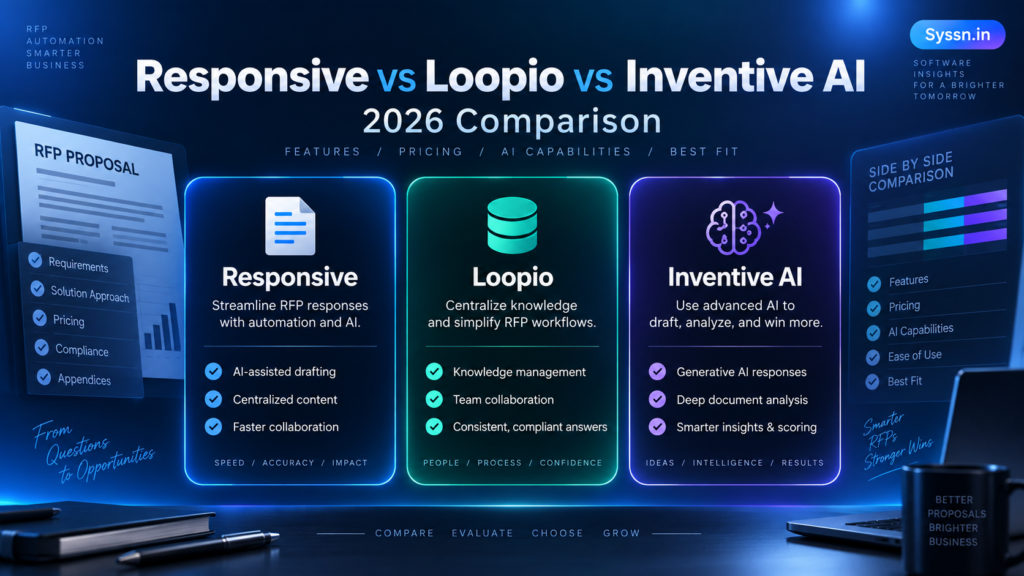
Responsive fits organizations that need broad response management, enterprise controls, integrations, reporting, and complex workflows.
Loopio is built around structured proposal management, reusable content, collaboration, and a mature answer-library model.
Inventive AI takes a more AI-native approach, with connected knowledge, contextual drafting, citations, confidence signals, conflict detection, and automated content governance.
All three can handle RFPs, RFIs, DDQs, security questionnaires, and reusable company information. The day-to-day experience can still be quite different.
If you are building a larger shortlist, our guide to the best RFP software in 2026 covers several additional products.
Responsive vs Loopio vs Inventive AI at a glance
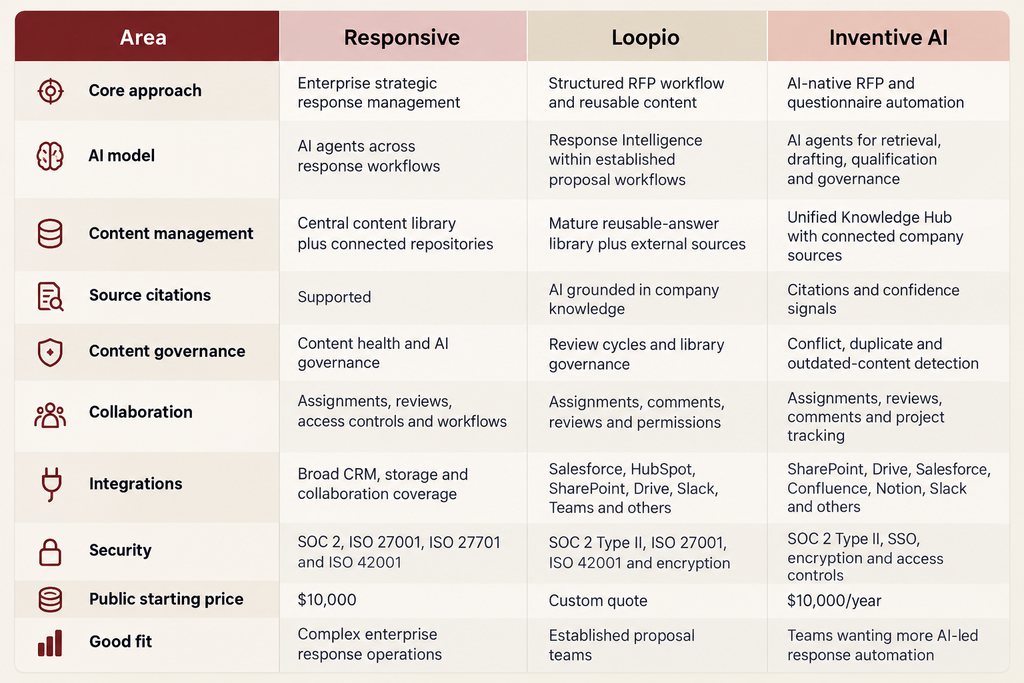
Responsive currently lists its Emerging Edition from $10,000, with Growth and Enterprise pricing requiring a sales conversation. Its plans include unlimited response projects, while pricing combines a platform fee, user licenses, and possible services or add-ons.
Loopio does not publish a dollar figure. It offers Foundations, Enhanced, and Enterprise plans, with Foundations beginning at 10 seats and including unlimited projects and library entries.
Inventive AI says its plans start at $10,000 per year. Its pricing uses a fixed platform fee plus RFP and security-questionnaire usage, with unlimited users and all features included in one plan.
Pricing pages change. Before buying, confirm implementation charges, user limits, AI usage, integrations, support, onboarding, contract length, and expected costs as your RFP volume grows.
What is RFP response management software?
RFP response management software helps teams organize company knowledge, find previously approved information, draft answers, assign questions, manage reviews, and complete RFPs, RFIs, DDQs, proposals, and security questionnaires.
The older model was mostly built around a content library.
You stored hundreds or thousands of approved answers. A new RFP arrived. The proposal manager imported it, searched the library, reused suitable answers, and sent everything else to subject-matter experts.
That still works.
But it creates an interesting operational problem.
What happens when the answer in the RFP library says one thing, the product documentation says another, and the security team changed its policy three months ago?
This is where newer AI systems are becoming more useful.
Modern RFP platforms can increasingly:
- Extract questions and requirements from uploaded files.
- Search documents and connected company systems.
- Draft responses using internal information.
- Attach supporting sources.
- Identify missing information.
- Flag conflicting or outdated content.
- Assign questions to appropriate contributors.
- Run response reviews.
- Help with bid qualification.
- Export answers into customer documents.
The real difference between products is how much work remains between importing the RFP and having an answer that someone is comfortable approving.
We explored the accuracy problem separately in our guide to how AI RFP software prevents hallucinations and produces traceable answers.
How does Responsive work?
Responsive, formerly RFPIO, has developed beyond a traditional proposal-management product into what it calls a Strategic Response Management platform.
Its model makes sense when responding to customers involves several departments.
Think about a large software company completing an enterprise RFP.
Sales owns the opportunity. A proposal manager runs the project. Security handles controls and data protection. Legal reviews contractual answers. Product covers functionality. Finance checks commercial information. Sales engineering handles technical requirements.
At that point, the problem is partly writing and partly coordination.
Responsive combines centralized content, projects, permissions, integrations, reporting, AI-assisted responses, and enterprise administration around that process.
Its newer AI agents can analyze complete RFPs, extract requirements, help with qualification, retrieve approved information, draft responses with citations, coordinate review work, and run quality checks.
Where Responsive stands out
Responsive has considerable breadth.
That becomes useful when RFP work sits inside a much larger sales and governance process rather than functioning as an isolated proposal activity.
The platform supports centralized content, access controls, reporting, CRM-driven workflows, integrations, enterprise hosting options, and response projects. Its higher editions add more advanced controls and deployment options.
The security program is also built for enterprise procurement. Responsive lists SOC 2 compliance together with ISO 27001, ISO 27701, and ISO 42001 certifications.
What should you test?
Breadth has a cost: there is more to configure and more for users to learn.
That does not make complexity inherently bad. A multinational company may genuinely need detailed permissions, multiple workflows, CRM integrations, reporting structures, and governance controls.
A 20-person SaaS company may not.
During a proof of concept, ask occasional contributors to use the platform as well as your proposal managers. The person who works inside RFP software every day will tolerate more process than an engineer who gets asked to answer five questions once a month.
That usability difference is easy to miss during a vendor demo.
How does Loopio work?
Loopio starts from a slightly different idea: good proposal teams build valuable response knowledge over time.
The answer you created for last month’s RFP may be useful again next week. The challenge is making sure people can find it, know whether it is approved, and update it when something changes.
That is the basis of Loopio’s mature content-library model.
Teams maintain approved response content, create projects, import questionnaires, search existing answers, assign questions to contributors, manage reviews, and reuse vetted information across future RFPs.
AI now sits inside that established workflow.
Loopio’s Response Intelligence helps interpret incoming questions and retrieve relevant content. SmartScan can turn Word, PDF, and Excel files into structured response projects, while Automated Answers helps populate first drafts.
Where Loopio stands out
Loopio is easy to understand if your organization already has a mature proposal function.
Suppose your team has spent several years building approved answers for implementation, security, support, product capabilities, company information, sustainability, privacy, and procurement questions.
You probably do not want to throw that structure away.
You want better retrieval, better governance, faster projects, and less repetitive work.
Loopio fits that model well.
It can also connect with outside systems. The company says the platform can access around 80 sources, including SharePoint and Google Drive, while integrations cover systems such as Salesforce, HubSpot, Slack, Microsoft Teams, Microsoft Copilot, Glean, and Confluence.
What should you test?
Use messy documents.
Clean demo RFPs tell you almost nothing.
Take a real Excel workbook with several tabs, merged cells, instructions, dropdowns, repeated sections, and oddly placed answer fields. Add a Word document with tables and formatting requirements.
Loopio itself notes that SmartScan works best with shorter, consistently formatted documents and recommends reviewing AI-detected questions after import.
That is useful advice for evaluating any RFP platform.
Your worst customer file is probably a better test than the vendor’s best demonstration file.
Loopio’s security documentation lists annual SOC 2 Type II audits, ISO 27001, ISO 42001, TLS encryption in transit, and AES-256 encryption at rest.
How does Inventive AI work?
Inventive AI approaches the problem from the AI side rather than beginning with a traditional response library.
That difference becomes clearer when you think about where company information actually lives.
Your security policies may be in SharePoint. Product documentation may be in Confluence. Implementation material may sit in Google Drive. Opportunity information may be in Salesforce. Previous proposals may be stored somewhere else entirely.
A conventional approach asks the proposal team to move useful answers into a separate RFP library and keep that library current.
Inventive AI is designed to work more directly with connected knowledge.
Its Knowledge Hub can connect with systems such as SharePoint, Google Drive, Notion, Confluence, Salesforce, and Slack. The platform can still use conventional Q&A content, but its main model centers on retrieving relevant information, drafting responses, citing sources, and keeping connected knowledge current. See Inventive AI’s RFP response workflow
Where Inventive AI stands out
The interesting part of Inventive AI is not simply that it generates answers.
Plenty of software can do that now.
Its product puts more attention on the steps around generation: retrieving supporting information, attaching citations, showing confidence signals, identifying conflicting information, detecting stale content, and flagging gaps rather than quietly filling them.
That distinction becomes especially useful for technical or security-heavy responses.
An answer saying your software “supports encryption” is easy to generate.
Knowing which security document supports the claim, whether the document is current, and whether another internal file contradicts it is harder.
Inventive describes its response agents as generating drafts from approved content with source citations and confidence scores. Its content-governance agents are designed to flag stale or conflicting information.
What should you test?
AI-native products should be tested on uncertainty, not only easy questions.
Give the system:
- Two documents that disagree.
- A recently updated product specification.
- An old RFP answer that is no longer correct.
- A question with no supporting evidence.
- A question requiring information from several sources.
- A security claim that must be verified carefully.
Then see what happens.
Does the system identify the conflict? Does it show where the answer came from? Does it admit when supporting information is unavailable?
Those cases tell you much more about an AI response product than asking it 50 questions whose answers already appear word-for-word in a source document.
Inventive AI lists SOC 2 Type II compliance along with SSO, access controls, encryption, audit logs, and related enterprise security controls.
Responsive vs Loopio vs Inventive AI: How does the AI differ?
The old distinction between “traditional RFP software” and “AI RFP software” is becoming less useful.
Responsive and Loopio now have substantial AI capabilities. Inventive AI has built much of its product around AI agents from the start.
A better comparison looks at what the AI does.
Responsive AI
Responsive uses AI across several parts of the response cycle.
Its agents can analyze RFP documents, identify requirements, support go/no-go analysis, retrieve approved material, produce grounded drafts with citations, coordinate SME reviews, and apply quality checks.
This sits inside a broader enterprise response-management system.
Loopio AI
Loopio combines AI with its established library and project model.
Response Intelligence interprets questions and retrieves appropriate vetted material. SmartScan assists with document intake, while Automated Answers helps create first drafts.
The result still feels connected to the proposal team’s structured content process.
Inventive AI
Inventive AI puts agents at the center of retrieval, drafting, qualification, review, and content governance.
Its response agents generate answers from connected knowledge, while governance functions look for stale or contradictory information. Citations and confidence signals help reviewers examine the evidence behind generated responses.
The useful distinction, then, is less about whether AI exists and more about how dependent the workflow remains on a manually maintained response library.
Which platform handles content management better?
This question sounds simple until you ask what “content management” means to your team.
For some proposal departments, a carefully curated Q&A library is an asset. Hundreds of answers have owners, review dates, approved wording, tags, and established processes.
For another company, creating a second copy of information that already exists in SharePoint, Confluence, and Google Drive feels unnecessary.
Responsive combines a centralized content model with external repositories and enterprise governance.
Loopio has a particularly established library-centered approach, with approved reusable content, review processes, and retrieval through Response Intelligence.
Inventive AI puts more emphasis on synchronizing existing knowledge systems and automatically identifying content problems.
None is automatically better.
The question is how much library maintenance your team actually wants to own.
Our guide to keeping AI RFP knowledge bases current and preventing duplicate answers goes further into this problem.
Which is better for collaboration?
All three support collaborative RFP work.
The differences become clearer when you examine the complexity of the organization.
Responsive is built for multi-team response operations with assignments, access controls, workflows, reporting, and enterprise administration.
Loopio supports assignments, comments, reviews, permissions, business units in higher plans, and structured proposal projects.
Inventive AI provides contributor assignments, review workflows, comments, response tracking, and AI-assisted routing around its response process.
For a smaller team, the important question may simply be:
“Can I get a technical expert to answer three questions without training them for two hours?”
For an enterprise, the questions become more detailed:
- Can business units be separated?
- Can confidential projects be restricted?
- Can legal approvals be required?
- Can external contributors participate safely?
- Is SSO supported?
- Can administrators see audit history?
- What happens when an employee leaves?
- Can permissions follow the company’s identity system?
We cover these questions in more detail in our guide to AI RFP software roles, permissions, and approval workflows.
Which platform has better integrations?
Responsive advertises broad integration coverage across CRM, storage, communication, and business systems.
Loopio connects with major tools used by proposal teams, including Salesforce, HubSpot, SharePoint, Google Drive, Slack, Teams, Confluence, Copilot, and Glean.
Inventive AI connects its Knowledge Hub with systems including SharePoint, Google Drive, Salesforce, Confluence, Notion, and Slack.
But counting logos on an integrations page is rarely useful.
Ask what each integration actually does.
Does the Salesforce connection create projects automatically?
Does SharePoint content remain synchronized?
Are source permissions respected?
Can contributors answer inside Slack or Teams?
Does the integration simply import documents, or can it maintain an ongoing connection?
Two products can both claim a “SharePoint integration” while solving very different problems.
Responsive vs Loopio vs Inventive AI pricing
The public pricing picture in September 2026 looks like this:
| Platform | Published information | Pricing structure |
|---|---|---|
| Responsive | Emerging starts at $10,000 | Platform, users, edition and possible add-ons/services |
| Loopio | Dollar pricing not published | Foundations, Enhanced and Enterprise custom quotes |
| Inventive AI | Plans start at $10,000/year | Fixed platform fee plus RFP/SecQ usage, unlimited users |
Responsive’s pricing can increase based on edition, user licensing, services, integrations, controls, and other requirements.
Loopio’s Foundations plan includes 10 seats, unlimited projects and unlimited library entries. Enhanced adds features including confidential projects and multi-step reviews, while Enterprise adds separate business units, sandboxes and custom seat counts.
Inventive AI says all features and integrations are included, with unlimited users and usage-based charges tied to RFP and security-questionnaire volume.
Do not compare these products using the first number a salesperson gives you.
Build a three-year model.
Include:
- Platform fees.
- User or seat charges.
- RFP and questionnaire usage.
- AI consumption.
- Implementation.
- Onboarding.
- Support.
- Premium integrations.
- Additional business units.
- SSO or security requirements.
- Expected growth.
A cheaper year-one quote can become the more expensive system once adoption expands.
Responsive vs Loopio: What’s the difference?
Responsive and Loopio both have established RFP-management foundations, but their emphasis is different.
Responsive has expanded into broader enterprise response operations. It combines RFP management with extensive workflow controls, integrations, AI agents, analytics, governance, and enterprise deployment options.
Loopio retains a stronger proposal-team identity. Its content library, structured projects, collaboration model, and Response Intelligence fit teams that have invested heavily in reusable approved content.
The decision often comes down to the scale and structure of your response operation.
Loopio vs Inventive AI: What’s the difference?
Loopio and Inventive AI reveal two different ideas about how proposal knowledge should work.
Loopio assumes there is significant value in building and governing a reusable answer library.
Inventive AI assumes more knowledge can remain inside the systems where your company already maintains it.
Neither assumption is always correct.
A heavily regulated proposal department may want tightly approved wording and scheduled content reviews.
A fast-moving software company may dislike copying information between its product documentation and its RFP platform every time something changes.
The right architecture depends partly on how your company creates and maintains knowledge before an RFP ever arrives.
For more options around Loopio, see our comparison of Loopio alternatives in 2026.
Responsive vs Inventive AI: What’s the difference?
Responsive brings a wider set of enterprise response-management capabilities developed around complex proposal organizations.
Inventive AI concentrates more heavily on AI-led retrieval, drafting, citations, content governance, qualification, and connected knowledge.
A company with detailed reporting requirements, complex permissions, multiple regions, and established proposal administration may value Responsive’s breadth.
A team trying to reduce manual answer-library work may be more interested in Inventive’s connected-knowledge approach.
Testing both on the same RFP will reveal more than comparing feature pages.
How should you choose between Responsive, Loopio, and Inventive AI?
I would start with your own process rather than a vendor checklist.
Take one recently completed RFP and reconstruct what actually happened.
Who received it?
Who decided whether to bid?
Who prepared the first draft?
Where did people search for answers?
How many questions needed an SME?
How many answers were rewritten?
How many Slack messages, emails, spreadsheets, and meetings were needed?
Where did the process slow down?
Once you understand that, evaluate software against those problems.
1. Find out where your trusted information lives
If your company depends heavily on SharePoint, Drive, Confluence, Notion, Salesforce, or another source, test how each platform accesses that information.
Do not settle for “yes, we integrate with it.”
Ask to see the integration working.
2. Measure how much maintenance the system creates
Someone has to keep RFP information accurate.
Find out whether that means manually maintaining thousands of library entries or whether some information can remain connected to its original source.
3. Map your approval process
List every person who may review security, legal, product, finance, technical, or commercial answers.
Then reproduce that workflow during the trial.
4. Measure AI editing
Take 100 generated answers and classify them:
- Approved without changes.
- Minor editing.
- Major editing.
- Completely rewritten.
- Unsupported or incorrect.
That gives you a much better AI metric than asking which vendor says it has the “strongest” model.
5. Test source verification
For security, compliance, legal, architecture, pricing, and product claims, reviewers should be able to determine where information came from.
6. Introduce contradictions deliberately
Give the platforms two sources containing different information.
See whether the conflict becomes visible to the reviewer.
7. Test your ugliest documents
Use difficult Excel files, Word documents, PDFs, portal questionnaires, and security assessments.
You are buying software for the files customers actually send you, not the files that look good in a demonstration.
What about DDQs and security questionnaires?
The boundaries between proposal software, DDQ software, and security questionnaire software are becoming less distinct.
An enterprise procurement request may contain commercial requirements, security questions, implementation details, company information, privacy requirements, product capabilities, and legal questions in the same document.
Responsive, Loopio, and Inventive AI all operate across parts of these workflows.
If due diligence is a major part of your workload, our guide to DDQ automation software explains the differences between DDQ, RFP, and security-questionnaire workflows.
Frequently asked questions
Which is the best RFP software: Responsive, Loopio, or Inventive AI?
There is no universal winner.
Responsive fits complex enterprise response operations that need extensive controls, integrations, reporting, and workflow management.
Loopio fits established proposal organizations that place significant value on structured reusable content and formal project workflows.
Inventive AI fits teams interested in connected knowledge, AI-generated responses, citations, conflict detection, and reducing manual content maintenance.
Your real RFPs should decide the shortlist.
Which has the strongest AI?
All three now have substantial AI capabilities.
Responsive uses AI agents across analysis, qualification, retrieval, drafting, review, and other response tasks.
Loopio uses Response Intelligence, SmartScan, Automated Answers, and related AI functions inside its content and project model.
Inventive AI uses agents for response generation, knowledge retrieval, qualification, review, and content governance.
Instead of ranking them by feature names, compare how much editing their answers require on the same set of difficult questions.
Can all three handle security questionnaires?
Yes. Each vendor supports security or due-diligence response use cases.
You should still test your own questionnaires because document formats, answer structures, portals, approval requirements, and technical content vary considerably between companies.
Which is better for enterprise teams?
All three sell to enterprise customers.
Responsive has particularly extensive response-management controls and deployment options. Loopio offers Enterprise capabilities including separate business units and custom seat counts. Inventive AI combines AI-native response functions with enterprise security and access controls.
The right fit depends on the administration and governance your organization actually requires.
Does AI RFP software replace proposal managers?
No.
AI can reduce searching, copying, first-draft writing, question routing, and repetitive checking.
Someone still has to understand the customer’s requirements, decide whether to pursue the opportunity, verify important claims, shape the response, coordinate contributors, and approve the final submission.
The interesting change is where proposal professionals spend their time when repetitive work decreases.
Which product is easiest to price?
Responsive and Inventive AI currently publish starting figures.
Responsive starts its Emerging Edition at $10,000. Inventive AI says plans start at $10,000 per year. Loopio requires a quote.
That still does not make either one automatically cheaper because the pricing structures are different.
Final comparison
There is something slightly strange about modern RFP software.
For years, the industry tried to create better libraries.
Store more answers. Organize them better. Search them faster. Review them more regularly.
AI has introduced another possibility: perhaps the long-term goal is not to maintain the biggest possible RFP library. Perhaps it is to make the company’s existing knowledge easier to find, verify, adapt, and approve when someone needs it.
Responsive, Loopio, and Inventive AI sit at different points in that shift.
Responsive gives complex organizations a broad response-management environment with AI, governance, integrations, reporting, and enterprise workflow controls.
Loopio builds on a mature model of structured proposal projects and carefully managed reusable content, adding AI to make that process faster.
Inventive AI starts closer to connected company knowledge and AI agents, with a stronger focus on citations, confidence, content conflicts, and reducing manual knowledge maintenance.
The most useful evaluation is therefore not a feature-counting exercise.
Give all three platforms the same RFP.
Connect the same sources.
Invite the same contributors.
Introduce the same outdated document.
Include the same conflicting answer.
Then measure setup time, draft quality, editing effort, source traceability, document handling, contributor experience, administration, and total cost.
You may discover that the most important difference between these platforms is not how much each one can do.
It is how much work your team still has to do after the software has done its part.