
What Roles, Permissions, and Approval Workflows Does AI RFP Software Support?

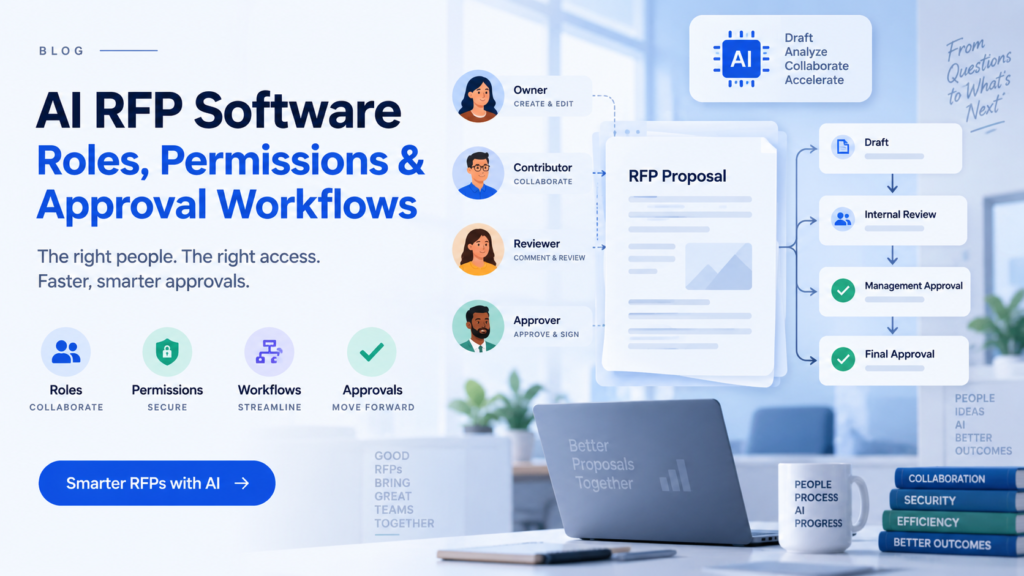
A proposal can start with one person and become a group project surprisingly quickly.
Sales owns the opportunity. A proposal manager coordinates the response. Security answers questions about controls. Legal checks contractual language. Finance reviews pricing. A technical specialist explains the architecture. Somewhere near the deadline, an executive may still need to approve the final submission.
AI can help draft the answers, but it does not remove this organisational problem. In some ways, faster drafting makes the problem more obvious. If ten people can work on a proposal at once, who should be allowed to change what?
That is where roles, permissions, and approval workflows become important.
Most AI RFP software supports separate access levels for administrators, proposal managers, contributors, subject matter experts, reviewers, approvers, and viewers. More advanced platforms can also restrict access to particular projects, knowledge sources, business units, or sections of an RFP.
The basic idea is simple: people should have enough access to do their work without automatically receiving permission to change everything.

What user roles are common in AI RFP software?
There is rarely one universal set of roles because proposal teams work differently.
A small software company may have one sales engineer doing most of the response. A large enterprise could involve dozens of contributors spread across sales, security, legal, finance, product, and regional teams.
Still, several roles appear frequently.
| Role | Typical responsibility |
|---|---|
| Administrator | Manages users, integrations, security settings, and system configuration |
| Proposal manager | Creates projects, assigns work, tracks progress, and coordinates the response |
| Contributor or SME | Drafts, verifies, or updates assigned answers |
| Reviewer | Checks content for accuracy, compliance, wording, or technical correctness |
| Approver | Provides formal approval before content moves forward |
| Viewer | Reads proposal content without editing it |
The interesting part is what happens below these broad labels.
A security specialist, for example, may need access to cybersecurity questions but have no reason to see commercial pricing. A finance leader may need to approve a pricing schedule without being able to modify security documentation.
This is why many RFP platforms go beyond simple “editor” and “viewer” permissions.
They may allow teams to assign individual questions, sections, or categories to specific people. Loopio, for example, has publicly recommended evaluating tools based on whether teams can assign individual questions and send review or approval requests to SMEs, compliance teams, and legal reviewers.
That sounds like a small feature until you have a 300-question RFP and twelve contributors.
At that point, precise assignments are less about administration and more about keeping the proposal understandable.
What permissions should AI RFP software provide?
Roles tell the software broadly who someone is.
Permissions decide what that person can actually do.
Depending on the platform, permissions may control whether someone can:
- Create or delete RFP projects
- View particular projects or business units
- Edit assigned questions
- Comment without changing the final response
- Upload source documents
- Access restricted company knowledge
- Modify knowledge-base answers
- Approve published answers
- Export completed proposals
- Invite or remove users
- Manage integrations
- Change organisation-level security settings
The knowledge base is where these distinctions become particularly important.
Consider a standard security answer about SOC 2 compliance.
Sales may need to find that response and include it in an RFP. That does not necessarily mean the salesperson should be allowed to rewrite the approved answer.
Security might own the source content. Sales can reuse it. A security reviewer can update it when necessary. Everyone else sees the approved version.
It is a fairly ordinary permission rule, but it solves a common problem: an innocent edit made during one proposal quietly becoming the company’s standard answer for every future proposal.
AI makes this question even more important.
If an AI system generates responses using your internal knowledge, you need to think about whether access to that knowledge should follow the same restrictions as access to the original documents.
Should someone who cannot open a confidential finance document be able to ask the AI questions about it?
A well-designed enterprise system should give organisations a clear answer to questions like that.
How do RFP approval workflows work?
Permissions control access. Approval workflows control movement.
A draft answer may begin with a proposal writer and then travel through several people before anyone considers it final.
A basic workflow could look like this:
Proposal writer → subject matter expert → legal reviewer → proposal manager → final approver
But real proposals rarely move in one neat straight line.
A technical answer might need engineering approval.
A question about insurance could go to legal or risk.
A discount request could require sales leadership.
A data-processing question may need both security and privacy review.
The useful systems recognise this.
Instead of forcing the entire proposal through one approval chain, configurable RFP platforms can route different sections to different reviewers.
This raises another useful question: what exactly counts as “approved”?
Suppose legal approves an answer on Monday. Someone changes two sentences on Tuesday. Is the answer still approved?
Good workflow design should make that visible.
Depending on the software, teams may be able to track:
- Who reviewed an answer
- Who approved it
- When approval happened
- Which version was approved
- What changed after approval
- Whether a new review is required
- Which items are still waiting for action
These records become particularly useful near a deadline, when “I think legal looked at it” is not a very reassuring project status.
Can approval workflows begin before the RFP is accepted?
Yes, and this is an interesting part of proposal workflow software that often gets overlooked.
Sometimes the first approval decision is whether the company should respond at all.
A sales team may receive an RFP that looks promising, but preparing the response could consume dozens of hours across sales, technical, legal, security, and executive teams.
Should every opportunity automatically receive those resources?
Some platforms support Go/No-Go processes that help organisations decide whether an opportunity deserves a full response.
Loopio, for example, documents a Go/No-Go process in which approval can be triggered when a qualification score falls below a defined threshold. Administrators can configure several approval steps and define what happens when a request is approved or rejected.
This shifts approval from being merely a final checkpoint to becoming part of resource allocation.
In other words, workflow software is not only asking, “Is this answer correct?”
Sometimes it is asking a more uncomfortable question:
“Should we be answering this RFP at all?”
How does Inventive AI handle roles and approval workflows?
Inventive AI combines AI-generated RFP responses with team assignments, role-based access controls, review workflows, version tracking, and audit trails.
Teams can assign sections of a response to people working in areas such as sales, solutions engineering, legal, finance, or sales operations. Subject matter experts and sales leaders can then review responses before the proposal moves toward submission.
Inventive AI also describes workflows that route proposal sections to relevant technical, legal, sales, or finance teams while keeping feedback and version history connected to the response.
The same principle applies to DDQs and security questionnaires.
An AI system may prepare an initial response using approved company knowledge, but questions involving security controls, privacy policies, implementation commitments, or contractual obligations may still require someone with direct responsibility for that subject to verify the answer.
That distinction matters.
The purpose of AI in an approval workflow is not necessarily to remove reviewers. It is often to make sure reviewers spend less time writing routine answers and more time checking the few things where their judgment is actually needed.
How do enterprise identity controls fit into RFP permissions?
As companies grow, proposal permissions become connected to a larger access-management problem.
People join.
People leave.
Employees change departments.
External consultants may need temporary access.
A company with hundreds or thousands of employees usually does not want administrators manually maintaining proposal-system accounts forever.
This is where features such as single sign-on and automated user provisioning can become relevant.
Inventive AI, for example, documents role-based access controls alongside SAML SSO, SCIM provisioning, and audit logs.
For an enterprise buyer, these capabilities are worth examining together rather than separately.
Role-based access answers:
What is this user allowed to do?
SSO helps answer:
How does this user authenticate?
Provisioning helps answer:
When should this person receive or lose access?
Audit records help answer:
What did this person actually do?
Those questions become increasingly important when proposal software contains confidential pricing, security information, customer data, product roadmaps, contractual language, or other restricted material.
What should you check before choosing AI RFP software?
One of the easiest mistakes during software evaluation is asking a vendor, “Do you support role-based access?”
Almost every enterprise software company can answer yes.
The more useful approach is to give the vendor a realistic scenario.
For example:
Sales starts an RFP.
A solutions engineer answers technical questions.
Security owns cybersecurity responses.
Legal must approve contractual clauses.
Finance reviews pricing.
Salespeople can reuse approved security answers but cannot modify the security knowledge base.
Only the proposal manager can export the completed response.
Then ask the vendor to demonstrate that process.
Watch what happens.
How many permission levels are available?
Can access be limited by project, department, section, or knowledge source?
Can one answer require several approvals?
Does changing approved content trigger another review?
Can administrators see who changed an answer?
Can reminders be sent automatically?
Can someone approve without receiving full editing access?
Can former employees be removed through identity provisioning?
Can restricted information remain restricted when employees use AI search?
Those answers tell you far more than a feature checklist.
What level of workflow control does your team actually need?
More control is not always better.
A five-person proposal team probably does not need fifteen custom roles and seven approval stages. Too much workflow can turn a simple response into an internal paperwork exercise.
A basic setup may be enough:
Owner → SME review → final approval
A large enterprise has a different problem.
When hundreds of people contribute to proposals across multiple regions, product lines, and departments, loose permissions become difficult to manage. Regulated industries may require even more control over who can access, modify, and approve certain information.
The right question is therefore not whether the platform has the most elaborate permission system.
It is whether the software can match the way responsibility already works inside your organisation.
Common mistakes teams make with RFP permissions
Giving everyone editing access
It feels convenient at first.
Then someone accidentally changes an approved answer, deletes part of a response, or replaces carefully reviewed wording.
Editing privileges should follow responsibility rather than convenience.
Treating every answer the same
A two-sentence company overview and a statement about data retention probably should not require identical review processes.
Higher-risk topics may deserve stricter approval rules.
Ignoring the knowledge base
Teams often concentrate on project permissions while giving broad access to the answer library.
That can be a bigger risk because a change to one reusable answer may affect dozens of future proposals.
Creating too many approval stages
Controls can also become excessive.
If five people must formally approve every routine answer, reviewers may start clicking approve simply to keep work moving.
The purpose of workflow is to direct attention where judgment is useful, not to generate more clicks.
Frequently asked questions
Can AI RFP software restrict users to certain projects?
Many platforms support project-level or role-based permissions, although the level of control varies. Enterprise buyers should verify whether restrictions can also apply to departments, business units, knowledge sources, or individual sections.
Can SMEs review answers without editing the entire proposal?
Often, yes. Many RFP platforms support assignments, comments, review requests, or approval actions that allow SMEs to work on specific questions rather than the entire response.
Should AI-generated RFP answers still require approval?
That depends on the question and your internal policies.
Routine answers based directly on approved company information may need relatively light review. Security, legal, pricing, privacy, compliance, and contractual responses usually deserve closer attention because small wording changes can carry larger consequences.
Conclusion
Roles and permissions can sound like administrative details compared with AI drafting, automated answer generation, or proposal analytics.
Yet the closer you look at an RFP process, the more obvious their importance becomes.
The difficult part of proposal work is rarely getting people to contribute something. It is knowing who owns the answer, who is allowed to change it, whose judgment is required, and whether the version sitting in front of you is actually the version everyone approved.
AI can make responses much faster to produce.
That may make responsibility more important rather than less.
Perhaps that is the more useful way to judge approval workflows: not by how many steps the software can create, but by whether everyone can tell, at any moment, who has the authority to say, “Yes, this answer can go to the customer.”

[…] We cover these questions in more detail in our guide to AI RFP software roles, permissions, and approval workflows. […]