
What Is Business Listing Management?

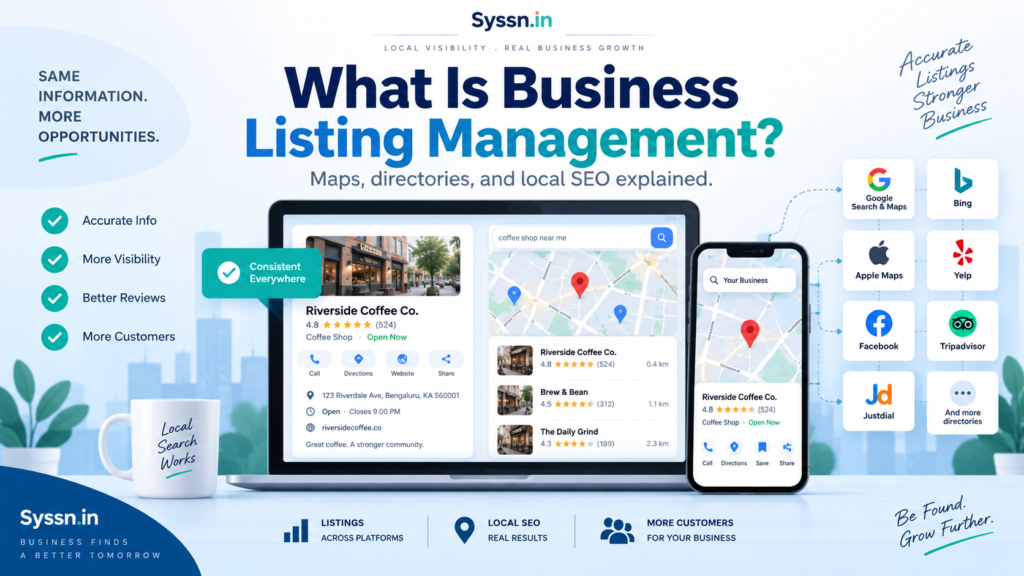
Business listing management is the ongoing process of keeping a business’s name, address, phone number, hours, website, categories, services, photos, and other location information accurate across search engines, maps, directories, apps, and review platforms.
For a US business, that usually means managing Google Business Profile, Apple Business, Bing Places, Yelp, Facebook, relevant industry directories, and other services customers use to find locations. For multi-location brands, listing management also covers bulk updates, duplicate control, permissions, verification, and monitoring.
The goal is simple: wherever a customer finds your business, the information should match what is actually happening at that location.
What is business listing management?
Business listing management is the process of creating, claiming, correcting, updating, distributing, and monitoring business information across the online services where customers discover physical locations or service-area businesses.
A business listing may appear when somebody:
- Searches for a plumber on Google
- Looks for a restaurant in Apple Maps
- Checks store hours on Bing
- Reads a company’s Yelp profile
- Searches for a nearby pharmacy
- Uses a navigation app
- Asks a voice assistant for a nearby business
- Encounters business information through an AI-powered search service
Managing these records once is rarely enough.
A location can move. Phone numbers change. Holiday schedules replace normal hours. A franchise changes ownership. Somebody creates a duplicate profile. A local manager edits information directly. A directory continues to display an old address.
Business listings therefore need an operating process rather than a one-time submission.
For a fuller walkthrough of auditing, claiming, correcting, and distributing listings, Syssn has a separate Business Listing Management: The Complete Guide. This article focuses more narrowly on what business listing management means, what a mature program contains, and when an in-house team may need software or outside support.
What information should a business listing include?
A business listing should give a customer enough accurate information to identify the business, reach it, visit it, and understand what the location provides.
| Business information | What needs to stay accurate |
|---|---|
| Business name | Real-world name used by the location |
| Address | Full customer-facing address or approved service area |
| Phone number | Current working contact number |
| Website | Main website or correct location page |
| Regular hours | Normal weekly operating schedule |
| Special hours | Holidays, temporary changes and special openings |
| Business categories | Accurate description of the business type |
| Services | Services customers can obtain at that location |
| Products or menus | Where supported and relevant |
| Photos | Current location, team, product or service images |
| Map coordinates | Correct location and entrance positioning |
| Attributes | Accessibility, amenities, payments and other supported details |
| Action links | Booking, reservation, ordering or appointment links |
| Operating status | Open, temporarily closed, permanently closed or relocated |
Google allows verified businesses to update addresses, contact information, hours, photos and other profile information on Search and Maps. It also supports business attributes that can describe amenities, payment options and other characteristics.
One practical rule works well: public listing information should describe the business customers will actually encounter.
If a restaurant closes its kitchen at 9 p.m., a listing should not say 10 p.m. because somebody thinks longer hours look better. If a business does not receive customers at its address, it should follow the publisher’s service-area rules rather than publish an address for marketing purposes.
Which listings does business listing management cover beyond Google?
Google Business Profile usually receives the most attention, but online business listing management extends well beyond Google.
For a US brand, the exact publisher mix depends on industry and customer behavior.
| Platform or listing type | What it covers |
|---|---|
| Google Business Profile | Google Search and Google Maps |
| Apple Business | Apple Maps and other Apple services |
| Bing Places for Business | Bing’s local business information |
| Yelp | Reviews and business discovery |
| Business information and social discovery | |
| Industry directories | Healthcare, legal, hospitality, real estate, home services and other verticals |
| Navigation platforms | Location and routing information |
| Data networks | Business information used by other services |
| Local directories | City, regional and specialist business discovery |
| Brand-owned location pages | First-party source for location information |
Google Business Profile
Google Business Profile lets eligible businesses claim and verify profiles, then control how business information appears on Google Search and Maps. Google also provides bulk-management workflows for organizations handling multiple profiles.
This remains one of the first profiles a US business should control directly.
Apple Business
A major change occurred in 2026.
Apple launched Apple Business on April 14, 2026, replacing Apple Business Connect, Apple Business Essentials and Apple Business Manager. Existing Business Connect location information migrated into the new service.
Apple Business now lets organizations manage location details, brand information, photos, place cards, actions and performance data that can appear through Apple Maps and other Apple services.
Older articles that still tell businesses to set up Apple Business Connect should therefore be read with that change in mind.
Bing Places for Business
Bing Places lets businesses claim or create listings, complete location information and verify their profiles. Microsoft also supports bulk uploads for businesses with multiple locations.
A business that manages only Google can therefore have perfectly accurate Google data while outdated information remains elsewhere.
Is business listing management the same as local listing management?
In most searches, business listing management and local listing management describe nearly the same work.
The difference is mainly wording and context.
| Term | Typical meaning |
|---|---|
| Business listing management | Managing business profiles and directory information across online services |
| Local listing management | The same work viewed specifically through local search and location discovery |
| Local business listing management | A more explicit phrase for listings belonging to physical or service-area businesses |
| Business profile management | Often refers to direct profile administration on individual publishers |
| Citation management | Usually narrower, with more attention on business mentions and NAP data |
Someone searching for “business listing management software” may be looking for a system that manages many directories.
Someone searching “local listing management” may be thinking about Google Maps rankings or nearby customer searches.
In practice, the operating work overlaps heavily: maintain accurate location data, control publisher profiles, fix duplicates, distribute changes and check that the public information is correct.
Why is business listing management important?
Business listings often appear at the exact point when a customer needs factual information.
A person searching for a dentist may need today’s hours. Someone choosing a restaurant needs directions. A customer looking for an auto repair shop wants a phone number. A hotel guest may need the correct entrance rather than the corporate mailing address.
Incorrect information can interrupt that process before the person reaches the business.
Common listing failures include:
- Calls going to an old phone number
- Customers arriving after closing
- Drivers reaching an old address
- Wrong map pins sending people to another entrance
- A closed store continuing to appear open
- A new location failing to appear
- Different profiles displaying different brand names
- Appointment links pointing to the wrong branch
For multi-location businesses, these problems can also create internal work. Customer-support teams receive complaints. Store managers ask marketing to correct profiles. Marketing asks operations which hours are correct. Different employees update different systems.
Business listings sit between marketing information and operating information, so the ownership model needs to reflect both.
How does business listing management help local SEO?
Accurate, complete profiles give search engines better information about what a business does and where it operates.
Google says local results are mainly based on relevance, distance and prominence. It also states that businesses with complete and accurate information are more likely to appear for relevant local searches.
That needs a careful interpretation.
Google does not publish a rule saying that perfectly identical NAP formatting across a certain number of directories will automatically raise rankings. Listing accuracy should therefore not be sold as a guaranteed local-ranking formula.
Business listing optimization can still support local search by making sure that Google and other services receive correct information about:
- The identity of the business
- Its physical location or service area
- Its category
- Its operating hours
- Its website
- The services available
- Its current operating status
Accuracy is the starting point. Reviews, website authority, relevance, distance, competition and other factors still affect local visibility.
For broader software that combines listings with rank tracking, reviews and local SEO reporting, see Syssn’s Local Listings Management Software: Best Tools for 2026.
Why is NAP consistency important?
NAP means name, address and phone number.
NAP consistency means that customers and platforms encounter the same correct business identity when they check different sources.
Consider a dental group that moved one clinic:
- Its website shows 420 Main Street.
- Google shows 420 Main Street.
- Yelp still shows 118 Main Street.
- One directory displays the old phone number.
- Another profile contains the new address but the old map coordinates.
The problem is larger than typography or whether one source spells out “Street.”
Customers now have conflicting instructions.
A useful approach is to focus on factual consistency rather than trying to make every punctuation mark identical. The business name, physical location, working phone number, URL and operating status need to describe the same real business.
What is the difference between business listings and local citations?
A listing is usually a managed business profile. A citation is an online reference to business information.
A Google Business Profile is a listing because the business can claim and manage it.
A directory page containing the business’s name, address and phone number is also a citation, even when the business has limited control over the page.
| Business listing management | Local citation management |
|---|---|
| Claims and verification | Citation discovery |
| NAP information | NAP correction |
| Hours | Directory submissions |
| Categories | Citation cleanup |
| Photos | Duplicate citation checks |
| Services | Business mentions |
| Map pins | NAP consistency |
| Booking links | Directory coverage |
| Publisher status | Citation tracking |
| Ownership and permissions | Less emphasis on account ownership |
Citation management fits inside the larger business listings management process.
That distinction becomes useful when comparing software. Some tools focus heavily on citation building. Others operate as a continuous publishing layer for business profiles. Some combine both.
How does business listing management work?
Most listing programs can be reduced to one controlled information flow.
Syssn uses the following editorial model to explain it.
The Syssn Source-to-Screen Control Loop
This is a Syssn editorial framework, not an industry standard or search-engine ranking model.
The framework has five stages:
1. Source
Maintain one approved location record.
It should contain the business name, location ID, address, coordinates, phone number, URL, categories, hours, services and operating status.
If there are 400 locations, there should be 400 controlled records rather than several competing spreadsheets.
2. Approve
Define who can change each type of information.
For example:
- Local manager reports a temporary closure.
- Regional operations confirms it.
- Marketing or the listings team approves the public update.
- The publishing system distributes it.
A store employee who notices incorrect Saturday hours should have an easy way to report the error. That does not mean every employee needs direct editing rights on Google, Apple and Facebook.
3. Publish
Send approved information to the relevant publisher network.
A small company might update Google, Apple, Bing, Yelp and Facebook manually.
A large chain may use business listing management software, publisher APIs or a managed service.
4. Verify
Check what customers can actually see.
“Submitted” and “live” are different states.
Synup’s August 2026 documentation, for example, explains that an update first gets saved, then sent to the publisher, after which the publisher processes it on its own timetable. Some updates may appear quickly while others take longer.
5. Measure
Track customer-facing and operational outcomes.
Depending on the publisher and business model, these can include:
- Profile views
- Calls
- Website visits
- Direction requests
- Reservations
- Bookings
- Location-page visits
- Listing errors
- Failed publisher connections
- Time needed to correct an error
This last stage prevents listing teams from measuring success purely by the number of directories submitted.
What does a basic program versus a multi-location program include?
The amount of process required changes quickly as location count and update volume increase.
| Area | Basic local program | Multi-location program |
|---|---|---|
| Source data | Spreadsheet or controlled record | Central location database or listings platform |
| Publishers | Main search and map platforms | Main platforms plus relevant directories and vertical sites |
| Updates | Manual | Bulk or automated |
| Permissions | Owner or marketer | Corporate, regional, agency and local roles |
| Hours | Manually maintained | Bulk schedules plus local exceptions |
| Verification | Per profile | Central tracking and escalation |
| Duplicates | Occasional manual checks | Regular detection and resolution |
| New locations | Manual setup | Repeatable opening workflow |
| Closures | Manual update | Coordinated closure workflow |
| Reporting | Basic profile metrics | Location, region and network reporting |
| Quality checks | Periodic review | Exception monitoring and scheduled audits |
| Governance | Informal | Defined owners, approval rules and audit history |
A five-location business with stable details may be perfectly capable of managing its main publisher accounts internally.
A restaurant group with 500 locations, changing seasonal hours and dozens of local managers has a different workload. The software decision should follow the workload.
What does “done” look like for a US brand?
Business listing management is never permanently finished, but a well-controlled program has a clear operating state.
For a US multi-location brand, “done” should mean:
- Every active location has an approved master record.
- Google Business Profiles are claimed, verified and owned by the correct organization.
- Apple Business locations are claimed and current.
- Bing listings are claimed or managed through an approved distribution process.
- Yelp, Facebook and relevant vertical profiles contain current information.
- Locations that closed no longer appear as operating businesses where the publisher supports closure status.
- Duplicate profiles have been investigated and resolved.
- Map pins point to the usable customer location.
- Regular and special hours have an identified source.
- Nobody needs to share a master password to manage profiles.
- Local employees know where to report incorrect information.
- Head office knows who approves changes.
- Failed updates and disconnected publisher accounts have an escalation process.
- New-store openings and closures use documented workflows.
- The business retains ownership records for its major publisher accounts.
- Listing performance is connected to calls, bookings, directions or another business outcome where the data allows it.
That is more useful than trying to achieve an arbitrary directory count.
When should you manage business listings manually?
Manual management works well when the workload remains small and predictable.
Consider staying in-house with direct publisher tools when:
- You have one or a few locations.
- Business details rarely change.
- One person clearly owns the process.
- Google, Apple, Bing, Yelp and a few industry profiles cover most customer discovery.
- You can respond quickly when hours or contact information changes.
- Duplicate listings are uncommon.
Google Business Profile, Apple Business and Bing Places can all be managed directly without paying a listings software subscription. Google and Bing explicitly provide free profile-management options, while Apple Business became a free service in April 2026.
When does business listing management software make sense?
Software becomes easier to justify when the cost of manual coordination exceeds the cost of central management.
Common triggers include:
- Dozens or hundreds of locations
- Frequent hour changes
- Store openings and closures
- Several brands
- Franchise structures
- Agency-client management
- Regional approval requirements
- Repeated duplicate problems
- Many relevant publishers
- Reporting requirements
- Multiple employees editing profiles
- API or database integrations
Do not choose software entirely by the number of directories advertised.
Check which publishers matter to your customers, how changes are distributed, what happens when a sync fails, who owns publisher accounts, how data can be exported and what happens after cancellation.
Syssn’s guide to Local Listings Management Contracts in 2026 covers the contract side of that decision in more detail.
Which business listing management tools can in-house teams consider?
Teams that have outgrown direct publisher management have several software options. The products below solve many of the same listing-management problems, but their approaches differ. Some put more emphasis on centralized location data and publisher distribution. Others combine listings with citations, reviews, local pages, social publishing, analytics, or AI-search visibility.
When comparing them, look beyond the advertised number of directories. Check how each platform handles bulk changes, duplicates, publisher connections, permissions, reporting, APIs, failed updates, and the locations or markets your business actually operates in.
1. Synup
Synup provides business listing management for multi-location companies, agencies, and teams that want to control location information through one system. Its listings network covers major discovery platforms including Google Business Profile, Apple Maps, Bing, Facebook, Yellow Pages, and other publishers. Teams can maintain a central location record and distribute changes instead of editing individual profiles one at a time.
The platform supports bulk editing, which is useful for changes that affect several locations at once. A restaurant chain, for example, could update holiday hours across a group of stores rather than opening every profile separately. Synup also supports service-area data and editable latitude and longitude information, which can help businesses that operate without a traditional storefront or need more precise map positioning.
Duplicate management is another part of the workflow. Synup continuously checks publisher data for possible duplicate records. Teams can compare a suspected duplicate with their approved location information and submit it for removal. The publisher, rather than Synup itself, ultimately decides whether the listing is removed. Synup’s August 2026 documentation also separates duplicate candidates into stages such as potential, flagged, deleted, and failed, which gives teams a clearer way to track unresolved cases.
For businesses that need to connect listings work with internal systems, Synup provides an API covering locations, listings, connected accounts, reviews, posts, rankings, analytics, user management, and other functions. Its API documentation also includes webhook support, allowing another system to respond when certain account or listing events occur.
Synup has also expanded its AI-related products in 2026. Its AI Listings feature tracks business presence across supported AI discovery services and lets users review whether locations are listed or submitted. The wider Synup platform now includes Sydekick, an AI agent designed to work across listings, reviews, social publishing, local SEO, and AI-search visibility. Synup presents Sydekick as an execution layer that can carry out repeatable marketing tasks rather than simply produce recommendations.
Reporting includes profile actions and other location-level performance information. Synup says teams can track measures such as impressions, clicks, calls, direction requests, and local ranking movement. For agencies, the platform also includes multi-client controls, client portals, white-label options, team permissions, and related partner features.
Best suited for: agencies, growing multi-location businesses, franchises, and in-house local marketing teams that want listings, duplicate management, reporting, APIs, and related local marketing functions in one platform.
What to check before choosing it: confirm publisher coverage for your countries and industry, which features are included in your plan, how account ownership works, and how quickly your highest-priority publishers process submitted changes. Sending an update does not guarantee that every publisher will display it immediately.
2. Yext

Yext is built primarily for organizations that need structured business information distributed at large scale. Its Listings product currently advertises more than 200 direct publisher integrations, with connections to services including Google, Apple Maps, Bing, Yelp and other discovery platforms. Yext says these connections are direct rather than relying entirely on an aggregator between its platform and the publisher.
At the center of the wider Yext platform is its Knowledge Graph. A company can maintain approved information about locations and other business entities there, then use that structured data across listings and other Yext products. For an enterprise with thousands of locations, this model can reduce the number of separate databases used for addresses, hours, categories, services, URLs, and related location information.
Its listings functions go further than basic directory submission. Yext provides tools for detecting errors, duplicates, and publisher changes. Its Listings Verifier compares live publisher information with data stored in the Knowledge Graph and can identify discrepancies that need attention. The platform also supports role-based access and audit trails, which may matter when several corporate, regional, or local employees work with the same location records.
Yext continued changing its listings workflow during 2026. Its May 2026 release introduced a Publisher Status Monitor inside the platform. Teams can see active publisher disruptions, review status histories, and subscribe to notifications instead of having to investigate every unexplained synchronization problem independently.
Apple-related management also changed. Yext’s April 2026 release added Apple updates to its Suggestions workflow. If Apple proposes a change to hours or business status based on third-party information, users can review the suggestion from Yext and choose whether to accept or reject it. That gives larger teams another control point when publisher information begins to differ from their approved records.
Industry coverage may also affect the decision. In February 2026, for example, Yext added Healthgrades listing synchronization for supported healthcare professionals, although Yext notes that the connection requires the appropriate subscription. This type of vertical publisher support can matter more to a healthcare organization than the raw total number of directories.
Beyond listings, Yext offers reviews, local pages, search, social tools, analytics, connectors, and other products tied to its structured business data. That broader product set can appeal to enterprise teams trying to run several location-marketing functions from the same underlying data source.
Best suited for: enterprises, national and international brands, regulated or complex organizations, and companies that need structured location data, formal permissions, auditability, and a large publisher network.
What to check before choosing it: determine which publishers and products your organization actually needs, how your existing location database will connect with Yext, what implementation work is required, how data exports operate, and what the contract covers. A 200-plus publisher network provides little value if most of those destinations are irrelevant to your customers.
3. Uberall
Uberall is designed around location marketing for brands with many physical locations. Its current Listings product states that it distributes and manages business information across more than 150 platforms, including Google, Apple Maps, Bing, Yelp, Facebook, Waze, navigation services, voice assistants, and other discovery channels.
The platform gives central teams one place to update location information rather than logging into each publisher independently. Uberall supports bulk edits, including changes to hours, descriptions, services, images, and other business data. Location information can also be uploaded with spreadsheets or managed through APIs, which is useful when the master record already lives in another internal system.
Uberall puts particular emphasis on location-data controls. Its location-data product includes tools for validating data against publisher requirements, managing map coordinates, identifying shop-in-shop relationships, and warning teams when business information changes. Those functions can become relevant for retailers with stores inside other stores, businesses located in large shopping complexes, and companies where map-pin accuracy affects customer arrival.
The product also addresses changes that originate outside the business. Google, Facebook, and other publishers can sometimes modify profiles based on external information or user input. Uberall describes its Profile Protection functionality as a way to monitor or correct unauthorized changes while keeping location information synchronized with the approved source. It also provides duplicate-management functions.
Permissions matter for multi-location operations. Uberall supports role-based access so a company can keep corporate control over core information while allowing appropriate local employees to work with assigned locations. That can fit franchise systems or regional operating structures where headquarters does not want every manager editing every location.
Uberall extends beyond listings into reviews, local pages, social publishing, location performance, and newer AI-search products. Its 2026 product pages also describe integrations with business intelligence, CRM, commerce, and other systems. The company says its integrations can connect location information and performance data with tools including Power BI, Zendesk, Shopify, and a larger application network.
The company is also incorporating AI-search discovery into its product direction. Its current listings materials explicitly include AI search engines alongside traditional maps and directories, while its GEO Studio product focuses on how multi-location brands appear in generative search results.
Best suited for: retailers, restaurant groups, franchises, hospitality companies, service networks, and large brands that need strong multi-location controls alongside reviews, local pages, integrations, and local performance reporting.
What to check before choosing it: map the 150-plus network against the publishers that matter in your markets, test how local and corporate permissions work, determine which integrations your team needs, and check how duplicate suppression and profile protection behave on your priority publishers.
4. BrightLocal
BrightLocal approaches listing management differently from Synup, Yext, and Uberall because it separates continuous synchronization of major profiles from broader citation-building work.
Its Active Sync product manages selected high-value listings through BrightLocal. Current documentation lists Google Business Profile, Facebook, Apple Maps, and Bing as supported profiles, with Yelp available through Active Sync Plus in the United States and Canada. Once accounts are connected, users can manage core information and supported fields without signing into every publisher individually.
Supported information extends beyond basic NAP data. Depending on the publisher, Active Sync can push categories, opening hours, descriptions, and other profile fields. BrightLocal also positions Active Sync as protection against third-party changes to supported listings, which helps teams maintain an approved version of important business information.
Its Citation Builder service solves a different problem. Instead of continuously synchronizing the same small group of profiles, Citation Builder is used to create new directory listings, correct inaccurate citations, and remove duplicates. BrightLocal describes it as a pay-as-you-go service where customers choose citation sites and submit the business information they want used.
That separation matters when comparing BrightLocal with platforms that advertise a large continuously managed publisher network. A business could use Active Sync for its most important profiles while running Citation Builder campaigns for broader directory cleanup. Those two activities have different maintenance models, so an in-house team should understand which listings stay synchronized and which were handled through a one-time citation campaign.
BrightLocal changed how these functions appear in its interface during 2026. In May, it introduced Connect & Sync, which puts account connections and Active Sync settings in the same area of Location Manager. The company also said at the time that it was working on aggregator support for future listing-management workflows.
The wider BrightLocal platform includes local rank tracking, local search auditing, citation work, Google Business Profile tools, reputation management, and reporting. This makes its listing products particularly relevant to agencies and SEO teams that already treat citation cleanup, map rankings, reviews, and business profiles as parts of the same local SEO program.
For example, an agency managing 30 independent local businesses may not need an enterprise location database connecting thousands of stores. It may instead want to monitor local rankings, audit citations, fix directory problems, manage major profiles, and produce client reports in one working environment.
Best suited for: local SEO agencies, consultants, small and mid-sized multi-location businesses, and marketing teams that want listing management closely connected with citation cleanup and local SEO measurement.
What to check before choosing it: distinguish Active Sync coverage from Citation Builder coverage, confirm which publishers remain continuously synchronized, check Yelp availability for your country, and decide whether you need broader enterprise data distribution or the more SEO-focused workflow BrightLocal provides.
Quick comparison for in-house teams
| Platform | Listings approach | Useful for | Areas to examine before buying |
|---|---|---|---|
| Synup | Centralized listings distribution, duplicate management, bulk tools, API and AI-related workflows | Agencies, franchises and multi-location marketing teams | Publisher coverage, plan features, account ownership and publisher processing |
| Yext | Structured data through Knowledge Graph with 200+ direct publisher integrations | Large enterprises and complex multi-location organizations | Implementation, integrations, contract scope, vertical publisher needs and data portability |
| Uberall | Location data management across 150+ platforms with bulk controls and wider location-marketing tools | Retail, restaurants, franchises and large physical-location networks | Publisher relevance, permissions, integrations and profile-protection workflow |
| BrightLocal | Active synchronization of major profiles plus separate citation-building services | Agencies, local SEO teams and smaller multi-location businesses | Active Sync versus Citation Builder coverage, geographic availability and required scale |
There is no useful winner based solely on directory count. An in-house team should compare each platform against its location count, countries, update frequency, existing data systems, local-manager access requirements, publisher mix, and reporting needs.
A 20-location dental group may care more about Google, Apple, Bing, Yelp and healthcare directories than a network of 200 general publishers. A 2,000-location retailer may care more about APIs, role permissions, bulk opening-hours changes, map-pin controls, failed-update monitoring, and the speed at which a central database can distribute changes.
That operating fit is a better buying criterion than the longest feature list.For a broader comparison, Syssn also maintains a current local SEO tools guide for 2026.
How is AI changing business listing management in 2026?
AI is becoming part of the workflow, but the underlying business information still needs an accountable source.
Google is gradually introducing Business Profile management through the Gemini web app. Google says eligible users can use Gemini to update hours, contact information and action links, draft review replies and posts, and access Business Profile performance information. Availability is still being rolled out.
Listings vendors are also adding AI-based execution, recommendations and monitoring.
This can remove repetitive work, but businesses still need approval rules for facts that can affect customers directly.
Consider a store closure.
An AI system can process the request and prepare an update. The business still needs a reliable answer to a basic question: is this location actually closed?
The same applies to:
- Changed opening hours
- Relocations
- Rebrands
- New phone numbers
- Temporary closures
- Services that have been discontinued
- Ownership transfers
AI works best when the source data and approval process are already controlled. Automating inconsistent information spreads the inconsistency faster.
How often should business listings be updated?
Update listings whenever the underlying business information changes.
Do not wait for a monthly or quarterly audit to correct a customer-facing error.
A practical cadence can look like this:
| Event | Recommended response |
|---|---|
| Wrong phone, address or closure status | Correct as soon as verified |
| Holiday or special hours | Publish before customers begin searching for them |
| Location opening | Prepare profiles as part of the opening workflow |
| Permanent closure | Update publishers as part of the closure process |
| Temporary closure | Update promptly and monitor reopening |
| Publisher connection failure | Investigate when detected |
| Major-platform accuracy check | Monthly spot check |
| Broader listing audit | Quarterly or after a large operational change |
| Ownership and permission review | At least quarterly and after staffing or agency changes |
These frequencies are Syssn editorial recommendations, not publisher requirements or industry benchmarks.
The correct schedule depends on how frequently your business changes.
A seasonal retailer needs more frequent hour management than a professional-services office with a stable schedule.
How can frontline employees and local managers fit into listing management?
Local employees often discover listing errors before the marketing team does.
A store manager sees that Maps directs customers to the loading entrance. A clinic receptionist hears callers say Google has the wrong hours. A restaurant employee knows that the branch will close early because of a maintenance issue.
The solution is not to give every employee editing access to every publisher.
Create a short reporting process.
For example:
- Employee reports the problem through an internal form.
- Location manager confirms the information.
- Regional operations approves changes that affect opening status or hours.
- Marketing or the listings platform publishes the update.
- The responsible team verifies the public result.
Include the listing URL, location ID, incorrect information, requested correction and required effective date in the request.
That gives local employees a way to report real-world changes while keeping account permissions controlled.
Practical example: a 40-location urgent-care group
Imagine a US urgent-care company operating 40 clinics.
A severe weather event forces six clinics to close at 4 p.m. instead of 8 p.m.
Without a listing-management process, each clinic may handle the situation differently. One manager changes Google. Another posts on Facebook. Somebody emails marketing. Apple and Bing remain unchanged.
A controlled workflow looks different.
Operations records the six affected location IDs and temporary hours. The listings owner approves one structured update. The business pushes the changes to supported publishers, then checks the most-used profiles.
When normal hours return, the same location IDs are restored.
The software is useful, but the real improvement comes from having a defined source, approval step, publishing process and verification step.
Frequently asked questions
What is business listing management?
Business listing management is the ongoing process of keeping business information accurate across Google, Apple, Bing, Yelp, Facebook, directories, maps and other discovery platforms. It covers claiming, verification, updates, duplicate control and monitoring.
Is business listing management the same as local listing management?
Usually, yes. The terms have slightly different search intent, but they describe much of the same work for physical and service-area businesses.
What does a business listing management service do?
A business listing management service may audit existing profiles, correct inaccurate information, claim listings, resolve duplicates, distribute approved data, monitor publisher status and manage future changes. Service scope varies, so businesses should check exactly which publishers and tasks are included.
Why do US businesses pay for listing management?
They usually pay when location count, publisher count, frequent changes or internal coordination make manual management inefficient. A one-location business may manage major profiles directly. A national chain may need centralized software and formal workflows.
What are the most important business listing sites?
For many US businesses, Google Business Profile, Apple Business, Bing Places, Yelp and Facebook form the starting group. Industry-specific directories may rank higher for healthcare, travel, legal services, restaurants and other sectors.
How do you manage business listings across multiple sites?
Start with one approved location record, claim major publisher profiles, distribute the same verified information, check the published result and create a process for future changes. Multi-location brands may use business listing management software or APIs to reduce manual work.
How often should business listings be updated?
Update them whenever business information changes. Address, phone, opening-status and hour errors should be corrected once the new information has been verified. Scheduled audits can find changes the business did not initiate.
What is business listing management software?
Business listing management software gives businesses one system for managing location information across several publishers. Depending on the product, it may support bulk changes, duplicate detection, publisher monitoring, permissions, analytics, APIs, reviews and other local-marketing work.
Does business listing management improve local SEO?
It can support local visibility by keeping business information accurate and complete. Google states that complete and accurate information can help businesses appear for relevant local searches, while local ranking mainly depends on relevance, distance and prominence.
Should every business use a paid listings platform?
No. Small businesses with stable information may be able to manage Google, Apple, Bing and other major profiles directly. Paid software becomes more useful as locations, updates, publishers, permissions and reporting requirements increase.
Final takeaway
Business listing management comes down to maintaining reliable public information wherever customers search for a business.
For a single-location company, that may mean controlling a handful of profiles and checking them regularly.
For a franchise or multi-location brand, the same task becomes an operational system involving approved location data, local managers, regional teams, marketing, permissions, bulk publishing, verification and measurement.
Start with accuracy. Control the profiles customers use. Give employees a clear way to report changes. Check the public result rather than assuming an update worked.
When manual processes become difficult to maintain, software can centralize the work. Synup, Yext, Uberall and BrightLocal take different approaches, so compare them against your actual publisher coverage, location count, update frequency, team structure and ownership requirements.
The best result is easy to define: a customer searches for one of your locations and gets the correct address, phone number, hours, services and next step without having to check another source.



[…] Syssn CLEAR model is an editorial evaluation framework rather than an established industry […]