How to Deliver Multilingual Employee Communications in 2026: Tools and Best Practices

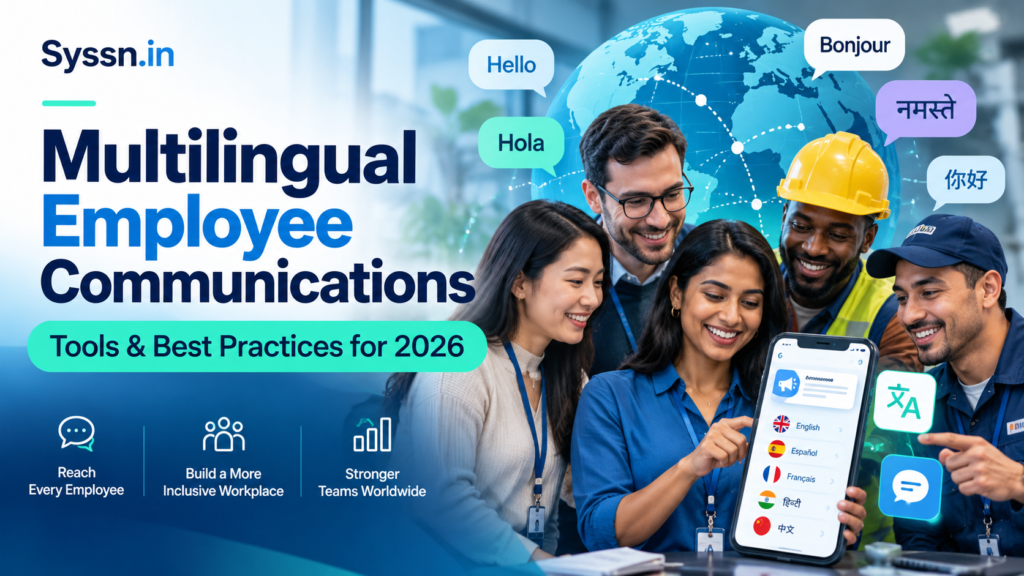
Multilingual employee communication means creating, translating, localizing, and delivering workplace information in languages employees understand. In 2026, companies can improve communication by combining AI translation, human review, mobile-first platforms, accessible messaging, and employee feedback. Leading tools to evaluate include HubEngage, Staffbase, Workvivo, Beekeeper (now part of LumApps), Blink, and Microsoft Viva Engage. The most effective approach is to identify employees’ language preferences, create accurate source content, translate according to message risk, distribute updates through accessible channels, and measure whether employees understand what they need to do.
For HR leaders and internal communications teams, successful multilingual communication is not simply about sending translated messages. It is about ensuring that employees across locations, departments, and shifts receive reliable information and can act on it confidently.
This guide explains how to build a multilingual employee communication strategy, choose suitable tools, use AI responsibly, and measure results.
What Is Multilingual Employee Communication?
Multilingual employee communication is the process of delivering workplace information in multiple languages so employees can understand organizational messages regardless of their primary language.
It covers more than translating company announcements. Organizations must also consider cultural context, employee accessibility, preferred communication channels, and whether translated information remains accurate.
Common examples include:
- HR communications: Benefits enrollment, compensation policies, workplace rules, and employee handbooks.
- Operational updates: Shift changes, production schedules, maintenance notices, and service instructions.
- Safety communications: Emergency procedures, hazard warnings, and mandatory training.
- Leadership messages: Business updates, organizational announcements, and strategic priorities.
- Employee engagement: Recognition, surveys, feedback, and company events.
- Onboarding: Employment documentation, orientation materials, and training resources.
These communications may be delivered through employee apps, intranets, email, SMS, digital signage, team meetings, or workplace kiosks.
Multilingual communication vs. employee translation
Although closely related, these activities serve different purposes.
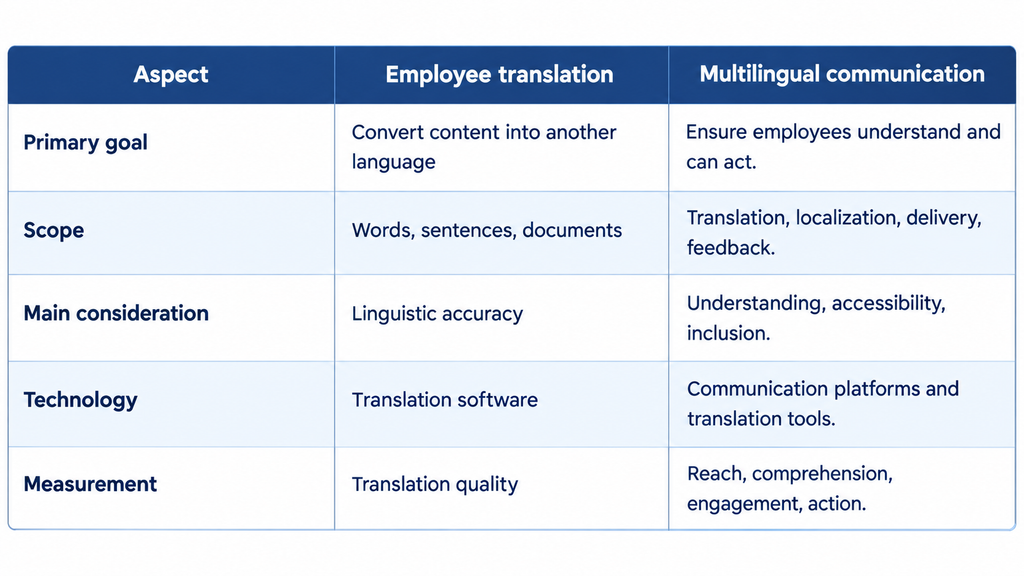
Multilingual communication vs. employee translation
Translation is one component of an effective multilingual workplace communication strategy, not the entire strategy.
Why Are Multilingual Employee Communications Important in 2026?
Multilingual communication helps organizations reduce misunderstandings, make important information accessible, and create more inclusive workplace experiences.
The need is particularly relevant to businesses employing distributed, frontline, and deskless workers.
According to the U.S. Census Bureau’s 2024 American Community Survey, approximately 23% of U.S. residents aged five and older spoke a language other than English at home. This is a population statistic, not a direct measure of workplace language needs, but it illustrates the linguistic diversity organizations may encounter.
Five important benefits
1. Better understanding of operational information
Employees can follow instructions more reliably when messages use familiar language, clear terminology, and practical examples.
2. More inclusive employee experiences
Providing language options helps employees participate in company activities, recognition programs, surveys, and organizational discussions.
3. Stronger workplace safety communication
Employees need to understand hazards and protective procedures. Translated instructions, supplemented by demonstrations and comprehension checks, can support safer work practices.
4. Greater access for frontline workers
Mobile communication, shared devices, and multilingual displays can reach employees who do not regularly use corporate email.
5. More consistent organizational messaging
A centralized content and translation workflow helps companies maintain consistent information across locations while allowing appropriate local adaptations.
However, multilingual communication does not automatically improve retention, productivity, or safety outcomes. Organizations must evaluate whether improved communication produces meaningful changes.
How to Build a Multilingual Employee Communication Strategy: 8 Steps
A successful implementation begins with employee needs rather than technology selection.
Step 1: Identify employees’ languages and communication preferences
Start by understanding which languages employees prefer for workplace communications.
Avoid assuming that nationality, location, or a person’s name reliably indicates their preferred language.
Use voluntary employee surveys, onboarding preferences, and appropriate HR data to identify requirements.
Document:
- Preferred written and spoken languages.
- Locations, teams, and shifts.
- Employee access to work or personal devices.
- Digital literacy and accessibility needs.
- Communication channels currently used.
- Types of information employees struggle to understand.
For example, a U.S. manufacturing company may discover that its production employees prefer English, Spanish, Vietnamese, and Haitian Creole.
That finding should determine which language versions the company prioritizes and which channels it tests.
Avoid collecting unnecessary sensitive information. Give employees a straightforward way to change their language preferences.
Step 2: Categorize communications by importance and risk
Not every employee message requires the same translation process.
A company celebration and a chemical safety instruction have different consequences if translated incorrectly.
Use a risk-based model:
| Communication type | Suggested translation approach | Review requirement |
|---|---|---|
| Company news | AI-assisted translation | Editorial spot-check |
| Recognition posts | AI-assisted translation | Review when needed |
| General operational updates | AI plus terminology checks | Manager or language review |
| Benefits and HR policies | Controlled translation | Qualified HR and language review |
| Safety instructions | Controlled translation | Qualified technical and language review |
| Legal or disciplinary notices | Professional translation | Legal and HR review |
These are recommended operating practices rather than universal legal classifications.
For safety training, consult the OSHA Training Standards Policy Statement. OSHA explains that required instruction must be presented in a language and vocabulary employees can understand.
A machine-translated document alone does not establish that training was understood.
Step 3: Create a clear source message before translating
Clear original writing improves the foundation for accurate translation.
Avoid lengthy sentences, unexplained abbreviations, idioms, and complicated corporate language.
Consider this announcement:
Before:
“All associates are requested to facilitate the timely completion of the upcoming compliance-related documentation exercise.”
After:
“Complete your required compliance form by Friday. Ask your manager if you need help.”
The revised message communicates the action and deadline directly.
A useful source message should answer four questions:
- What happened or changed?
- Who is affected?
- What must employees do?
- Where can employees get help?
The CDC Clear Communication Index offers evidence-informed principles for creating clear messages, including presenting the main point early, using familiar language, and stating the intended action.
Develop an approved terminology glossary for recurring workplace phrases, product names, job titles, and safety instructions.
Step 4: Use AI translation with appropriate human oversight
AI-powered employee translation can reduce the time required to produce routine multilingual content.
Modern translation systems can support rapid translation of announcements, employee posts, knowledge articles, and everyday questions.
However, translation tools may struggle with ambiguous instructions, regional expressions, specialized terminology, or culturally sensitive subjects.
Use a controlled workflow:
Source message → AI translation → terminology validation → human review when required → publication → employee feedback
For routine communications, automated translation may be suitable after testing.
For high-risk information, involve qualified reviewers who understand both the language and subject matter.
The NIST Generative AI Risk Management Profile provides a broader framework for identifying, evaluating, and managing risks associated with generative AI systems.
Companies should also review translation vendors’ data-handling practices before processing confidential HR records or employee information.
Step 5: Choose channels employees can actually access
A translated message provides little value if the intended employee cannot receive it.
Desk-based employees may prefer email, Microsoft Teams, or an intranet. Frontline workers may depend on mobile apps, workplace screens, SMS, or supervisor briefings.
Use channels according to message importance and employee access.
| Channel | Suitable use |
|---|---|
| Employee mobile app | News, policies, recognition, surveys |
| Email or intranet | Detailed updates for connected employees |
| SMS | Short, time-sensitive notifications |
| Digital signage | Shared workplace announcements |
| QR codes | Access to translated pages and forms |
| Team briefings | Safety instructions and operational discussions |
| Workplace kiosks | Employees without individual digital access |
Avoid relying entirely on personal smartphones. Device access, work-time expectations, privacy, connectivity, and accessibility all matter.
For practical distribution options, see Syssn’s guide to reaching employees without company email.
Step 6: Localize content rather than translating words literally
Localization adapts a message to the linguistic and cultural expectations of its audience.
A direct translation may preserve individual words while changing the intended meaning.
Consider differences involving:
- Date and time formats.
- Local employment terminology.
- Regional language variants.
- Currency and measurement systems.
- Images, symbols, and cultural references.
- Legal and benefits terminology.
For example, Spanish used in Mexico and Spanish used in Spain may share most vocabulary while differing in expressions and workplace terminology.
Localization should preserve the approved business meaning while making the communication understandable to the intended audience.
Use reviewers familiar with the relevant region, particularly when communicating about employee rights, financial benefits, or safety procedures.
Step 7: Make translated communications accessible
Language accessibility and disability accessibility should work together.
Employees may require captions, screen-reader compatibility, audio instructions, simplified layouts, or alternatives to smartphone-based content.
Follow practical accessibility measures:
- Add accurate captions and transcripts to videos.
- Identify document and webpage languages correctly.
- Test right-to-left languages such as Arabic.
- Avoid placing essential instructions only inside images.
- Provide readable typography and sufficient contrast.
- Test translated forms on mobile devices.
- Offer accessible alternatives when required.
The W3C Web Content Accessibility Guidelines explain why identifying a webpage’s language helps assistive technologies present content correctly.
Accessibility testing should include employees using the actual devices and assistive technologies available in their workplaces.
Step 8: Pilot, measure, and improve
Begin with a controlled pilot rather than translating the entire content library immediately.
For example, select two locations with different workforce language profiles and test three communication types:
- A routine company update.
- An operational announcement.
- An HR information notice.
Ask employees whether the information was clear, accessible, and actionable.
Track translation errors, missing language versions, delayed updates, and unanswered employee questions.
Then improve the workflow before expanding company-wide.
Best Multilingual Employee Communication Tools in 2026
Organizations should select software based on language coverage, delivery channels, content governance, frontline accessibility, analytics, and pricing.
Six platforms worth evaluating are HubEngage, Staffbase, Workvivo, Beekeeper, Blink, and Microsoft Viva Engage.
Multilingual communication tools comparison

How the tools were evaluated
This comparison uses publicly available vendor product pages, official help documentation, and published pricing information reviewed in October 2026.
The evaluation considers multilingual functionality, communication channels, frontline usability, governance, employee interaction, and commercial transparency.
It is a documentation-based comparison, not a claim of independent hands-on product testing. Feature availability may depend on subscriptions and configuration.
1. HubEngage
Best for: Organizations seeking multilingual communication across multiple employee channels.
Key capabilities: HubEngage provides a multi-channel employee communication platform with AI-assisted translation, mobile access, surveys, content scheduling, knowledge resources, and employee engagement features. Its official documentation describes automatic translation across more than 14 languages, including multilingual structured content and surveys.
Organizations can use its employee app alongside communication channels such as email, SMS, and digital displays. This can be useful when a distributed workforce has different preferences for receiving information.
Strengths: HubEngage combines content distribution with engagement and feedback capabilities. Its centralized approach may simplify campaigns that need to reach desk-based and frontline employees through different channels. Employee surveys can also provide feedback about whether communication is working.
Limitations: Buyers should confirm the exact languages available for every content type, how translation review is handled, and whether the required delivery channels are included. Digital signage and SMS may involve additional charges.
Pricing: HubEngage provides customized proposals based on workforce size, subscription term, and requirements rather than a single published enterprise price.
Choose HubEngage if: Your priority is coordinating multilingual announcements, employee feedback, and communications across several workplace channels.
2. Staffbase
Best for: Large enterprises requiring multilingual employee apps, intranets, and governed corporate communications.
Key capabilities: Staffbase supports multilingual content creation across employee apps and intranet environments, with AI-powered translation capabilities and configurable language settings. Its documentation distinguishes interface languages from supported content languages, an important detail when evaluating translated employee experiences.
Organizations can manage news, employee journeys, and shared information while supporting different language preferences. Staffbase also provides communication tools for distributed and frontline workforces.
Strengths: Staffbase is relevant for enterprises requiring structured publishing, brand consistency, permissions, and centralized communication governance. Its multilingual configuration can support organizations operating across different regions while maintaining a shared approach to company information.
Limitations: Language support can vary between product interfaces, content areas, and plugins. Organizations must verify specific regional languages, translation behavior, and implementation requirements before deployment.
Pricing: Staffbase offers customized pricing based on workforce composition, communication channels, scale, and configuration. Standard public per-user enterprise pricing is not provided.
Choose Staffbase if: Your organization needs a multilingual employee communication environment with enterprise-level publishing controls, intranet capabilities, and administrative governance.
3. Workvivo
Best for: Organizations combining multilingual internal communications with social engagement and employee collaboration.
Key capabilities: Workvivo, part of Zoom, provides employee communication feeds, communities, chat, recognition, knowledge pages, and communication campaigns. Its documented automatic translation functionality allows employees to access supported content in their preferred languages.
Workvivo also offers mobile access and workplace display options, supporting communication with employees who do not regularly work at desks.
Strengths: The platform brings organizational announcements and employee-generated conversations into a shared environment. This is relevant when multilingual communication should encourage participation rather than operate solely as top-down publishing. Employees can interact with colleagues across locations and language groups.
Limitations: Administrators should verify which content formats support translation, how language detection works, and whether translated pages require additional configuration. Machine-translated messages still need appropriate review when the meaning is sensitive.
Pricing: Workvivo provides customized pricing based on licenses, organizational requirements, and selected capabilities. Its published pricing page directs organizations to request a quote.
Choose Workvivo if: Your organization wants multilingual communication alongside employee communities, recognition, collaboration, and engagement features.
4. Beekeeper, Now Part of LumApps
Best for: Frontline-heavy organizations communicating with employees across shifts, locations, and operational teams.
Key capabilities: Beekeeper provides mobile-first frontline communication and operational workflows. Its documented inline translation functionality uses Google Cloud Translation to provide approximate translations of posts, comments, chats, forms, and tasks where supported.
Beekeeper became part of LumApps following the companies’ 2025 merger. In 2026, the frontline product continues operating while the combined organization develops a broader employee experience platform.
Strengths: Beekeeper’s frontline-oriented communication model suits businesses such as hospitality, manufacturing, retail, and facilities operations. Combining multilingual updates with task-related content can help employees access work instructions within their daily workflows.
Limitations: Machine translation should not be treated as authoritative for critical instructions. Buyers should also confirm current product packaging, roadmap commitments, and integration availability as Beekeeper and LumApps evolve their combined offering.
Pricing: Current commercial terms require consultation with the vendor. LumApps states that existing Beekeeper customers retain their contracts and pricing during the immediate transition.
Choose Beekeeper if: Your organization prioritizes multilingual operational communication for employees working away from traditional office environments.
5. Blink
Best for: Businesses requiring mobile-first communication with multilingual feeds, resources, and employee collaboration.
Key capabilities: Blink provides an employee communication app featuring news feeds, chat, knowledge pages, employee surveys, and workflow-related tools. Its documentation describes content translation, language preferences, and the ability to attach manually curated translations to supported content.
Blink supports on-demand translation and offers optional automatic translation for eligible configurations. Its translation documentation also distinguishes content translation from the language used by the application interface.
Strengths: Blink combines communication and employee interaction within a mobile-oriented experience. Public pricing information makes initial budget comparisons easier than with platforms that require sales discussions for all plans.
Limitations: Automatic translation is identified as a premium add-on, so organizations should not assume it is included in every plan. Language availability and translation features must also be checked separately from the app interface.
Pricing: Blink lists Core starting at $3.75 per user monthly and Pro starting at $5 per user monthly, billed annually in USD. Enterprise pricing is customized.
Choose Blink if: Your organization needs mobile employee communication, language options, and relatively transparent starting subscription prices.
6. Microsoft Viva Engage
Best for: Organizations already using Microsoft 365 and seeking multilingual employee communities and leadership communication.
Key capabilities: Microsoft Viva Engage supports organizational conversations, community discussions, announcements, and employee engagement within the Microsoft ecosystem. Its premium multilingual posting feature allows communicators to create manually curated language versions of a single discussion post.
Microsoft documents support for up to ten translations within one multilingual post. Users can view published versions according to their selected language. Message translation is also available through separately controlled settings.
Strengths: Viva Engage offers a practical route for businesses whose employees already use Microsoft Teams and Microsoft 365. Existing identity, collaboration, and communication workflows may reduce the need for another standalone employee community environment.
Limitations: Multilingual posting requires eligible premium licensing, and translation functionality varies by feature. Organizations with large deskless workforces should test identity access, device availability, and frontline adoption before relying on it.
Pricing: Microsoft’s U.S. Employee Communications and Communities plan is listed at $2 per user monthly with annual commitment, subject to licensing requirements.
Choose Viva Engage if: Your business uses Microsoft 365 extensively and needs multilingual employee discussions within its existing workplace ecosystem.
How to Choose the Right Multilingual Employee Communication Platform
The best tool depends on how employees work, where they receive information, and what level of translation control is necessary.
For organizations communicating across several digital and physical channels, HubEngage is worth evaluating. For enterprise publishing and intranet governance, consider Staffbase.
Workvivo is relevant where community participation is central. Beekeeper is suited to frontline operational communication. Blink offers a mobile-first approach with published entry pricing, while Viva Engage may suit existing Microsoft environments.
Before purchasing, request a demonstration using your actual languages and documents.
Evaluate these questions:
- Can employees choose their preferred language?
- Which languages are supported for each content type?
- Does the product distinguish automatic translation from approved human translations?
- Can administrators prevent translation of sensitive content?
- Can the platform reach workers without corporate email?
- Are translations available across mobile, desktop, forms, and notifications?
- Can administrators target communication by location, role, shift, and language?
- What analytics measure reach, responses, and completion?
- How are employee data and translation-provider access protected?
- What additional licensing, implementation, or channel charges apply?
Also examine the total cost of ownership rather than comparing subscription prices alone.
Relevant costs include implementation, integrations, translation services, content maintenance, employee onboarding, and support.
Syssn’s guide on building a business case for an employee communication platform provides additional context for evaluating the investment.
Best Practices for Multilingual Frontline and Deskless Communication
Frontline employees often face different communication challenges from office-based teams.
They may work rotating shifts, have limited device access, or receive instructions through supervisors rather than email.
An effective frontline communication approach should:
- Provide important messages in employees’ preferred languages.
- Make essential information accessible during appropriate working hours.
- Support shared devices and physical communication alternatives.
- Use brief, actionable instructions.
- Provide translated captions or transcripts for training videos.
- Avoid overwhelming employees with unnecessary notifications.
- Allow employees to ask questions confidentially.
- Give managers approved language-specific communication materials.
Consider a warehouse introducing a new equipment inspection procedure.
The company could publish the approved instructions in its employee app, provide translated QR-code access, display reminders in break areas, and conduct supervisor-led demonstrations.
Employees then complete a short practical verification to confirm they understand the required procedure.
This approach measures actual comprehension rather than relying only on message delivery.
For more practical approaches, explore frontline employee engagement strategies.
How to Translate HR Policies, Benefits, and Safety Communications
High-impact workplace communications require more controlled translation processes than routine announcements.
HR policies and employee benefits
Use qualified HR reviewers and appropriate language specialists for employee handbooks, benefits information, disciplinary procedures, and employment notices.
Maintain version control so employees do not accidentally reference outdated translations.
The EEOC’s guidance on national origin discrimination discusses workplace language policies and advises employers to consider translating important policies and offering language assistance where appropriate.
Organizations should seek jurisdiction-specific legal advice where necessary. Translation does not replace other applicable employment-law obligations.
Workplace safety communications
Safety instructions should preserve exact procedures, warning meanings, measurements, and equipment terminology.
Qualified reviewers should validate technical accuracy, while workers should be given opportunities to demonstrate understanding.
Do not rely on an unreviewed AI translation for emergency instructions or mandatory safety training.
Company announcements
Routine announcements can use faster AI-assisted workflows when the organization has appropriate quality checks.
For example, a monthly leadership update might be translated automatically, reviewed against a glossary, and published through employees’ preferred channels.
The review intensity should reflect the consequences of an error.
How Can Organizations Measure Multilingual Communication Effectiveness?
Multilingual communication effectiveness should be measured through reach, comprehension, action, and employee feedback—not translation volume alone.
Use metrics that reveal whether messages are helping employees.
| KPI | How to measure it | What it reveals |
|---|---|---|
| Language coverage | Employees with an available preferred-language option ÷ total employees | Accessibility of language support |
| Message reach | Employees who received a message ÷ target audience | Distribution success |
| Read rate | Employees who opened or viewed a message ÷ employees reached | Initial attention |
| Comprehension | Employees correctly answering key questions ÷ employees assessed | Understanding |
| Action completion | Employees completing the required action ÷ targeted employees | Operational effectiveness |
| Translation quality | Reviewed samples meeting quality standards ÷ reviewed samples | Linguistic reliability |
| Engagement | Comments, responses, surveys, and participation | Employee interaction |
Segment results by location, language, job function, and shift where privacy and sample size permit.
For example, a company-wide read rate of 80% could hide poor communication reach among night-shift employees who primarily speak another language.
Investigate differences rather than treating the overall number as sufficient.
Avoid interpreting a message opening as proof of comprehension.
Common Multilingual Communication Mistakes to Avoid
Translating everything without prioritization
An enormous translation backlog can consume resources without improving important employee outcomes. Prioritize essential messages and the languages employees actually need.
Depending entirely on AI translation
AI can support routine communication, but sensitive materials require appropriate review. Build a clear process for escalating uncertain translations.
Ignoring cultural and regional differences
Literal translations may feel unnatural or create confusion. Localize terminology, examples, and formats where needed.
Using email as the only delivery channel
Many frontline employees do not have reliable access to corporate inboxes. Use alternative channels and test actual accessibility.
Measuring engagement without understanding
Clicks, reactions, and message views cannot establish whether employees understood an instruction. Include comprehension and action-based measures.
Publishing inconsistent language versions
Every approved policy change should trigger a review of all affected translations. Assign content owners and maintain a clear version history.
A Practical 90-Day Implementation Roadmap
Organizations can use a phased rollout to manage complexity and avoid unnecessary translation costs.
| Timeline | Main activities | Expected deliverable |
|---|---|---|
| Days 1–30 | Language audit, audience mapping, content inventory, risk classification | Approved strategy and priority language list |
| Days 31–60 | Tool demonstrations, glossary development, translation workflow, pilot content | Configured pilot and reviewed templates |
| Days 61–90 | Employee testing, manager training, analytics review, workflow improvements | Pilot results and wider rollout plan |
During the first month, HR, communications, IT, compliance, and frontline operations should agree on responsibilities.
During the second month, test representative content across required languages, communication channels, and devices.
During the third month, compare pilot outcomes against baseline communication performance.
Scale only after resolving serious translation, access, privacy, and comprehension problems.
Frequently Asked Questions About Multilingual Employee Communications
1. What is multilingual employee communication?
Multilingual employee communication is the process of creating, translating, localizing, and distributing workplace information in multiple languages. It helps employees understand important messages about policies, safety, benefits, operations, and company updates, regardless of their preferred language.
2. What are the best multilingual employee communication tools in 2026?
HubEngage, Staffbase, Workvivo, Beekeeper, Blink, and Microsoft Viva Engage are relevant options. HubEngage focuses on multi-channel communications, Staffbase on enterprise publishing, Workvivo on collaboration, Beekeeper on frontline operations, Blink on mobile communication, and Viva Engage on Microsoft-based employee communities.
3. How can AI improve multilingual internal communications?
AI can accelerate routine translation, support content localization, and reduce repetitive manual work. Organizations should combine automation with terminology controls, quality testing, privacy safeguards, and qualified human review for sensitive information.
4. Can AI translation replace human translators?
Not completely. AI translation may be suitable for everyday employee updates, but safety instructions, employment policies, legal notices, and other high-impact materials often require qualified human review. The appropriate approach depends on the risks associated with errors.
5. How can companies communicate with multilingual frontline employees?
Companies can combine mobile apps, workplace screens, SMS notifications, QR codes, supervisor briefings, and accessible translated materials. Employees should receive essential information through channels they can realistically access, with opportunities to ask questions and demonstrate understanding.
6. How do multilingual communications improve employee engagement?
Multilingual communications can make organizational information and participation opportunities more accessible. When employees understand company messages and can contribute feedback in a familiar language, they may find it easier to participate in workplace activities. The actual impact should be measured through employee feedback and engagement data.
7. What is the biggest challenge in multilingual workplace communication?
The largest challenge is ensuring understanding across different languages, workplace environments, and communication channels. Accurate translation is important, but organizations must also address cultural context, accessibility, employee trust, inconsistent content versions, and limited digital access.
8. How should organizations measure multilingual communication success?
Track language coverage, message reach, reading activity, comprehension, required-action completion, and employee feedback. Review these metrics by language and employee group to identify communication gaps. Translation volume alone is not a reliable measure of success.
Conclusion
Delivering effective multilingual employee communications in 2026 requires more than purchasing translation software or publishing messages in several languages.
Organizations need a coordinated strategy that brings together employee language preferences, clear source content, AI-assisted translation, qualified human review, accessible communication channels, and continuous measurement.
Platforms such as HubEngage, Staffbase, Workvivo, Beekeeper, Blink, and Microsoft Viva Engage offer different ways to support that strategy. The appropriate choice depends on workforce structure, communication priorities, language requirements, governance needs, and budget.
The central objective is not simply to translate more content. It is to ensure that every employee can receive, understand, question, and act on the information necessary to do their job.
Companies that design multilingual communication around those outcomes will have a stronger foundation for inclusive employee experiences and reliable workplace operations.