
Review Analytics for Multiple Locations: Compare Ratings by Location

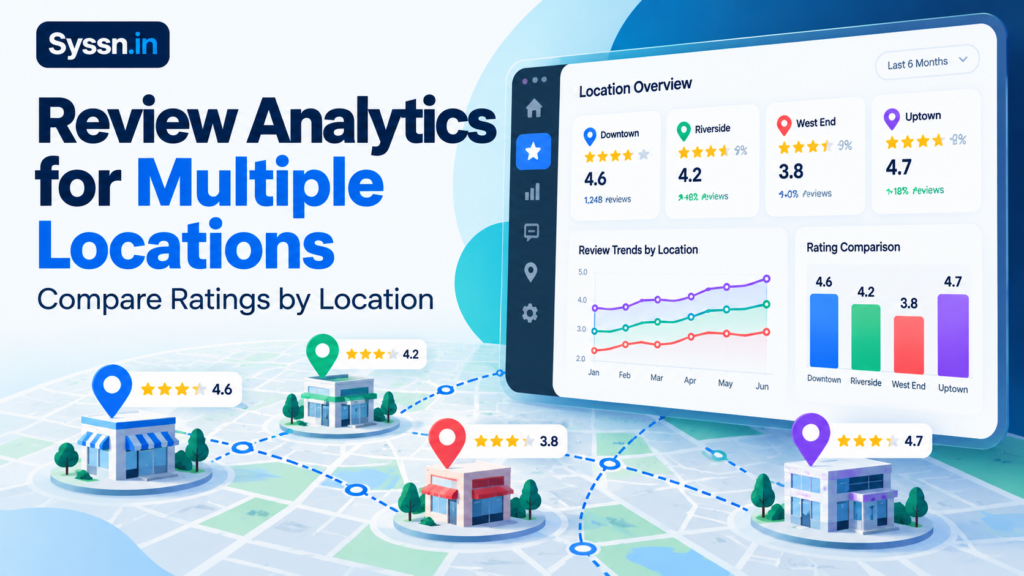
Review analytics for multiple locations involves measuring and comparing customer ratings, review volume, negative feedback, sentiment, and response performance across business branches. To compare locations fairly, use the same reporting periods and review platforms while accounting for differences in review counts and business activity.
Tools such as Synup, Birdeye, Reputation, SOCi, Yext, and ReviewTrackers can help centralize this process. However, a successful review analytics program does more than rank branches by star rating. It helps managers understand why customer experiences differ and which operational problems require attention.
This guide explains which metrics matter, how to compare locations accurately, how to build a reporting dashboard, and what to consider when choosing multi-location review analytics software.
What Is Review Analytics for Multiple Locations?
Multi-location review analytics is the process of collecting, organizing, and analyzing customer reviews across two or more business locations to evaluate customer experience and reputation performance.
Instead of relying on one company-wide reputation score, businesses evaluate each branch individually and compare results using consistent measurements.
For example, a restaurant franchise operating 75 locations might maintain a strong overall reputation while several branches regularly receive complaints about slow service, cleanliness, or incorrect orders.
A network-wide average could conceal those problems.
Location-based review analytics helps businesses answer three important questions:
- Which locations consistently receive stronger customer feedback?
- Which locations show signs of declining customer satisfaction?
- Which operational changes could address recurring customer complaints?
The process combines quantitative measurements, such as star ratings and review counts, with qualitative information from written feedback.
It also supports reputation management by helping businesses detect emerging complaints, assign follow-up responsibilities, and evaluate whether customer feedback improves after operational changes.
For organizations managing dozens or hundreds of branches, this creates a more consistent way to monitor customer experience across the network.
Which Review Metrics Matter Most Across Multiple Locations?
The most useful metrics are average rating, review volume, rating distribution, review recency, rating trends, response rate, response time, and recurring customer sentiment.
Each metric answers a different question.

1. Average Star Rating
Average star rating is a useful starting point for comparing ratings by location.
To calculate it, divide the total number of stars awarded by the number of rated reviews.
Average rating = Sum of star ratings ÷ Number of rated reviews
Suppose a location receives:
- 40 five-star reviews
- 30 four-star reviews
- 15 three-star reviews
- 10 two-star reviews
- 5 one-star reviews
Its average rating is:
[(40 × 5) + (30 × 4) + (15 × 3) + (10 × 2) + (5 × 1)] ÷ 100 = 3.90 stars
The calculation is straightforward, but interpretation requires additional context.
A lifetime average of 4.5 stars may hide a recent decline if the newest reviews are substantially more negative.
For that reason, track two values separately:
- Cumulative average rating: The location’s rating history across all available reviews.
- Recent average rating: The average among reviews first submitted during a defined period, such as the previous 30 or 90 days.
The recent average helps managers identify changes that may not yet be visible in the cumulative score.
Important: An internally calculated average may not exactly match the rating displayed by a review platform because of rounding, available records, review removals, or platform-specific processing. Label internal calculations clearly rather than presenting them as official platform scores.
2. Review Volume and Recency
Review volume measures how many reviews a business location has received.
A branch with a 4.9-star average from eight reviews should not automatically rank above one with a 4.7-star average from 600 reviews.
The smaller collection of reviews provides a less stable numerical average. However, even a large number of online reviews does not guarantee a representative sample of all customers, because people choose whether to leave feedback.
Review recency is also important.
A location may have hundreds of historical reviews but very little recent feedback. That makes it harder to understand its current customer experience.
A practical dashboard should show the number of newly submitted reviews in the previous 30 and 90 days, alongside the date of the newest review.
For businesses with reliable transaction data, managers can also examine review activity relative to customer volume. This helps distinguish low review activity caused by low business volume from an unusually low feedback rate.
3. Rating Distribution
Rating distribution shows how reviews are divided among one-, two-, three-, four-, and five-star categories.
It can reveal problems that average ratings conceal.
For example, two branches might both have an average rating of 4.2 stars.
One could receive mostly four- and five-star reviews, while the other receives numerous five-star reviews alongside a noticeable number of one-star complaints.
Those branches have similar averages but different customer feedback patterns.
A useful measure is the percentage of one- and two-star reviews:
Negative review share = (One-star reviews + Two-star reviews) ÷ Total rated reviews × 100
Track that percentage over comparable periods.
A rising share of negative reviews may provide an earlier warning than a declining cumulative average.
However, a single negative review should not automatically trigger a conclusion about location performance, particularly when review volume is low.
4. Review Response Rate and Response Time
Response rate measures how consistently a business replies to customer reviews.
Response rate = Reviews receiving a business reply ÷ Reviews eligible for response × 100
For example, if a location receives 100 eligible reviews and replies to 85, its response rate is 85%.
Response time measures how long the business takes to respond.
For operational reporting, the median response time is often useful because unusually late replies can distort the average.
For a fair comparison, define these metrics consistently:
- Which review platforms support replies?
- Are response rates based on reviews created during the reporting period?
- Are response times calculated from original submission dates?
- Are replies submitted after the reporting period included?
- How are unanswered reviews counted?
Do not treat an unanswered review as a zero-hour response.
If a location has no completed replies, its response-time metric should be shown as unavailable rather than zero.
A useful dashboard also distinguishes urgent negative feedback from routine positive reviews.
5. Customer Review Sentiment
Sentiment analysis examines what customers say in their written reviews.
For restaurants, recurring topics might include food quality, staff behavior, cleanliness, waiting times, pricing, and order accuracy.
For healthcare businesses, the main themes may be scheduling, communication, waiting periods, and administrative service.
A location could maintain a strong star rating while developing a recurring pattern of complaints about one particular issue.
Automated sentiment analysis can help group reviews into themes, but it has limitations.
Sarcasm, mixed opinions, industry-specific terminology, and short comments can lead to incorrect classification.
For example, a customer might write:
“The food was excellent, but we waited almost an hour.”
A simple positive-or-negative classification could miss the operational importance of the waiting-time complaint.
Managers should therefore inspect representative reviews rather than relying entirely on automated sentiment labels.
How Do You Compare Ratings Across Locations Fairly?
Fair comparisons use consistent review sources, reporting periods, and metric definitions while accounting for differences in review counts and operating conditions.
Step 1: Use Identical Reporting Periods
Compare all locations using the same period, such as the previous 30 or 90 complete days.
Avoid comparing one branch’s lifetime rating with another branch’s recent average.
For example, a location with a 4.7-star lifetime average and a 3.8-star recent average is experiencing a different situation from a location that has maintained 4.5 stars across both periods.
Use cumulative ratings for historical context and recent ratings for identifying changes.
Also distinguish the original review submission date from the latest update date. Edited reviews can otherwise appear in inconsistent reporting periods.
Step 2: Account for Different Review Counts
A difference between 4.8 stars from 10 reviews and 4.6 stars from 400 reviews is not sufficient evidence that the smaller location delivers a better customer experience.
When a business needs an internal comparison that accounts for review count, it can use an adjusted rating.
One option is a Bayesian-style weighted calculation:
Adjusted rating = (n × R + m × C) ÷ (n + m)
Where:
- R: Observed location average
- n: Number of rated reviews for that location
- C: Average rating used as the comparison-group baseline
- m: Predetermined prior strength, expressed as an equivalent number of reviews
This approach pulls small-sample ratings toward the comparison-group baseline.
For an illustrative calculation, suppose:
- A location has an average rating of 4.8 from 10 reviews.
- The comparison-group baseline is 4.4.
- The chosen prior strength is 20 reviews.
The adjusted rating becomes:
[(10 × 4.8) + (20 × 4.4)] ÷ 30 = 4.53
This does not change the location’s actual published rating of 4.8.
It provides an internal comparison measure that is less sensitive to very small review counts.
The prior strength should be selected consistently and documented before analyzing the results. It is not Google’s published rating formula, a confidence interval, or proof that customer experiences are statistically representative.
Step 3: Normalize Review Activity for Business Volume
Review counts alone can favor busy locations.
A restaurant serving 20,000 customers may naturally collect more reviews than a smaller restaurant serving 2,000 customers.
Where reliable transaction data is available, calculate:
Reviews per 1,000 transactions = New reviews ÷ Completed transactions × 1,000
Consider two branches:
| Metric | Branch A | Branch B |
|---|---|---|
| Completed transactions | 20,000 | 2,000 |
| New reviews | 50 | 30 |
| Reviews per 1,000 transactions | 2.5 | 15 |
Branch A collects more reviews overall, but Branch B receives substantially more reviews relative to transaction volume.
This may justify checking whether review request processes differ.
However, review activity is not a direct measurement of satisfaction. Customers may complete multiple transactions, not every customer has equal access to a review platform, and unsolicited reviews are not a random sample.
Use this metric to understand feedback collection, not to determine which branch has happier customers.
Step 4: Compare Similar Business Locations
Location characteristics affect how review data should be interpreted.
Where possible, compare branches with similar:
- Business categories and services
- Transaction or appointment volumes
- Store maturity
- Geographic market characteristics
- Seasonal operating patterns
- Customer service models
For example, a newly opened clinic with 25 reviews should not automatically be considered weaker than an established clinic with 800 reviews simply because it has fewer reviews.
Comparing locations within reasonable peer groups provides better operational context.
Step 5: Separate Review Platforms
Google, Yelp, Facebook, and industry-specific review platforms have different audiences, publishing policies, and review collection patterns.
Start by comparing Google ratings with other Google ratings.
Do the same separately for each relevant platform.
If the business creates an internal cross-platform reputation index, document the weighting method and clearly label the result as an internal score.
Do not describe a blended cross-platform rating as an official Google rating.
Also check whether reviews from different platforms refer to the same customer interaction before interpreting a combined volume figure.
Practical Example: Comparing Three Business Locations
Consider a fictional US restaurant chain comparing Google review performance from three branches over the same 90-day period.
Illustrative data only. The figures do not represent actual businesses or independently measured performance.
| Metric | Location A | Location B | Location C |
|---|---|---|---|
| Recent average rating | 4.8 | 4.5 | 4.0 |
| New reviews | 12 | 120 | 100 |
| One- and two-star share | 0% | 8% | 30% |
| Response rate | 50% | 96% | 42% |
| Median response time | 3 days | 12 hours | 5 days |
Location A: Strong Rating, Limited Recent Feedback
Location A has the highest recent average at 4.8 stars.
However, it received only 12 reviews during the reporting period.
That rating is encouraging, but a small number of additional reviews could materially change its average.
Its response rate of 50% also suggests that some reviews are not receiving replies.
The next step is to examine whether low review volume reflects limited customer traffic, inconsistent feedback requests, or another factor.
Location B: Strong Performance Across Several Metrics
Location B has a slightly lower average rating of 4.5 stars, but it received 120 reviews.
It also has a relatively low negative review share, high response coverage, and a short median response time.
These indicators make it a useful comparison location for examining operational practices.
Managers could investigate how the branch handles customer complaints, assigns review responses, and maintains service consistency.
Those practices should be evaluated before assuming they can be transferred successfully to other branches.
Location C: Clear Investigation Priority
Location C has the lowest recent average, with 30% of reviews carrying one or two stars.
Its response rate is also comparatively low, and its median response time is five days.
Several signals therefore point toward a possible customer experience problem.
The appropriate next step is to read its negative reviews and identify recurring themes.
If customers repeatedly describe long waiting times, poor service, or incorrect orders, managers should investigate the underlying causes.
The example demonstrates why location rankings based only on star ratings are insufficient.
A location deserves attention when multiple indicators suggest a meaningful problem, even if its historical rating remains reasonably strong.
How to Track Google Reviews Across Multiple Locations
Businesses can track Google reviews manually through Google Business Profile, retrieve records through approved API access, or use specialized review management software.
The right approach depends on location count, available technical resources, and reporting requirements.
Option 1: Use Google Business Profile
Start by confirming that the organization has appropriate management access to each location’s verified Google Business Profile.
Then review each branch’s customer ratings, recent reviews, negative feedback, and unanswered reviews.
Record the information against a consistent location identifier, such as an internal store code.
Google’s Business Profile performance reporting documentation explains how eligible businesses can view customer interactions and download performance data for multiple profiles.
However, Business Profile performance reporting primarily covers discovery and interaction metrics, such as profile views, website clicks, calls, and direction requests.
Those metrics are useful for local marketing, but they do not replace dedicated review analytics.
For smaller networks, a spreadsheet maintained alongside direct review monitoring may be sufficient.
Option 2: Use the Google Business Profile API
Businesses and developers with approved access can use the Google Business Profile reviews API to retrieve review records for verified locations they are authorized to manage.
The documented reviews endpoint provides information such as individual review records, average rating, total review count, and pagination details.
A technical implementation can use this information to calculate location-specific metrics and create standardized reports.
However, API implementation requires more than retrieving a list of reviews.
Teams should account for:
- Authentication and permissions
- Pagination and applicable usage limits
- Review creation and update timestamps
- Edited or removed reviews
- Duplicate imports
- Location identifiers
- Missing review text and rating-only feedback
- Publisher-specific data restrictions
For accurate historical reporting, retain properly governed snapshots and document how edits, removals, and late-arriving records affect calculations.
Option 3: Use Specialized Review Analytics Software
Dedicated software can reduce manual work involved in monitoring multiple review platforms, consolidating location data, comparing performance, and assigning follow-up actions.
It becomes particularly useful when regional managers oversee many branches or when different departments share responsibility for review responses.
Before choosing a product, confirm whether it supports the exact publishers, location groups, reporting metrics, and response workflows required.
Integration availability does not necessarily mean every review source supports the same reporting or reply features.
For related operational guidance, see Syssn’s multi-location review management weekly checklist.
How to Build a Multi-Location Review Analytics Dashboard
A useful dashboard should give leadership a network-wide overview while allowing regional and local managers to investigate specific branches.
It should also make the source and reporting period of every metric clear.
Step 1: Centralize Review Records
Collect reviews from the platforms most relevant to the business.
For many US businesses, this includes Google, with additional sources selected according to industry and customer behavior.
Avoid adding platforms simply to increase the amount of data.
Step 2: Assign Consistent Location Identifiers
Create a master location list containing internal store IDs, business names, regions, and relevant platform profile identifiers.
This helps prevent reviews from being assigned to the wrong branch or duplicated because of inconsistent business names.
Step 3: Standardize Reporting Definitions
Define how the dashboard calculates ratings, negative review percentages, new review counts, response rates, and response times.
Specify whether the reporting period uses original submission dates or updated timestamps.
Document any exclusions, missing data, and unsupported publisher capabilities.
Step 4: Create Location Comparison Views
Build tables or charts that show each location’s performance alongside network or regional averages.
Use consistent date ranges and give managers the ability to filter by region, location type, and review source.
Step 5: Add Trend Indicators
Include previous-period comparisons to highlight improving or declining performance.
For example, a branch’s current 30-day average can be compared with the preceding 30-day average, provided review volume is sufficient to make the comparison useful.
Show review counts with trend changes so that small samples are not overstated.
Step 6: Enable Review-Level Investigation
Managers should be able to move from an unusual metric to the actual reviews behind it.
A rising negative review percentage is more actionable when managers can see whether complaints involve staffing, scheduling, service quality, billing, or another recurring issue.
Example Review Analytics Dashboard
| Dashboard field | Recommended information |
|---|---|
| Location identifier | Unique store or branch ID |
| Region | Geographic or operational group |
| Review source | Google, Yelp, or another platform |
| Reporting period | Previous 30 or 90 complete days |
| Average rating | Period-specific average and cumulative rating |
| Review volume | New reviews and cumulative review count |
| Negative review share | Percentage of one- and two-star reviews |
| Response performance | Response rate and median response time |
| Sentiment themes | Recurring positive and negative topics |
| Trend | Current period compared with previous period |
| Action owner | Manager responsible for investigation |
| Action status | Open, in progress, or resolved |
For businesses building their first dashboard, monthly reporting is a practical starting point.
Use more frequent monitoring for urgent complaints and maintain historical data so managers can evaluate changes over time.
Data quality matters as much as dashboard design. A polished dashboard can still produce misleading conclusions if connected sources are incomplete, review timestamps are inconsistent, or location identifiers are incorrect.
How Do You Identify Underperforming Locations?
The strongest warning signs include declining recent ratings, increasing negative review percentages, recurring complaints, and unresolved customer feedback.
A location should move higher in the investigation queue when several indicators worsen together.
For example, a branch might have a cumulative rating of 4.3 stars while its 30 most recent reviews average only 3.5 stars.
That difference is worth investigating, particularly if the latest reviews repeatedly identify the same service problem.
However, not every decline signals a sustained operational issue. Review counts, unusual incidents, seasonality, and the underlying written feedback should be considered.
A Practical Escalation Framework
| Priority | Example trigger | Recommended action |
|---|---|---|
| Critical | Repeated safety-related or serious service complaints | Immediate escalation to the appropriate operational team |
| High | Sharp rating decline alongside recurring negative themes | Regional manager investigation |
| Medium | Falling response coverage or unusually low review activity | Review workflows and staff responsibilities |
| Low | Stable ratings with occasional isolated complaints | Routine monitoring |
These are suggested operational categories, not universal industry thresholds.
Safety-related complaints should be investigated according to the organization’s applicable legal, regulatory, and incident-response procedures rather than treated as ordinary reputation issues.
Once a problem is identified, the business should:
- Assign a responsible manager.
- Examine representative reviews and relevant operational records.
- Identify a plausible underlying cause.
- Implement a specific corrective action.
- Compare subsequent feedback with the baseline.
- Document whether the issue appears to be improving.
For example, if customers repeatedly mention excessive waiting times, managers may need to investigate staffing levels, appointment scheduling, or service capacity.
Simply increasing the number of review responses would not solve the underlying problem.
Six Review Analytics Software Options for Multi-Location Businesses
Review analytics software can centralize feedback and reporting, but platforms differ in their capabilities, location-management features, automation, and commercial terms.
1. Synup

Best for: Businesses and agencies seeking centralized review comparisons across multiple locations.
Synup provides review monitoring, location-level analytics, sentiment analysis, and response management capabilities.
Its location leaderboard documentation describes a consolidated view of reviews, average ratings, response coverage, sentiment, recent activity, and location health indicators.
Managers can examine rating changes, identify locations with unanswered negative reviews, and filter for branches showing declining performance or limited recent feedback.
This makes Synup relevant when a business needs to combine location comparisons with day-to-day reputation management.
Differentiator: A location leaderboard connects network-level reporting with individual review queues, helping managers identify where attention is needed.
Limitations: Buyers should verify which review sources are connected, how reporting metrics are calculated, and what export, permission, and integration capabilities their subscription includes.
Pricing: Synup publishes location-based plans. Check the current rate card and any usage-based charges, location allowances, or review-related entitlements before comparing total costs.
Choose it if: Your main requirement is comparing locations while coordinating review monitoring and response activities.
2. Birdeye

Best for: Organizations needing detailed review reporting alongside wider customer experience management.
Birdeye provides review monitoring, rating trends, location comparisons, sentiment reporting, and response performance measurements.
Its Review Reports documentation describes reports covering review distribution, response times, review sources, sentiment, and location-level performance.
Businesses can use these reports to identify branches with falling ratings, compare feedback patterns, and examine how consistently reviews are handled.
Differentiator: Birdeye offers a range of dedicated reports that can support both operational monitoring and broader customer experience analysis.
Limitations: Certain capabilities have account-type restrictions. Birdeye’s documentation identifies enterprise requirements for particular by-location reports, while relative location ranking is limited to qualifying multi-location or enterprise accounts.
Pricing: Request current pricing and verify which reporting features, locations, and products are included in the proposed subscription.
Choose it if: Your organization requires detailed review analytics within a wider customer experience reporting program.
3. Reputation
Best for: Enterprise businesses managing reputation and customer feedback across large location networks.
Reputation provides centralized review monitoring, response management, and analytics for evaluating location performance.
Its product offering documentation describes review filtering by location, website, sentiment, and date, together with analysis of review volume, average ratings, and sentiment trends.
These capabilities can help regional managers identify recurring customer experience issues across different branches.
Differentiator: Reputation connects review management with broader reputation and customer experience workflows, making it relevant to organizations that need oversight across several operational teams.
Limitations: Buyers should examine how location hierarchies, reporting configurations, data permissions, and operational follow-up processes will work in their specific implementation.
Pricing: Obtain a current proposal covering required locations, analytics functionality, onboarding, and any additional modules.
Choose it if: Your business needs a coordinated enterprise reputation program with location-specific reporting and structured follow-up.
4. SOCi

Best for: Franchise groups and distributed brands combining review management with local marketing operations.
SOCi offers multi-location review monitoring, AI-assisted response workflows, and customer feedback analysis.
Its Genius Reputation product documentation describes monitoring across review platforms, brand-defined response rules, escalation workflows, and analysis of recurring customer feedback themes.
The product also describes identifying sentiment patterns by location and region, helping businesses understand which service issues are recurring across their networks.
Differentiator: SOCi emphasizes automating review response workflows while maintaining centralized brand oversight and location-level operational visibility.
Limitations: Businesses should evaluate response approval settings, escalation safeguards, topic-analysis accuracy, and whether the available reports meet their specific benchmarking requirements. Automated responses to sensitive complaints warrant particular oversight.
Pricing: Request a current proposal covering locations, reputation management, analytics, and automation features.
Choose it if: Your organization wants review workflows integrated with a broader distributed local marketing program.
5. Yext

Best for: Organizations managing customer reviews alongside a broader multi-location digital presence.
Yext provides centralized review monitoring and analytics across supported publishers.
Its Reviews Insights documentation describes average rating, review volume, response time, response rate, review themes, and filtering by publisher, date range, and business entity.
These capabilities allow managers to compare location-level feedback, investigate recurring topics, and monitor performance changes.
Differentiator: Review analytics can be connected with Yext’s broader location and business information management environment.
Limitations: Publisher support and response capabilities vary. Review reporting also depends on metric definitions, subscriptions, and user permissions. Buyers should confirm how the platform handles created versus updated review dates.
Pricing: Verify applicable product subscriptions, location terms, analytics entitlements, and required add-ons.
Choose it if: Your business wants review analytics connected with location information and broader digital presence management.
6. ReviewTrackers
Best for: Businesses prioritizing review monitoring and customer feedback intelligence.
ReviewTrackers provides review monitoring, reputation reporting, competitive analysis, and customer experience analytics.
Its product website describes tools for identifying review trends, monitoring customer feedback, and turning recurring issues into operational insights.
The relationship provides a potential connection between review monitoring and broader customer experience analysis, depending on the products implemented.
Differentiator: ReviewTrackers places emphasis on reputation data and customer feedback analysis, making it relevant to businesses that want to investigate the reasons behind rating changes.
Limitations: Buyers should establish which ReviewTrackers and InMoment capabilities are included in their proposed solution and whether broader experience analytics require additional products or integrations.
Pricing: Request current pricing, reporting entitlements, integration details, and relevant implementation terms.
Choose it if: Your primary objective is investigating customer review trends and connecting findings to customer experience improvement.
For a wider comparison of review management software, see Syssn’s best review management tools guide.
What Should You Ask a Review Analytics Software Vendor?
A product demonstration is more useful when vendors are asked to show how their platform handles realistic reporting situations.
Before selecting software, ask:
- Can the platform compare 30-day and 90-day ratings across all our locations using the same definitions?
- Can it identify branches with declining ratings even when their cumulative ratings remain high?
- Which review sources support monitoring, responses, exports, and sentiment analysis?
- Can managers distinguish original review dates from edited or updated reviews?
- Can we group locations by region, franchise ownership, or business type?
- What happens to historical reporting when reviews are removed or integrations stop working?
- Can location managers access their own branches while regional leadership sees a wider portfolio?
- Which analytics features are included in the quoted price, and which require additional subscriptions?
Ask vendors to demonstrate these workflows using representative data.
A simple leaderboard is useful, but the ability to investigate the reviews behind a performance change is more important for operational decisions.
How to Turn Review Analytics Into Customer Experience Improvements
Review analytics becomes valuable when businesses use the findings to improve customer experiences rather than concentrating only on higher star ratings.
A practical improvement process has four stages.
1. Identify the Problem
Use rating trends, negative review percentages, sentiment analysis, and response activity to find locations needing attention.
Focus on recurring issues and meaningful changes rather than isolated scores.
2. Investigate the Cause
Read representative reviews and compare feedback with relevant operational information.
For example, repeated complaints about long waiting times might require examining employee schedules, customer traffic, service capacity, or appointment procedures.
Reviews can suggest where to investigate, but they do not establish the cause by themselves.
3. Implement Corrective Actions
Assign a manager and document the operational changes being made.
Depending on the problem, actions could include employee training, revised scheduling, improved service procedures, or clearer customer communication.
The corrective action should address the underlying experience rather than only the public review.
4. Measure Subsequent Results
Compare new reviews with the baseline using the same reporting rules.
Track whether the relevant complaint theme becomes less frequent and whether operational measures also improve.
Interpret results carefully, especially when review volume is low or several changes occur at the same time.
Google’s review management guidance explains how verified businesses can read and reply to customer reviews.
Thoughtful public responses can demonstrate that a business takes feedback seriously, but they do not replace resolving service problems.
Google also states in its local ranking guidance that more reviews and positive ratings can help local rankings. Google’s local results are primarily based on relevance, distance, and prominence.
Improving review metrics does not guarantee a specific ranking position.
For businesses connecting customer feedback analysis with broader local search performance, Syssn’s local SEO tools for multiple locations comparison offers additional context.
How to Improve Review Collection Without Manipulating Ratings
Review analytics is most useful when customer feedback reflects genuine experiences.
Businesses should make review requests consistently without selecting customers based on whether they are likely to leave positive feedback.
Google’s guidance on requesting reviews allows businesses to encourage customers to share genuine experiences, including by providing review links or QR codes.
However, Google’s content policies prohibit review manipulation.
Businesses should not:
- Offer payments, discounts, gifts, or other incentives in exchange for Google reviews.
- Ask only satisfied customers to submit public reviews.
- Discourage customers from leaving negative feedback.
- Pressure customers to leave reviews or specify what they must write.
- Require employees to obtain particular review ratings or review content.
- Arrange fake reviews or reviews influenced by undisclosed conflicts of interest.
The US FTC Consumer Reviews and Testimonials Rule also addresses deceptive review practices, including fake reviews, certain forms of review suppression, and incentives conditioned on a particular positive or negative sentiment.
The FTC’s rule does not impose the same blanket restriction on all review incentives as Google’s platform policy. Businesses must comply with both applicable law and the policies of the review platforms they use.
A practical review collection process should prioritize genuine feedback, accurate reporting, and improving customer experiences.
The objective is not to engineer higher ratings. It is to understand what customers experience and give future customers a reliable picture of the business.
Frequently Asked Questions
1. What Is the Best Way to Analyze Customer Reviews Across Multiple Locations?
Use a centralized dashboard tracking average ratings, review volume, rating distribution, negative review percentages, response performance, and recurring feedback themes.
Compare identical reporting periods and review sources. Prioritize investigation based on recent changes and repeated complaints rather than a single overall reputation score.
2. How Often Should Businesses Compare Review Ratings Across Locations?
Monthly comparisons are a practical starting point, supported by more frequent monitoring for urgent complaints and emerging problems.
Businesses receiving substantial daily review activity may benefit from weekly or daily trend checks.
Quarterly analysis can help evaluate whether operational improvements are associated with sustained changes in customer feedback.
3. How Do You Calculate an Overall Average Rating Across Locations?
To calculate a combined average based on individual reviews, use a review-count-weighted mean.
Network average rating = Sum of (Location average × Location review count) ÷ Total review count
For example, suppose:
- Location A has a 4.0-star average from 100 reviews.
- Location B has a 5.0-star average from 20 reviews.
The combined average is:
[(4.0 × 100) + (5.0 × 20)] ÷ 120 = 4.17 stars
This is different from a simple average of the two location averages, which would be 4.5 stars.
Both calculations can serve different purposes.
The weighted average describes the combined review-level rating, while the unweighted average gives each location equal influence.
Use unrounded source averages or individual ratings where possible to avoid rounding errors.
4. How Can Customer Sentiment Analysis Improve Location Performance?
Sentiment analysis groups written reviews into recurring topics, such as service quality, staff behavior, scheduling, cleanliness, pricing, or product reliability.
Managers can compare these themes across branches to investigate where particular problems appear more frequently.
The findings become useful when businesses validate them against actual reviews, investigate operational causes, and measure the effects of corrective actions.
5. What Should a Monthly Multi-Location Review Report Include?
A monthly report should include network-wide performance, location comparisons, rating changes, review counts, negative review percentages, recurring sentiment themes, and review response performance.
It should also identify locations requiring investigation, actions completed during the previous period, unresolved issues, and responsible managers.
Include reporting periods and data source definitions so results can be interpreted consistently.
6. Can Review Analytics Help Franchises Improve Performance?
Yes. Franchise businesses can use review analytics to compare customer feedback, identify recurring service issues, and examine operational practices at stronger-performing locations.
However, fair comparisons should account for review sample sizes, location maturity, transaction volume, market differences, and variations in services.
The objective should be improving service consistency rather than encouraging competition based solely on star ratings.
Final Takeaway
Effective review analytics for multiple locations requires more than comparing average star ratings.
Businesses should evaluate recent ratings, review volume, rating distribution, response performance, and customer sentiment together, using consistent reporting periods and platform-specific data.
A location with the lowest cumulative rating is not necessarily the highest priority. Sudden declines, recurring complaints, and unresolved negative feedback may reveal more urgent problems.
Whether a business uses spreadsheets, Google Business Profile, or specialized review analytics software, the most useful approach remains consistent: measure performance fairly, investigate the customer experience behind the numbers, assign corrective actions, and monitor subsequent results.
The purpose of multi-location review analytics is not simply to improve how a business looks online. It is to help every location deliver a better customer experience.


[…] For more detail, see Syssn’s guide to review analytics across multiple locations. […]
[…] For a practical reporting framework, see Review Analytics for Multiple Locations: Compare Ratings by Location. […]