
Local SEO Tools for Multiple Locations: What Each One Does Best in 2026

Managing local SEO across multiple locations requires accurate business listings, optimized Google Business Profiles, location-level rank tracking, customer review management, and consistent reporting. The right software helps teams coordinate these activities without updating every branch manually.
Eight local SEO tools worth comparing in 2026 are Synup, BrightLocal, Semrush Local, Yext, Uberall, Moz Local, Whitespark, and Local Falcon. BrightLocal is particularly useful for auditing and reporting. Synup combines listings, reviews, local visibility, and automation. Yext and Uberall address complex multi-location operations, while Local Falcon specializes in geographic rank tracking.
You do not necessarily need separate subscriptions for listings, reviews, and rankings. Several platforms combine these capabilities, although their coverage and subscription requirements differ.
This guide compares eight platforms, examines their published pricing and limitations, and explains how to choose tools based on your location count, team structure, and operational needs.
What Are Local SEO Tools for Multiple Locations?
Local SEO tools for multiple locations are software platforms that help businesses manage their presence in geographically relevant search results across multiple branches, stores, offices, or service areas.
Instead of updating every location separately, businesses can use these tools to coordinate several important activities:
- Business listing management: Maintaining accurate names, addresses, phone numbers, operating hours, and other location details across relevant directories.
- Google Business Profile management: Updating business information, managing eligible profiles, and monitoring performance.
- Local rank tracking: Measuring how individual branches appear in Google Search and Google Maps.
- Citation management: Finding, correcting, and monitoring business information across directory websites.
- Review management: Monitoring feedback, organizing responses, requesting genuine customer reviews, and analyzing reputation trends.
- Local SEO reporting: Comparing search visibility, engagement, and other performance indicators across locations.
Consider a restaurant chain with 75 branches across several states.
Without centralized software, its marketing team may need to correct holiday hours, monitor reviews, identify listing errors, and check search rankings separately for every restaurant.
A multi-location SEO platform can consolidate much of that work. However, the software still needs reliable business information, clear responsibilities, and ongoing monitoring.
It is also important to distinguish managing listings from improving rankings.
According to Google’s local ranking guidance, local rankings depend primarily on relevance, distance, and prominence. Complete and accurate business information helps Google understand a business and helps customers find it, but purchasing listing software does not guarantee better rankings.
8 Local SEO Tools for Multiple Locations at a Glance
The following tools address different aspects of multi-location SEO. They are listed by use case, not by independently measured product performance.

The biggest distinction is between broad location management platforms and specialist SEO tools.
BrightLocal and Semrush Local are useful when rank analysis, auditing, and SEO reporting are central requirements. Synup, Yext, and Uberall provide broader location marketing workflows.
Moz Local focuses on relatively straightforward local presence management. Whitespark and Local Falcon offer more specialized capabilities that may complement another platform.
How We Evaluated These Local SEO Tools
This comparison focuses on the needs of US businesses and agencies managing multiple physical locations.
The assessment uses seven criteria:
- Listings coverage: Support for distributing, updating, and monitoring business information across important publishers.
- Google Business Profile management: Capabilities for maintaining profiles and managing location-level updates.
- Local rank tracking: Availability of keyword tracking, geographic rank grids, and competitor analysis.
- Review management: Support for monitoring feedback, organizing responses, and managing review requests.
- Multi-location scalability: Bulk operations, permissions, location organization, and enterprise controls.
- Reporting and automation: Dashboards, scheduled reports, integrations, and workflow automation.
- Pricing transparency: Public plan costs, location allowances, usage limits, and potential additional charges.
Product information and pricing were reviewed against available vendor documentation and published pricing materials in October 2026.
This is a documentation-based editorial comparison, not a hands-on software benchmark. The products were not tested under identical conditions, and no comparative performance scores have been assigned.
Published prices are expressed in US dollars where available. Prices, promotional terms, included features, and contract conditions can change.
8 Best Local SEO Tools for Multiple Locations: Detailed Reviews
1. BrightLocal — For Local SEO Auditing and Agency Reporting
Best for: SEO agencies, consultants, and businesses that need detailed visibility into location-level search performance.
What it does: BrightLocal combines local rank tracking, citation monitoring, Google Business Profile auditing, local search analysis, and reporting. It also offers listing synchronization and reputation capabilities through specific subscription plans.
BrightLocal is particularly useful when a team needs to diagnose why certain locations perform differently in local search.
Its Local Rank Tracker measures location-specific keyword performance, while Local Search Grid helps visualize rankings across geographic points.
Key features and advantages
BrightLocal provides tools for auditing business listings, monitoring citations, checking Google Business Profiles, and comparing local search performance with competitors.
Its reporting tools support agencies that need to organize data for different clients and prepare recurring performance reports.
The platform offers three primary subscription levels:
- Track: Local SEO audits, rank monitoring, citation analysis, and visibility tracking.
- Manage: Adds active listings synchronization and Google Business Profile posting features.
- Grow: Adds broader review monitoring, response, and review generation capabilities.
BrightLocal also offers Citation Builder as a separate pay-as-you-go service.
This structure allows businesses to purchase monitoring capabilities without automatically paying for every location management feature.
Limitations
BrightLocal’s lower-tier subscription does not include the same active listing management and reputation functionality as its higher tiers.
Citation building is purchased separately rather than provided as an unlimited service.
Organizations with complex franchise structures should also examine the available permission controls, location organization, and operational workflows before adopting the platform.
Pricing
BrightLocal’s published monthly prices for one location are:
- Track: $41/month
- Manage: $54/month
- Grow: $65/month
Annual billing provides lower effective monthly rates. Pricing also changes according to the number of managed locations.
Choose BrightLocal if: Your priority is understanding rankings, auditing local SEO issues, tracking citations, and producing location-level or client reports.
2. Synup — For Centralized Multi-Location Marketing Management
Best for: Multi-location businesses, agencies, and franchise operators looking to manage listings, reviews, visibility, and marketing activities through a shared platform.
What it does: Synup combines business listing management, review monitoring, local search tracking, social publishing, local content tools, and AI-assisted workflows.
Its approach is broader than managing directory listings alone.
Synup is designed to coordinate routine marketing activities across locations while providing centralized information management.
Key features and advantages
Synup supports the distribution and updating of business information across its supported publisher network.
Businesses can manage location details, monitor customer reviews, organize responses, and analyze local search visibility.
Its Sydekick AI agent is designed to assist with activities such as listings updates, review workflows, social publishing, audits, and reporting.
The platform also offers local landing-page functionality and AI-search-related visibility capabilities.
For agencies, white-label functionality is available on eligible subscriptions.
A notable characteristic of Synup’s current pricing model is that its plans include a common feature set while increasing location capacity, agent credits, and parallel agent activity across higher tiers.
This may appeal to organizations that want to coordinate several marketing functions without purchasing unrelated subscriptions.
Limitations
Synup’s plan economics depend partly on location allowances and metered agent activity.
The company states that agent tasks such as listing updates, review replies, publishing, rankings, and audits draw from monthly credits. Organizations with high automation volumes should estimate how quickly those credits may be used.
Some functions continue operating when agent credits are exhausted, but credit-metered tasks pause until additional capacity becomes available.
White labeling is available from Premium upward. Organizations managing more than 50 locations need an enterprise arrangement.
Buyers should also distinguish standard subscription allowances from promotional credit allocations.
Pricing
Synup publishes the following monthly plans:
| Plan | Price | Included locations |
|---|---|---|
| Solo | $49/month | 1 |
| Premium | $299/month | Up to 10 |
| Pro | $499/month | Up to 25 |
| Scale | $899/month | Up to 50 |
| Enterprise | Custom quotation | More than 50 |
The plans differ in credit capacity, agent concurrency, and infrastructure arrangements.
Synup’s pricing page also describes special launch-related credit allowances. Buyers should confirm the allowance applicable to a new account rather than assuming a promotional allocation remains available indefinitely.
Choose Synup if: Your organization wants to coordinate business listings, reputation management, local search analysis, publishing, and automation through one platform.
Official source: Synup pricing and features
3. Semrush Local — For Combining Local SEO With Broader SEO Workflows

Best for: Marketing teams and agencies that want local search management alongside technical SEO, keyword research, and competitive analysis.
What it does: Semrush Local provides Google Business Profile optimization, geographic rank tracking, listing management, and review-related features through its Local subscription plans.
It can operate as a standalone local marketing product or alongside other Semrush tools.
Key features and advantages
Semrush Local includes Map Rank Tracker, which measures Google Maps visibility across geographic locations.
This matters because a business may appear prominently for a keyword in one neighborhood but rank differently several miles away.
The Local Base plan includes Google Business Profile automation, AI-assisted publishing, review auto-replies, and a limited Map Rank Tracker credit allowance.
Local Pro adds listing distribution, broader review management and generation features, more advanced profile management, and a larger rank tracking allowance.
Teams using Semrush for broader SEO campaigns may find this combination convenient because local visibility can be examined alongside other search marketing activities.
Semrush Local also supports organizations managing multiple locations, although each location requires appropriate subscription capacity.
Limitations
Semrush Local Base is not equivalent to a complete listings and reputation management package.
While it includes some automated review response functionality, broader listing distribution and review management capabilities require Pro.
Costs also increase as additional locations are added.
Organizations with large portfolios should confirm account limits, user permissions, reporting features, and custom business pricing.
Pricing
Published annual-billing rates are:
- Local Base: $30 per location per month
- Local Pro: $60 per location per month
- Local Business: Custom pricing
The monthly equivalents above require annual billing.
Choose Semrush Local if: You need local profile optimization and map rank tracking within a broader SEO workflow.
4. Yext — For Enterprise Location Data and Listings Governance

Best for: National brands, enterprise retailers, healthcare networks, financial institutions, and businesses managing complex location information.
What it does: Yext provides centralized location data management, publisher distribution, review management, local pages, analytics, and enterprise workflows.
Its Knowledge Graph helps organizations maintain structured information for use across connected digital experiences.
Key features and advantages
Yext emphasizes centrally controlled business information and direct publisher integrations.
The company advertises more than 200 direct integrations, although supported publishers, fields, and geographic coverage should be assessed for each organization’s requirements.
Enterprise teams can manage business addresses, categories, operating hours, media, and other location attributes within a consistent data structure.
Yext also provides governance functionality such as permissions, approval workflows, and audit trails.
These controls become important when regional marketers, agencies, operations teams, and headquarters all need different levels of access.
The platform also supports local pages and location-level analytics.
For organizations managing hundreds or thousands of branches, structured information and controlled updates can be more important than adding another standalone rank tracker.
Limitations
Yext’s broader enterprise capabilities may be unnecessary for a small business whose primary requirement is inexpensive keyword monitoring.
Its commercial arrangements also require careful evaluation.
Buyers should confirm which products are included, which services cost extra, and what happens to listing synchronization and integrations if the contract ends.
Publisher coverage should be assessed based on relevant directories rather than simply the total number advertised.
Pricing
Enterprise pricing is generally provided through custom quotations.
Request a detailed breakdown covering location count, required modules, integrations, onboarding, support, and contractual commitments.
Choose Yext if: Your organization needs structured location data, enterprise governance, and controlled publisher distribution across a large business network.
5. Uberall — For Franchise and Multi-Location Marketing Operations

Best for: Franchise businesses, restaurant groups, retailers, and distributed marketing teams coordinating many locations.
What it does: Uberall combines location data management, business listings, customer reviews, local social publishing, analytics, and additional location marketing capabilities.
Its product structure emphasizes maintaining a consistent brand presence while supporting activity at individual locations.
Key features and advantages
Uberall allows businesses to manage important location information, including operating hours, addresses, contact details, and media.
Its listings functionality supports distribution to connected publishers and tools for addressing duplicates or data inconsistencies.
Review management capabilities help organizations monitor feedback, coordinate responses, and analyze customer interactions.
Local social publishing supports campaigns and communications relevant to individual stores or regions.
Uberall offers three main packages:
- Show Up: Core location data and listings capabilities.
- Stand Out: Adds review management functionality.
- Connect: Adds local social publishing and broader engagement features.
Additional offerings include local pages, store locators, enhanced analytics, collaboration capabilities, and GEO Studio for AI-search-related measurement.
These features can be useful where headquarters and regional teams need to coordinate marketing activity while maintaining brand consistency.
Limitations
Not every Uberall capability is included in every subscription package.
Enhanced review features, analytics, collaboration controls, and location pages may require particular plans or add-ons.
Businesses should also examine approval permissions, publisher coverage, and integration requirements during procurement.
For an organization that only needs citation research or occasional ranking reports, Uberall’s wider marketing capabilities may exceed its practical requirements.
Pricing
Uberall publishes its package structures but does not provide a single universal price covering every configuration.
Organizations should request a quote based on location count, required capabilities, add-ons, and support needs.
Choose Uberall if: Your organization needs coordinated listings, reputation management, local social publishing, and collaboration across distributed locations.
6. Moz Local — For Straightforward Local Listing Management
Best for: Small and medium-sized businesses that want to manage listings and selected reputation activities without adopting a large enterprise marketing platform.
What it does: Moz Local helps businesses maintain consistent location information across supported directories and manage aspects of their local presence.
Moz Local is a separate product from Moz Pro, which focuses on broader SEO analysis and research.
Key features and advantages
Moz Local emphasizes keeping business information consistent across relevant platforms.
Organizations can manage addresses, contact information, operating hours, and other business attributes while monitoring the health of their listings.
The platform also offers capabilities related to reviews, posting, reporting, and local visibility, depending on the plan.
Its Local Grid functionality helps businesses assess location-sensitive map visibility.
For an organization whose main problem is incorrect directory information, Moz Local may offer a more focused approach than a broad marketing operations system.
It is also worth considering for small teams that want a relatively simple process for managing several locations.
Limitations
Moz Local’s plan tiers do not provide identical functionality.
Review response capabilities, social publishing, and some AI-assisted features may require higher tiers or additional purchases.
Moz Local and Moz Pro are also separate subscriptions. Businesses needing technical site audits, backlink research, and broader SEO keyword analysis may need additional software.
Larger organizations should confirm enterprise management, integration, and reporting requirements before making a purchasing decision.
Pricing
Published US monthly plan prices are commonly listed as:
- Lite: $20 per location
- Preferred: $30 per location
- Elite: $40 per location
Annual billing may offer lower effective monthly costs. Confirm the current rates and included features on the vendor’s purchasing page.
Choose Moz Local if: You want accessible listings management and selected reputation features without investing in extensive enterprise marketing workflows.
7. Whitespark — For Citation Discovery and Local SEO Research
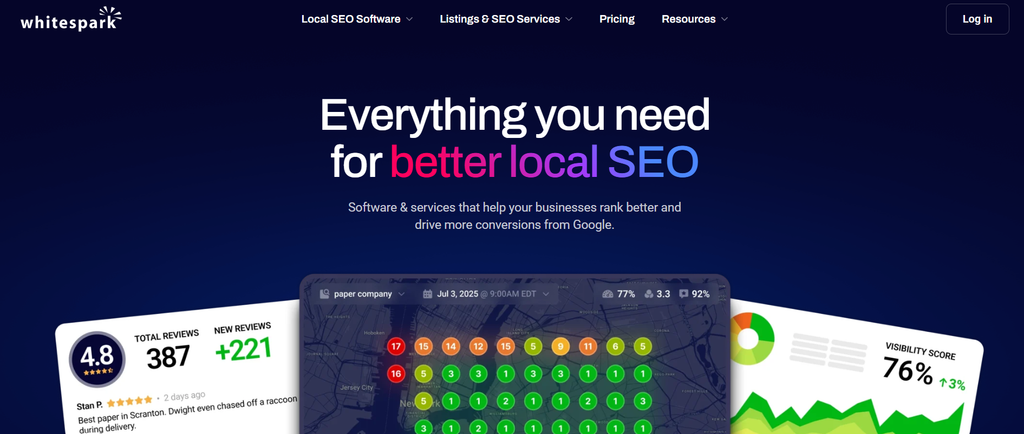
Best for: SEO consultants, agencies, and organizations focused on citation opportunities, directory research, and specialized local SEO analysis.
What it does: Whitespark sells a collection of local SEO products and services, including Local Citation Finder, Local Rank Tracker, Local Ranking Grids, and Google Business Profile management tools.
Rather than requiring every customer to purchase one broad platform, Whitespark offers products individually.
Key features and advantages
Whitespark’s Local Citation Finder helps businesses identify directory opportunities and evaluate citations associated with competitors.
Users can organize citation prospects, track campaigns, and monitor progress.
Whitespark also provides citation-building services for businesses that want assistance with submissions and cleanup.
Its ranking products support local keyword monitoring and geographic analysis, while its Local Platform provides Google Business Profile management capabilities.
This modular approach is useful when a business already has a primary listings platform but needs more detailed citation research or specialized ranking analysis.
For example, an agency might use one product for daily listings management and Whitespark’s Citation Finder for periodic citation research.
Limitations
Whitespark is not a single subscription containing every product it offers.
Citation research, ranking tools, Google Business Profile management, and citation-building services have separate pricing arrangements.
Businesses looking for one unified dashboard covering directory management, reviews, social publishing, and enterprise workflows should evaluate whether additional products will be necessary.
Pricing
Whitespark’s Local Citation Finder starts at:
- $39/month with monthly billing
- $33/month when billed annually
Other software products and citation services have separate pricing.
Choose Whitespark if: Your priorities are citation research, directory opportunities, local rank analysis, and targeted SEO work rather than a large bundled marketing platform.
8. Local Falcon — For Geographic Google Maps Rank Tracking
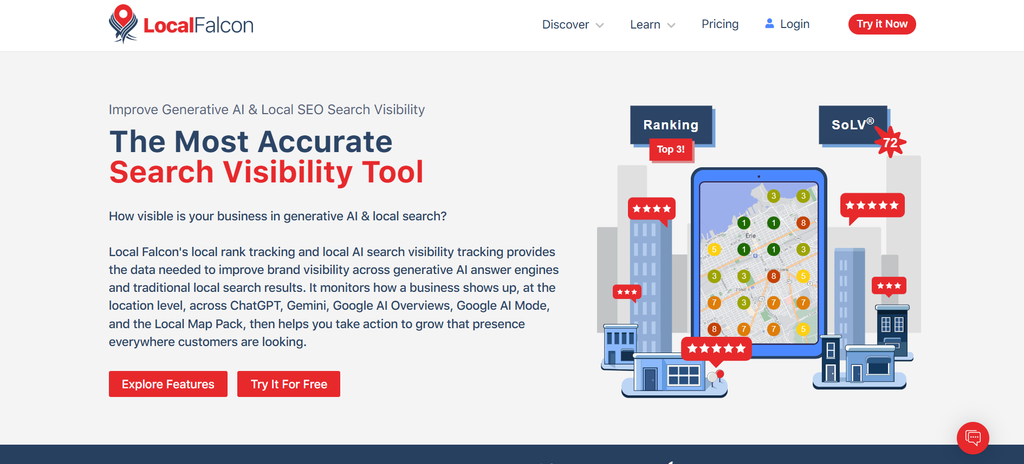
Best for: Local SEO agencies, consultants, and businesses that need detailed geographic analysis of Google Maps visibility.
What it does: Local Falcon specializes in geographic rank tracking through grid-based scans.
Instead of reporting only one search position for a business, it measures how rankings change across multiple points within a defined geographic area.
Key features and advantages
Local Falcon’s geo-grid reports help reveal where a location performs strongly or poorly for relevant search terms.
Consider a dental practice that appears prominently in map results near its office but becomes much less visible farther away.
A geographic ranking scan can illustrate that difference and help identify where additional analysis is needed.
Local Falcon provides scheduled scans, competitor analysis, historical reporting, and export capabilities.
Its offering also includes AI visibility-related functionality and integrations for more advanced reporting workflows.
Users can select grid sizes and scanning frequencies according to their research needs.
For agencies managing multiple clients, geographic reports can help explain why a single average ranking position does not accurately represent local visibility across an entire market.
Limitations
Local Falcon is primarily a search visibility analysis tool, not a direct replacement for cross-directory listings management.
Its credit-based model also requires budgeting.
Credit consumption depends on the number of scans, geographic grid points, keywords, and other activity.
A business scanning many keywords across dozens of locations every week may use substantially more credits than one performing occasional analysis.
Geographic tracking also needs consistent settings. Comparing scans with different grid sizes, centers, or search radii can produce misleading conclusions.
Pricing
Local Falcon’s published Starter plan costs $24.99 per month and includes 7,500 monthly credits.
Higher credit packages and enterprise options are available.
Choose Local Falcon if: Your main requirement is understanding geographic Google Maps visibility and measuring how it changes across different search areas.
Do You Need Separate Tools for Listings, Reviews, and Rank Tracking?
No. A business does not automatically need separate software for every local SEO activity.
Several platforms cover multiple requirements, although feature availability depends on the vendor and subscription tier.
The more useful question is whether one platform provides enough depth for your actual workflows.
| Business requirement | Practical approach |
|---|---|
| Maintain accurate listings across 10 branches | Use a centralized listing management platform |
| Monitor and respond to reviews across locations | Choose software with suitable reputation workflows |
| Analyze rankings across neighborhoods | Use geographic rank tracking |
| Find missing industry citations | Consider a dedicated citation research tool |
| Manage hundreds of locations with approvals | Prioritize enterprise governance and permissions |
| Prepare reports for separate agency clients | Prioritize client organization and reporting functionality |
For example, a retail business might use Synup or Uberall for daily location management and add Local Falcon when detailed Google Maps analysis is required.
An agency focused on auditing local SEO campaigns may instead use BrightLocal and purchase citation-building services when necessary.
The additional tool should solve a specific problem that the primary platform cannot adequately address.
Avoid buying overlapping products merely because they advertise different feature counts.
Duplicated tools can increase costs, fragment reporting, and create inconsistent location information.
How Much Do Multi-Location Local SEO Tools Cost?
Multi-location local SEO software uses several pricing models, making direct cost comparisons difficult.
Some platforms charge for each location. Others use location bands, enterprise agreements, separate modules, or usage-based credits.
Common pricing models
| Pricing model | How it works | Examples |
|---|---|---|
| Per-location subscription | Every managed location requires paid capacity | Semrush Local, Moz Local |
| Location-band subscription | A plan supports a defined number of locations | Synup |
| Tiered location-volume pricing | Subscription cost changes across location ranges | BrightLocal |
| Custom enterprise contract | Pricing reflects negotiated requirements | Yext, Uberall |
| Usage-based credits | Consumption depends on tracking or automated activity | Local Falcon |
| Modular software and services | Individual products are purchased separately | Whitespark |
Example: Comparing costs for 10 locations
Suppose a company operates 10 retail branches.
Semrush Local Pro costs $60 per location per month when billed annually.
Its monthly-equivalent software budget would therefore be:
10 locations × $60 = $600 per month equivalent, or $7,200 annually.
Synup’s published Premium plan costs $299 per month on monthly billing and covers up to 10 locations.
However, the products do not provide identical feature bundles, tracking allowances, automation, or account capabilities.
A lower subscription cost does not necessarily make one option better.
The correct comparison should include required features, annual expenditure, implementation work, and usage limits.
Questions to ask before purchasing
A vendor quote should explain the full cost of running the software across your locations.
Check onboarding charges, additional location fees, API access, user permissions, credit overages, integration costs, annual commitments, and support.
Also examine what happens when the agreement ends.
Does the business retain control of its Google Business Profiles and other publisher accounts? Can location records be exported? What happens to synchronization and vendor-hosted location pages?
These questions matter especially for franchises and enterprises where location data is a long-term operational asset.
For a closer look at these procurement issues, read Syssn’s guide to local listings management contracts, pricing terms, and cancellation considerations.
How to Choose the Right Local SEO Software for Your Business
The most suitable platform is the one that solves your operational and search visibility problems at a manageable total cost.
A practical evaluation should begin with your business requirements rather than the length of a vendor’s feature list.
1. Start with your location count
Businesses managing two to five locations may only need listing synchronization, review monitoring, and periodic audits.
Organizations with 10–50 locations often benefit from shared reporting, centralized information updates, and repeatable review management.
At 50 or more locations, permissions, regional responsibilities, integration requirements, and bulk workflows become increasingly important.
National brands with hundreds of locations may need formal procurement, integration testing, security reviews, and dedicated implementation support.
These location ranges are planning guidelines rather than strict product requirements.
A business with five locations and complicated data systems could need enterprise-level controls, while a well-organized chain with many similar branches may have simpler requirements.
2. Identify your biggest local SEO challenge
Start with the issue that creates the greatest operational burden.
If locations frequently display incorrect operating hours or phone numbers, prioritize listing accuracy and reliable synchronization.
If branches struggle to appear in Google Maps for relevant searches, investigate local rank tracking and geographic reporting.
If reviews arrive across many locations without consistent responses, evaluate reputation management features.
If multiple teams update business information, examine permissions, approval processes, and audit histories.
A platform with dozens of unused features may provide less practical value than one that handles your main problem reliably.
3. Evaluate agency and franchise permissions
Agencies should confirm whether platforms support client separation, user roles, reporting permissions, and white-label options.
Franchise businesses need a slightly different governance model.
Corporate teams may need to control location names, categories, websites, and brand assets while allowing local managers to handle approved operational changes.
For example, a franchise manager might be permitted to request changes to holiday hours without being allowed to remove corporate ownership of the Google Business Profile.
The software should reflect those responsibilities rather than giving every user unrestricted access.
Businesses developing this type of workflow can also consult Syssn’s guide to managing franchise local listings and location-level permissions.
4. Compare reporting capabilities
A useful local SEO report should make differences between locations visible.
Ask whether the platform supports:
- Individual location and regional reporting
- Keyword rankings and geographic visibility
- Listing accuracy and unresolved issues
- Review trends and response performance
- Competitor comparisons
- Historical reporting and exports
Agencies should determine whether reports can be shared with clients.
Enterprise teams should check whether data can be exported or connected to existing analytics and business intelligence systems.
Most importantly, distinguish reporting metrics from actual business outcomes.
A dashboard showing more impressions is useful, but it does not automatically establish increased revenue.
5. Test a complete workflow
A product demonstration should involve more than looking at dashboards.
Select a few representative locations and test realistic tasks.
Include one location with inaccurate listing data, another receiving regular reviews, one requiring new business hours, and one with weak local search visibility.
Evaluate how the platform identifies each issue, assigns responsibility, makes changes, and confirms the result.
Also check whether unsuccessful publisher updates are reported clearly.
The objective is to measure the amount of work the platform actually removes from the team’s routine.
Which Local SEO Tool Should You Choose Based on Business Size?
Business size can help narrow the shortlist, but the primary requirement should still determine the final choice.
| Business type | Platforms worth comparing | Main decision factor |
|---|---|---|
| Small business with 2–5 branches | Moz Local, BrightLocal | Simplicity, listing management, and reporting costs |
| Growing brand with 10–50 locations | Synup, Semrush Local, BrightLocal | Centralized workflows, automation, and tracking |
| Franchise with 50+ locations | Uberall, Synup, Yext | Bulk operations, franchisee access, governance |
| National enterprise brand | Yext, Uberall | Structured data, integrations, and enterprise controls |
| Agency managing multiple clients | BrightLocal, Synup, Semrush Local | Client separation, reporting, and subscription economics |
| Citation-focused SEO consultancy | Whitespark, BrightLocal | Citation discovery and auditing |
| Google Maps-focused SEO agency | Local Falcon, Whitespark | Geographic rankings and competitor analysis |
These are starting points, not universal rankings.
For instance, BrightLocal may suit an agency whose core service is local SEO auditing, while Synup may be more relevant to an agency managing listings, customer reviews, and recurring marketing workflows.
Similarly, Yext and Uberall may be appropriate for enterprise operations, but their broader capabilities might not be necessary for smaller businesses.
A shortlist of two or three suitable products is usually more practical than comparing every feature across all eight platforms.
How to Manage Local SEO Across Multiple Locations
Software works best when supported by a consistent operating process.
Businesses should establish clear ownership of location information before introducing additional automation.
Step 1: Create a master location database
Maintain one approved internal record for every business location.
Each record should include the business name, physical address where applicable, phone number, website URL, operating hours, business category, store identifier, and operating status.
Additional information may include local services, booking URLs, accessibility details, and authorized managers.
Use a stable identifier for each location.
A consistent internal ID helps prevent confusion when branches move, managers change, or location data is imported between systems.
Assign a person or team responsible for maintaining each record.
Step 2: Verify and organize Google Business Profiles
Claim and verify eligible Google Business Profiles.
Use appropriate account roles and business groups instead of sharing personal login credentials between employees or agencies.
Google’s bulk location management documentation explains that businesses with 10 or more eligible locations can use bulk management tools.
However, bulk verification has additional eligibility requirements. For example, agencies managing unrelated businesses cannot automatically combine those locations into one bulk-verification request.
Organizations should review Google’s bulk verification requirements before selecting an implementation process.
Step 3: Synchronize business listings
Update important publisher profiles using approved information from the master database.
Relevant services may include Google Maps, Apple Maps, Bing Places, Facebook, and industry-specific directories.
Prioritize platforms that customers actually use to find, contact, book, or visit the business.
When information changes, confirm whether each important publisher accepted the update.
Successful submission does not always mean a change has already appeared publicly.
Also monitor duplicate profiles and outdated listings, especially after relocations, rebranding, ownership changes, and closures.
Step 4: Monitor local search visibility
Track keywords relevant to the services provided by each branch.
For example, a dental group might monitor searches such as “emergency dentist,” “family dentist,” and relevant city-specific service terms.
Measure performance individually rather than relying only on brand-wide averages.
Geo-grid tracking can provide additional context where search rankings vary significantly across neighborhoods.
Use consistent grid settings and keyword definitions when comparing historical results.
Remember that a ranking report is a measurement of search visibility, not direct evidence that a particular software feature caused a ranking improvement.
Step 5: Centralize review management
Assign responsibility for monitoring customer reviews and responding appropriately.
Establish response guidelines covering tone, escalation, complaints, and sensitive information.
Templates can improve consistency, but responses should address the actual feedback rather than repeating generic language.
Review requests should seek genuine customer feedback.
Google’s review policies prohibit practices such as paying for reviews, incentivizing positive ratings, or manipulating review content.
Businesses operating in healthcare, financial services, and other sensitive sectors should also ensure public responses do not disclose confidential customer information.
Step 6: Audit and report regularly
Set a consistent review schedule.
Monthly operational checks and more detailed quarterly audits may be appropriate, with additional checks after major location changes.
Monitor incorrect listings, duplicate profiles, unresolved publisher errors, review response activity, local search visibility, website performance, and conversions.
Reporting should identify problems that can be assigned to specific teams.
For example, a report showing that 12 locations still display incorrect holiday hours is more actionable than one showing only an overall listing accuracy percentage.
What Metrics Should Multi-Location Brands Track?
Multi-location SEO reporting should connect operational quality with customer engagement and business outcomes.
| Metric | What it measures | Why it matters |
|---|---|---|
| Listing accuracy rate | Percentage of audited listings with correct information | Highlights location data errors |
| Verified profile coverage | Percentage of eligible locations with verified, controlled profiles | Identifies access and ownership gaps |
| Local keyword visibility | Search rankings for relevant location-level queries | Reveals search visibility differences |
| Google Maps geo-grid results | Rankings across a defined geographic area | Shows neighborhood-level performance |
| Review rating and volume | Customer feedback by location | Helps identify reputation patterns |
| Review response time | Time taken to respond to customer feedback | Measures operational responsiveness |
| Profile interactions | Available calls, directions, clicks, and related actions | Indicates customer engagement |
| Local page conversions | Website actions associated with individual location pages | Connects online activity to business goals |
A useful reporting framework distinguishes three categories.
Operational metrics measure whether business information is accurate and location profiles are properly maintained.
Visibility metrics show whether customers can discover locations through relevant searches.
Outcome metrics measure actions such as qualified inquiries, bookings, purchases, or other conversions where reliable tracking is available.
Avoid judging a multi-location company only by its average ranking or average review score.
A strong network-wide average can conceal locations with poor search visibility, inaccurate information, or persistent customer service problems.
For meaningful reporting, compare results by location, region, and business category.
Local SEO Tools and AI Search Visibility in 2026
AI-assisted search is becoming another consideration for businesses managing local visibility.
Customers may encounter business recommendations through AI-generated search experiences as well as traditional Google Search and Maps results.
Some local SEO platforms now offer tools intended to monitor how businesses appear in AI-generated answers.
For example, Synup advertises AI discovery-related functionality. Yext provides AI-oriented visibility features, and Uberall offers GEO Studio.
BrightLocal and Local Falcon also advertise AI visibility measurement capabilities.
However, these products do not necessarily measure the same platforms, prompts, geographic conditions, or metrics.
A report showing that a business appeared in a particular AI response should not be treated as a guarantee that future users will receive the same recommendation.
What should businesses evaluate?
When comparing AI visibility tools, ask which AI platforms are supported and how the product measures brand mentions, citations, and geographic results.
Determine how queries are sampled, whether response histories are available, and whether the tool can verify the sources referenced in an AI-generated answer.
Businesses should also understand the limitations of these measurements.
AI responses may vary by query wording, location, context, model, and time. Visibility measurements are therefore observations under specific conditions rather than permanent ranking positions.
What does Google recommend?
Google’s official guidance on AI features in Search says that established SEO best practices remain relevant for AI Overviews and AI Mode.
Google does not require additional technical optimizations specifically for inclusion in these AI search features.
Businesses should therefore continue emphasizing accurate information, helpful website content, accessible location pages, and sound technical SEO.
AI visibility tracking may provide useful additional analysis, but it should complement rather than replace the fundamentals of local search management.
Frequently Asked Questions
1. What are the best local SEO tools for multiple locations?
BrightLocal, Synup, Semrush Local, Yext, Uberall, Moz Local, Whitespark, and Local Falcon are eight relevant options to compare.
BrightLocal is useful for auditing and reporting. Synup supports centralized location marketing. Semrush Local connects local visibility tools with broader SEO workflows.
Yext and Uberall address enterprise requirements, while Moz Local focuses on relatively straightforward local presence management.
Whitespark and Local Falcon specialize in citation research and geographic rank analysis, respectively.
The right choice depends on business size, operational requirements, and budget.
2. Which local SEO tool is best for franchise businesses?
Synup, Uberall, and Yext are useful platforms to evaluate for franchise networks.
The final choice depends on location count, integration requirements, governance policies, and whether franchisees need controlled access to individual profiles.
Franchise operators should prioritize reliable bulk updates, approval processes, account ownership, and location-level reporting.
3. Is BrightLocal better than Semrush Local?
BrightLocal may be more suitable when auditing, citation monitoring, and agency reporting are the main priorities.
Semrush Local may be preferable when geographic ranking analysis and Google Business Profile workflows need to fit alongside broader Semrush SEO tools.
The two platforms have different subscription structures, so compare the features included in the specific plans you would purchase.
4. What is the difference between Yext, Uberall, and Moz Local?
Yext emphasizes structured location data, publisher integrations, and enterprise governance.
Uberall combines location information management with customer reviews, local social publishing, and additional marketing capabilities.
Moz Local focuses more directly on listing management and selected reputation and visibility features.
All three support local presence management, but their operational scope and pricing structures differ.
5. How do you track Google Maps rankings across multiple locations?
Use a local rank tracker that supports individual business locations and geographic measurement.
Local Falcon, BrightLocal, Semrush Local, and Whitespark provide relevant geographic ranking capabilities.
Select keywords for each branch, define a consistent geographic area, and repeat scans using comparable settings.
A geo-grid report is particularly useful because rankings near a business do not necessarily represent visibility throughout its broader service area.
6. How much does local SEO software cost for 50 locations?
Costs depend on whether the platform uses per-location subscriptions, location bands, credits, or enterprise quotations.
For example, Synup publishes a $899 monthly Scale plan covering up to 50 locations under its stated subscription and credit terms.
Other providers calculate charges individually for each location or negotiate enterprise pricing.
A useful 50-location comparison should include onboarding, required features, usage allowances, support, and annual commitments.
7. Can one platform manage listings, reviews, and rank tracking?
Yes. Several local SEO platforms combine these capabilities.
Synup and Semrush Local offer tools covering listings, reviews, and local tracking, while BrightLocal provides related capabilities across different subscription levels.
Yext, Uberall, and Moz Local also cover multiple aspects of local presence management, although the depth of ranking analysis and specific feature packaging vary.
Dedicated software may still be appropriate where advanced geographic reporting or specialized citation research is required.
8. Which local SEO tools are useful for agencies managing many clients?
BrightLocal, Synup, and Semrush Local are sensible starting points.
BrightLocal emphasizes auditing and reporting. Synup supports broader listings, reviews, and marketing workflows with eligible white-label functionality.
Semrush Local may suit agencies that already manage traditional SEO campaigns through Semrush.
Agencies should also compare client account separation, team permissions, reporting automation, and the total cost of managing multiple customer locations.
Final Verdict
The right local SEO software is not necessarily the platform with the largest number of advertised features.
It is the one that addresses your most important location management problems without introducing unnecessary cost or complexity.
BrightLocal is a useful choice to evaluate for agencies focused on auditing and reporting. Synup suits teams seeking centralized listings, reviews, visibility analysis, and automation. Semrush Local is relevant for organizations combining local SEO with broader search marketing.
For complex location networks, Yext focuses on structured data and enterprise controls, while Uberall combines location management with reviews, social publishing, and distributed marketing operations.
Moz Local provides a comparatively straightforward approach to listing management. Whitespark is useful for citation-focused work, and Local Falcon provides detailed geographic ranking analysis.
Before subscribing, test realistic workflows using actual locations, compare equivalent capabilities, and calculate the total cost based on expected usage.
Successful multi-location SEO depends on more than software. Accurate information, verified and controlled profiles, clear responsibilities, consistent review management, useful location pages, and meaningful performance measurement remain essential.
The best platform is the one that helps your organization maintain those fundamentals reliably across every location.


[…] For more information about this software category, see local SEO tools for multiple locations. […]