
Multi-Location Review Management: A Weekly Checklist

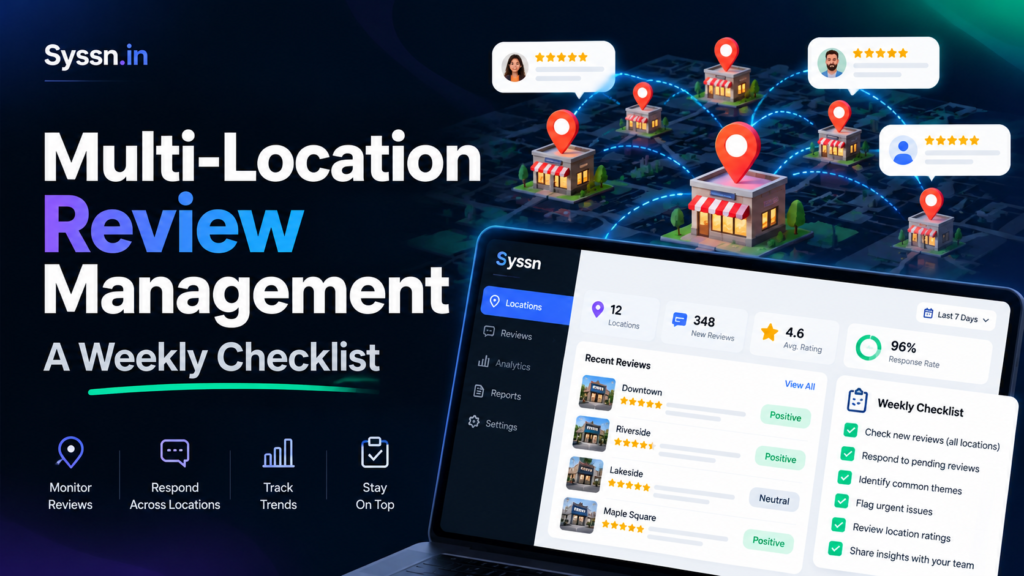
Multi-location review management is the process of monitoring, responding to, analyzing, and improving customer reviews across multiple business locations through a coordinated workflow. An effective weekly checklist includes collecting new reviews, prioritizing complaints, assigning responses, investigating recurring issues, measuring customer sentiment, and comparing location performance.
Businesses can manage these activities manually or use review management software such as Synup, Birdeye, Podium, Reputation, Yext, and BrightLocal. The goal is to maintain consistent reputation standards across locations while allowing teams to address individual customer experiences.
This guide provides a Monday-to-Friday review management checklist, recommended responsibilities, performance metrics, automation practices, and software evaluation criteria for multi-location businesses.
Why Is Multi-Location Review Management Important?
Every business location contributes to the overall brand reputation, but customers often judge their experiences at individual stores, offices, and branches.
A restaurant chain might have excellent reviews nationwide while several locations regularly receive complaints about slow service. Similarly, a healthcare organization might maintain a strong average rating even though one clinic repeatedly receives scheduling complaints.
Without a structured review management workflow, those issues can remain hidden behind brand-wide averages.
Effective multi-location reputation management helps businesses:
- Identify negative customer experiences and emerging operational problems.
- Respond consistently across Google, Yelp, Facebook, and relevant industry platforms.
- Improve customer communication through timely, personalized responses.
- Identify recurring service problems that require operational changes.
- Compare review trends across locations and regions.
- Support local search visibility through authentic customer feedback.
- Establish accountability among location and regional managers.
According to Google’s local ranking guidance, more reviews and positive ratings can help a business’s local ranking. Google explains that local rankings are primarily determined by relevance, distance, and prominence.
However, responding to reviews does not guarantee higher rankings. Review management should primarily support customer experience, operational improvement, and trust.
Multi-Location Review Management: Weekly Checklist at a Glance
The following schedule provides a practical starting point for retail chains, franchises, restaurants, healthcare groups, service businesses, and agencies managing multiple locations.
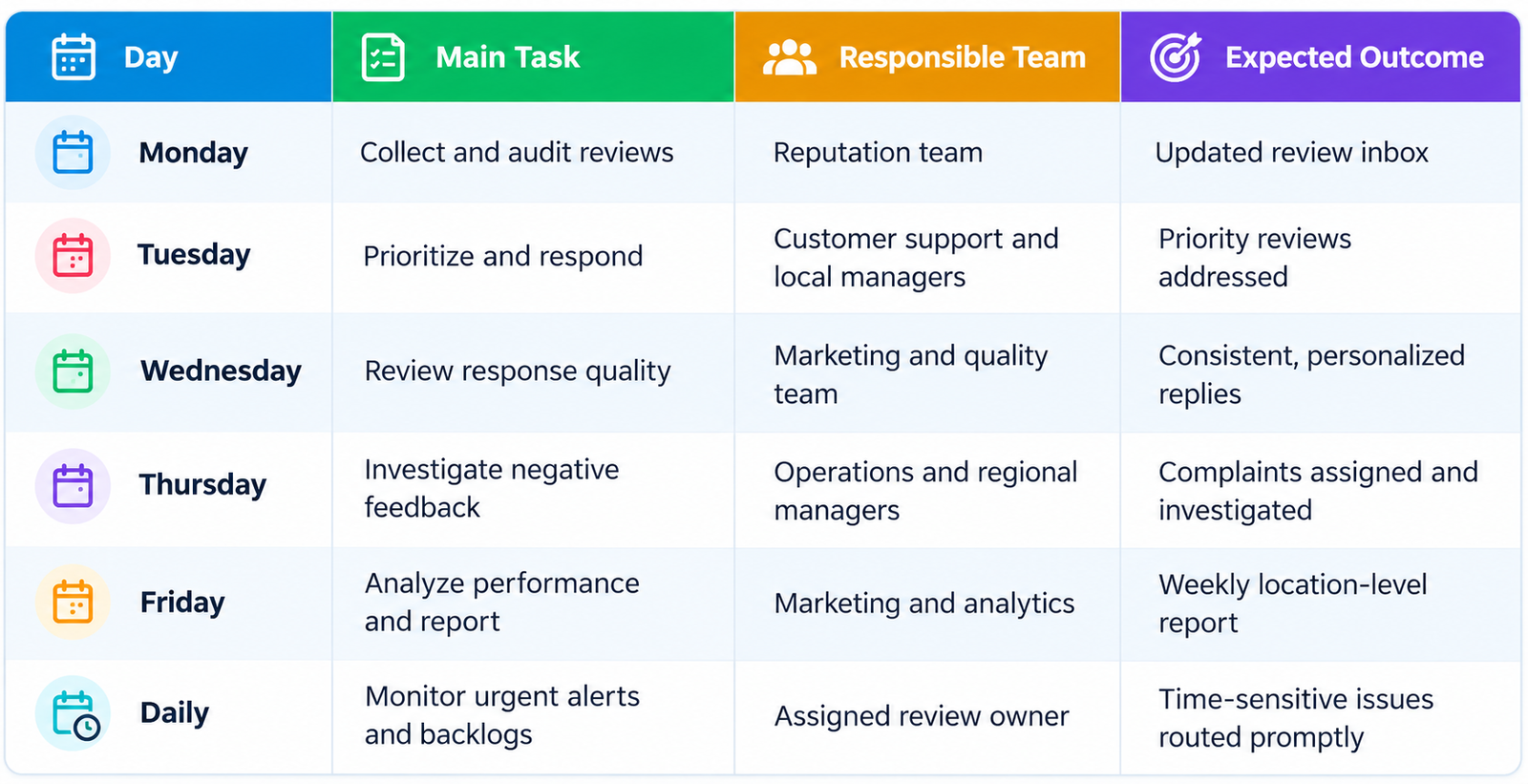
Important: Businesses should not wait until their assigned weekday to address urgent reviews. The schedule organizes weekly activities, while daily monitoring and alerts help teams respond to time-sensitive problems.
Before introducing this workflow, create a master list of active locations, the review platforms connected to each location, the people responsible for responses, and the escalation contacts.
This initial setup helps prevent reviews from being missed because of disconnected accounts, incomplete location records, or unclear ownership.
Step 1: Monday
Start the week by collecting newly published reviews from platforms your customers actually use.
For many US businesses, Google Business Profile should be a priority. Depending on the industry, Yelp, Facebook, Tripadvisor, Healthgrades, DealerRater, and specialist directories may also matter.
Not every platform allows the same review monitoring, response, or integration capabilities, so businesses should prioritize sources based on their customers and operational requirements.
Monday Checklist
- Collect new reviews from all monitored platforms.
- Confirm every active location is included in the review management system.
- Check whether connected accounts and integrations are working.
- Identify unanswered reviews from the previous week.
- Separate positive, neutral, and negative feedback.
- Check for reviews associated with an incorrect business location.
- Tag recurring complaint themes.
- Identify unusual changes in review volume or ratings.
- Confirm that each unresolved review has an assigned owner.
For businesses managing 50 or 100 locations, manually checking every business profile can become inefficient. A centralized review inbox can consolidate feedback and help teams identify which reviews require attention.
However, verify that the software supports the review platforms relevant to your business. Some integrations support monitoring without allowing responses to be published directly.
What Should a Centralized Review Queue Include?
A practical review queue should capture:
| Field | Purpose |
|---|---|
| Location name or ID | Identifies the affected business location |
| Review platform | Shows where feedback was published |
| Review date | Establishes when the review was received |
| Star rating | Helps categorize feedback |
| Complaint category | Identifies the issue or feedback theme |
| Priority | Determines response urgency |
| Response status | Shows whether the review has been addressed |
| Assigned owner | Identifies the responsible employee |
| Escalation status | Tracks issues requiring further investigation |
Use a consistent location identifier to prevent confusion when several branches have similar names.
Monday deliverable: One updated review queue containing new feedback, unresolved reviews, assigned owners, and priority classifications.
Step 2: Tuesday — Prioritize Reviews and Respond Quickly
Not every review requires the same level of attention.
A five-star review praising an employee can usually receive a brief acknowledgment. A complaint involving unsafe conditions, suspected fraud, discrimination, or sensitive customer information may require immediate internal escalation.
Use a standard priority system to establish clear response expectations.
| Priority | Review Type | Suggested Internal Target |
|---|---|---|
| Critical | Safety concerns, discrimination allegations, legal threats, or sensitive privacy issues | Escalate immediately |
| High | Detailed one- or two-star complaints | Initial response within 24 hours |
| Medium | Three-star reviews or routine service concerns | Initial response within 48 hours |
| Routine | Positive reviews and general appreciation | Reply within 2–3 business days |
These are suggested organizational service targets, not response-time requirements published by Google or other review platforms.
Businesses should adjust targets according to staffing, operating hours, industry risks, and customer expectations.
According to Google’s instructions for managing customer reviews, businesses must verify their Business Profiles before replying to Google reviews. Approved public responses appear under the business name.
How to Respond to Negative Reviews
A useful response acknowledges the customer’s concern without arguing, making unsupported claims, or disclosing private information.
Example:
“Thank you for sharing your experience. We’re sorry your visit did not meet expectations. Our team would appreciate the opportunity to understand what happened and address your concerns. Please contact our location manager through our official support channel.”
This is a general example, not a response that should be copied into every complaint.
A stronger response should reference the customer’s specific concern when doing so is appropriate and does not reveal confidential information.
For example, if a customer mentions a long waiting time, the response can acknowledge that concern directly rather than offering a generic apology.
For serious allegations, businesses should avoid publicly confirming disputed facts or promising a resolution before investigating the issue.
Negative feedback may require both a public acknowledgment and a separate internal investigation.
Tuesday deliverable: Priority reviews answered or escalated, with remaining responses assigned to owners and tracked against internal targets.
Step 3: Wednesday — Standardize Responses Without Losing Personalization
Maintaining a consistent brand voice is one of the challenges of managing reviews across multiple locations.
A franchise with 100 stores may have 100 different managers responding to customers. Without guidelines, public communication can become inconsistent.
Some managers may offer discounts without authorization. Others may ignore complaints, disclose unnecessary details, or respond defensively.
The solution is a standardized review response policy that provides clear instructions while allowing location-specific responses.
Wednesday Checklist
- Review response templates for tone and accuracy.
- Confirm each response addresses the customer’s actual concern.
- Check spelling, grammar, and professional language.
- Remove unnecessary personal or confidential information.
- Verify that location names and contact details are correct.
- Review AI-generated responses according to the organization’s approval policy.
- Confirm that employees are not promising unauthorized compensation.
- Identify locations with repeated response-quality problems.
- Provide coaching where necessary.
Create Three Response Categories
Positive reviews: Thank the customer and acknowledge something specific they appreciated, when appropriate.
Neutral reviews: Recognize the mixed experience, address practical feedback, and explain an appropriate next step.
Negative reviews: Acknowledge the concern, avoid defensiveness, and provide an appropriate resolution channel without disclosing private information.
For additional platform-specific guidance, see Yelp’s recommendations for responding to critical reviews.
Templates should provide structure rather than replace human judgment.
Establish Review Response Approval Rules
Not every response needs the same approval process.
Routine acknowledgments may be handled by trained location managers. Complaints involving safety, privacy, discrimination, regulatory issues, or potential legal disputes should follow a more controlled review process.
For larger businesses, response approval rules can help distinguish between:
- Responses that local managers can publish independently.
- Responses requiring regional management approval.
- Sensitive complaints requiring legal, compliance, or specialist review.
This approach supports faster routine communication without removing appropriate oversight.
Wednesday deliverable: Consistent response standards, clear approval responsibilities, and improved response quality across locations.
Step 4: Thursday — Investigate Negative Reviews and Resolve Complaints
Publishing a response is not the same as resolving a complaint.
Suppose five locations repeatedly receive negative reviews about late deliveries.
A marketing team might reply politely to every customer. However, if delivery operations do not improve, the same complaints may continue.
Effective customer feedback management therefore requires cooperation between marketing, customer support, and operations.
Thursday Checklist
- Review unresolved one- and two-star complaints.
- Assign serious issues to the appropriate location or regional manager.
- Investigate recurring service failures.
- Contact customers privately when appropriate.
- Document corrective actions.
- Verify whether promised resolutions were completed.
- Escalate recurring issues affecting multiple locations.
- Record unresolved issues requiring follow-up.
Create a Complaint Escalation Workflow
A practical escalation process follows six stages:
Review received → Issue classified → Responsible manager assigned → Investigation completed → Corrective action recorded → Resolution verified
Each escalation should have a clear status and responsible owner.
| Field | Illustrative Example |
|---|---|
| Location ID | US-NY-014 |
| Review platform | |
| Complaint category | Customer service |
| Severity | High |
| Assigned owner | Regional operations manager |
| Target resolution | Within 3 business days |
| Status | Investigation in progress |
The three-business-day target is illustrative. Organizations should establish resolution timelines based on issue severity and internal capabilities.
Handle Sensitive Reviews Carefully
Regulated businesses should establish additional privacy, security, and legal review requirements.
For healthcare organizations subject to HIPAA, public replies must not disclose protected health information or improperly confirm an individual’s patient relationship.
The US Department of Health and Human Services has documented enforcement actions involving healthcare providers that disclosed patient information while responding to online reviews.
Healthcare teams should use approved response procedures and involve the appropriate privacy or compliance personnel.
Similar care may be needed in other industries where customer complaints involve confidential financial, legal, employment, or account information.
Track Resolution Separately From Review Responses
A review marked as “answered” should not automatically be marked as “resolved.”
For example, a business may acknowledge a complaint within 24 hours while the underlying service problem remains under investigation.
Track at least three separate statuses:
- Response status: Has the business publicly replied?
- Investigation status: Has the complaint been assessed and assigned?
- Resolution status: Has the required action been completed or the case formally closed?
This distinction helps businesses measure operational improvement rather than public response activity alone.
Thursday deliverable: Every serious complaint has an assigned owner, documented status, appropriate deadline, and next action.
Step 5: Friday — Analyze Reviews and Compare Location Performance
Friday should focus on learning from customer feedback rather than simply counting responses.
Review analytics can reveal operational trends that may not be obvious in aggregate brand reporting.
Consider a retail brand with 75 stores.
Its overall average rating may look healthy, but location-level analysis could identify specific branches where complaints about employee behavior or inventory availability are increasing.
Friday Checklist
- Calculate review response rate.
- Measure median review response time.
- Compare review volume across locations.
- Identify changes in average ratings.
- Review recurring positive and negative themes.
- Track unresolved complaints and overdue escalations.
- Identify locations requiring operational support.
- Evaluate response performance against internal targets.
- Prepare a weekly reputation report for leadership.
Where transaction or customer counts are available, compare review activity relative to business volume rather than using raw review totals alone.
For example, consider two hypothetical locations:
| Metric | Location A | Location B |
|---|---|---|
| Weekly transactions | 4,000 | 500 |
| New reviews | 40 | 15 |
| Reviews per 100 transactions | 1 | 3 |
Location A receives more total reviews, but Location B receives more reviews relative to its transaction volume.
That does not necessarily mean Location B provides better service. It shows why review volume should be interpreted alongside business activity, review-request practices, customer mix, and rating distribution.
Turn Customer Sentiment Into Operational Decisions
A useful weekly report identifies not only what customers said but also what the organization should do next.
| Customer Feedback Trend | Operational Action |
|---|---|
| Repeated complaints about long waits | Review staffing and scheduling |
| Frequent praise for employee helpfulness | Share successful training practices |
| Negative feedback about cleanliness | Conduct location inspections |
| Complaints about incorrect opening hours | Audit Google Business Profiles and other listings |
| Recurring delivery delays | Investigate delivery processes |
Review insights become more valuable when teams connect them with existing local listings management practices.
Create an Action-Oriented Weekly Report
A useful report should highlight four areas:
Performance: Review volume, ratings, response rates, and response times.
Risks: Critical complaints, negative sentiment changes, and overdue investigations.
Operational findings: Repeated customer issues and potential causes requiring investigation.
Next actions: Responsible owners, deadlines, and measurable follow-up tasks.
Avoid presenting a change in review ratings as proof that a particular operational initiative succeeded without additional evidence.
Friday deliverable: A weekly report showing reputation performance, emerging risks, operational findings, and assigned improvement actions.
Who Should Own Review Management Across Multiple Locations?
A hybrid approach is often suitable for multi-location businesses.
Head office defines policies, brand guidelines, reporting standards, and serious escalation procedures. Location managers provide local context and resolve routine operational complaints.
Regional managers coordinate issues that affect multiple branches or require additional oversight.
| Responsibility | Head Office | Regional Manager | Location Manager |
|---|---|---|---|
| Review response policy | Accountable | Consulted | Informed |
| Daily review monitoring | Oversight | Oversight | Responsible |
| Routine response drafting | Support | Support | Responsible |
| Serious complaint escalation | Oversight | Responsible | Supports |
| Customer issue resolution | Oversight | Supports | Responsible |
| Weekly analytics | Responsible | Reviews | Reviews |
| Staff coaching | Sets standards | Responsible | Implements |
This table is an illustrative operating model rather than a universal organizational requirement.
Each review or complaint should have one clearly assigned owner.
Shared visibility is helpful, but ambiguous ownership increases the chance of missed responses.
For franchise businesses, clarify review access, permissions, approval rules, and response responsibilities in operating agreements or internal brand standards.
Multi-Location Review Management Software: Six Options to Consider
Review management software can help businesses collect customer feedback, assign responses, automate monitoring, and analyze location performance.
Six relevant options are Synup, Birdeye, Podium, Reputation, Yext, and BrightLocal.
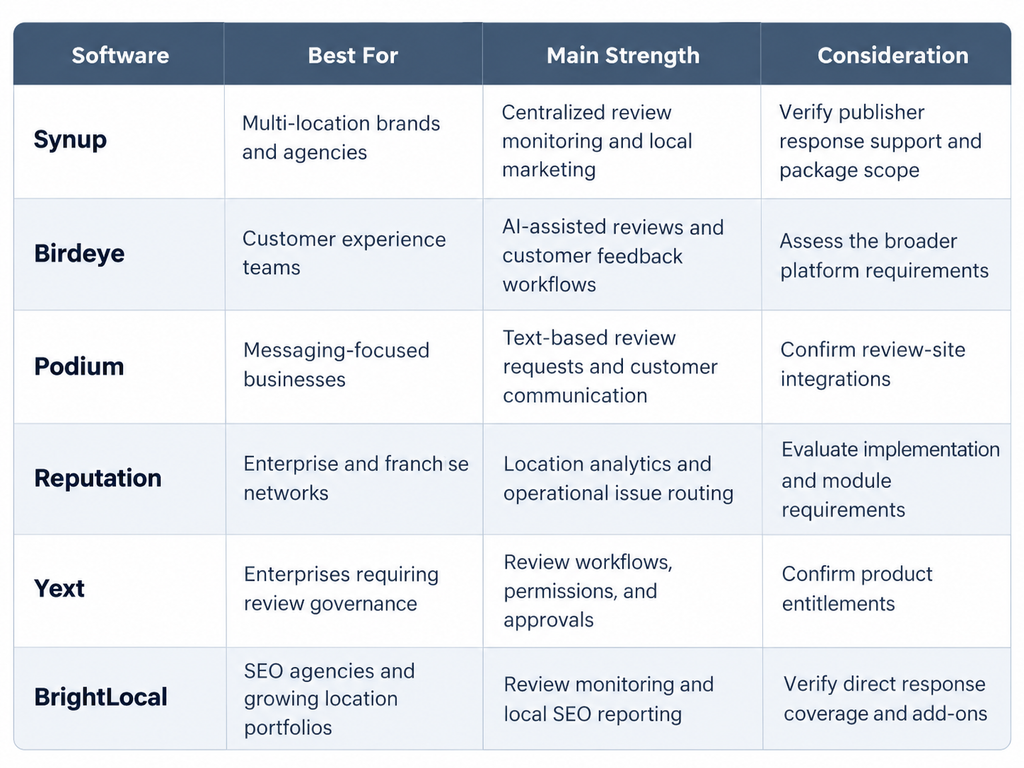
The following comparison considers published review management capabilities, workflow automation, reporting, and suitability for distributed teams.
Quick Software Comparison
1. Synup
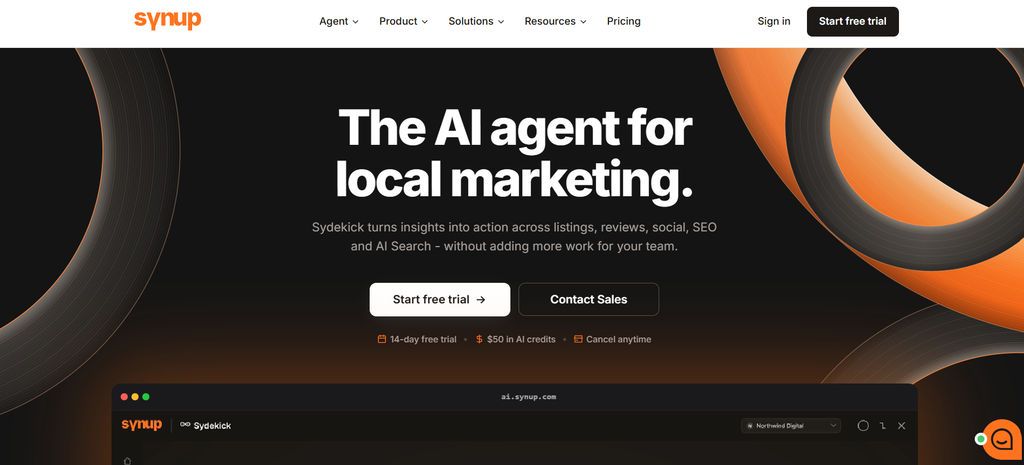
Best for: Agencies, franchise operators, and brands managing reviews alongside local listings.
Synup provides a centralized review management environment for monitoring customer feedback across business locations.
Teams can filter reviews by source, rating, and response status, draft or publish supported responses, and use templates or AI-assisted response suggestions.
Synup also offers review analytics and broader local marketing capabilities, allowing businesses to coordinate reputation management with location information and local visibility activities.
Its documented review management features include multi-location monitoring, review responses, reporting, and AI-assisted drafting.
Strength: Centralized review monitoring and reporting alongside broader local marketing management.
Limitation: Organizations should confirm which review publishers support direct replies, which automation capabilities are included, and whether additional services or usage limits apply.
Pricing: Confirm current subscription terms, location limits, and optional features with Synup before purchasing.
Choose Synup if: Your organization needs review management connected to local listings and wider multi-location marketing operations.
2. Birdeye

Best for: Multi-location businesses seeking review generation, AI-assisted responses, and customer feedback management.
Birdeye provides centralized review monitoring, review requests, response workflows, and customer sentiment analysis.
Its published review management capabilities include a unified dashboard, AI-assisted response tools, review notifications, feedback tagging, and location-wide monitoring.
Birdeye also positions review management within a broader customer experience platform, helping businesses connect reputation activity with customer feedback and service improvement.
For distributed teams, these capabilities can help standardize review monitoring while identifying location-specific customer concerns.
Strength: Combines review management, AI-assisted communication, and customer experience insights.
Limitation: Organizations that only need basic review monitoring should evaluate whether the broader feature set is necessary for their requirements.
Pricing: Request current pricing based on the required modules, location count, and subscription terms.
Choose Birdeye if: Your business wants review management connected to customer feedback, automated workflows, and broader experience management.
3. Podium

Best for: Customer-facing businesses that rely heavily on text-based communication.
Podium combines customer messaging with review invitations, feedback monitoring, and response tools.
Its review management offering emphasizes text-based review requests, automated follow-ups, AI-assisted replies, and a shared inbox for customer communications.
This makes it relevant to organizations where review collection is closely connected to appointments, purchases, service interactions, or customer follow-up.
Businesses can use review activity alongside customer conversations instead of treating reputation management as an entirely separate process.
Strength: Review invitations and customer messaging operate within a connected communication workflow.
Limitation: Organizations requiring extensive industry-specific review monitoring should verify supported sources, response permissions, and the functionality included in their subscription.
Pricing: Confirm the current package, messaging allowances, automation features, and location-based requirements.
Choose Podium if: Text-based customer communication and review requests are central to your reputation management process.
4. Reputation
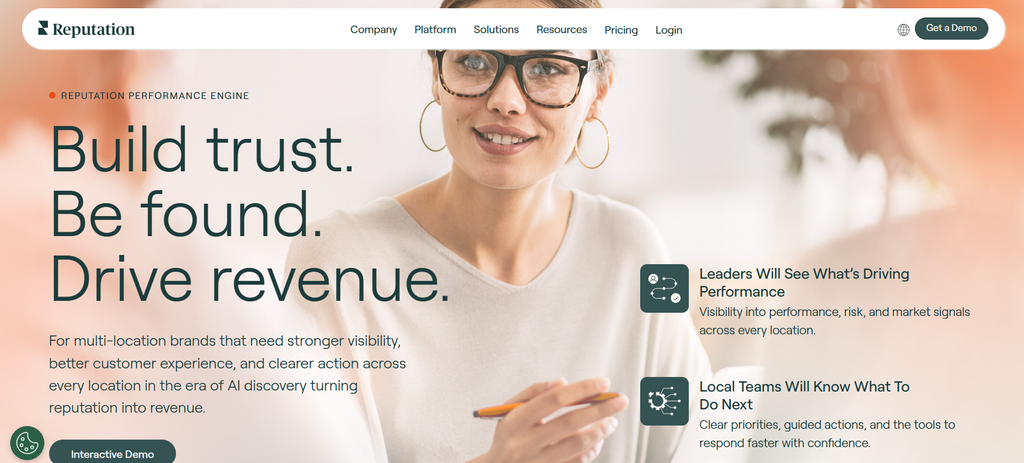
Best for: Large enterprises, franchise networks, and organizations requiring detailed location-level analysis.
Reputation provides review monitoring, response management, customer feedback analysis, and reporting capabilities for distributed businesses.
Its platform supports centralized review activity, AI-assisted response drafting, sentiment monitoring, and performance comparisons across brands, regions, and individual locations.
Reputation also offers operational workflows that connect customer feedback with assigned tasks and issue resolution.
This can be useful for organizations that need to investigate recurring complaints instead of simply responding to reviews.
Strength: Combines reputation reporting with enterprise-level customer feedback and issue-routing workflows.
Limitation: Businesses with straightforward review monitoring needs should evaluate implementation effort, administration requirements, and whether operational workflow modules are necessary.
Pricing: Request a commercial proposal covering the required modules, locations, integrations, and implementation services.
Choose Reputation if: Your organization needs structured reputation oversight across numerous locations and wants to connect customer complaints with operational improvements.
5. Yext

Best for: Enterprises needing structured review management alongside location information governance.
Yext provides review monitoring, response management, review generation tools, analytics, and configurable response workflows.
Its documented workflow capabilities include manual response assignments, approved response templates, AI-generated drafts, and configurable approval processes.
Organizations can use permissions and workflows to allow local teams to suggest responses while designated managers approve sensitive communications.
Yext also connects review-related activities with its broader business information management platform.
Strength: Structured permissions, workflow rules, and review response approvals can support complex multi-location operations.
Limitation: Organizations should confirm which review capabilities, publishers, automation settings, and approval functions are available under their selected products and agreements.
Pricing: Verify current licensing, review management entitlements, and location-based commercial terms.
Choose Yext if: Your business prioritizes controlled response workflows, permissions, and centralized location information management.
6. BrightLocal

Best for: SEO agencies, consultants, and businesses wanting reputation insights alongside local search reporting.
BrightLocal’s Reputation Manager provides review monitoring, review generation, response capabilities, and reputation reporting.
Its multi-location overview helps users examine review counts, rating changes, and performance differences across locations.
BrightLocal also offers local SEO auditing and reporting tools, making it useful when reputation management is part of a wider local search visibility program.
According to BrightLocal’s documentation, connected Google Business Profile and Facebook reviews can be answered directly within Reputation Manager. Other review platforms may require users to visit the original review site.
Strength: Combines reputation monitoring with local SEO reporting and agency-oriented workflows.
Limitation: Direct response functionality differs by platform, and users should confirm monitoring frequency, available integrations, and communication credits.
Pricing: Review the current location-based subscription, Reputation Manager capabilities, and relevant add-ons before purchasing.
Choose BrightLocal if: Local SEO reporting, review monitoring, and performance comparisons across locations are your main priorities.
For a more detailed buyer comparison, read Best Review Management Tools for Local SEO in 2026.
How to Choose the Right Platform
Before selecting software, assess the requirements of your actual review management workflow.
Consider:
- Review platform coverage: Can the software monitor the platforms your customers use?
- Response capabilities: Which platforms allow direct publishing, and which require manual access?
- Location management: Can teams organize reviews by brand, region, and individual location?
- Permissions and approvals: Can local employees draft responses without unrestricted publishing rights?
- Automation: Which tasks can be automated, and what safeguards are available?
- Reporting: Can you compare response performance, review volume, and complaint trends across locations?
- Integrations: Does the product connect with your existing customer support or operational systems?
- Total cost: What is included in the subscription, and what costs extra?
For businesses handling sensitive customer information, data access, retention, security, and compliance requirements should also be part of the evaluation.
A short pilot using representative locations can help assess actual workflows before a larger rollout. A pilot should include routine positive reviews, complex complaints, different publishers, and the required approval paths.
The most suitable platform is the one that meets the organization’s review coverage and operational needs without introducing unnecessary complexity.
Which Review Management Tasks Should Be Automated?
Automation is useful for repetitive administrative work, but customer-sensitive communication still benefits from human judgment.
| Task | Automation Recommendation |
|---|---|
| Collect reviews from connected platforms | Automate |
| Send notifications for new negative reviews | Automate |
| Assign reviews by location | Automate where supported |
| Categorize common feedback themes | Automate with quality checks |
| Draft routine review responses | AI-assisted, with oversight |
| Respond to serious complaints | Human approval |
| Investigate service failures | Human-led |
| Generate weekly reports | Automate |
| Approve refunds or other resolutions | Human-led |
Google’s Business Profile review API documentation describes methods for retrieving and replying to reviews associated with authorized business locations.
Organizations using APIs or third-party integrations should confirm account permissions, access requirements, and available publisher functionality.
Recommended Automation Safeguards
Create alerts for critical complaints, privacy-sensitive information, unusual review spikes, and locations with growing response backlogs.
Before enabling automated responses, define which types of feedback are eligible and which must be reviewed by a person.
Do not allow an AI system to invent customer interactions, promise unauthorized compensation, disclose confidential information, or claim that an issue has been resolved without verification.
For sensitive reviews, human approval should remain part of the workflow.
Automation should reduce administrative work without removing accountability.
What Review Management KPIs Should Businesses Track Weekly?
A useful review performance dashboard should include both response activity and customer experience outcomes.
| KPI | What It Measures | Why It Matters |
|---|---|---|
| Review response rate | Percentage of eligible reviews answered | Shows response coverage |
| Median response time | Typical time between review publication and response | Measures responsiveness |
| Average rating | Average customer star rating | Provides a broad indication of customer perception |
| Review volume | Number of new reviews | Shows feedback activity |
| Rating distribution | Mix of one- through five-star ratings | Reveals issues hidden by averages |
| Negative complaint resolution rate | Share of tracked complaints resolved | Measures operational follow-through |
| Sentiment trends | Changes in recurring customer feedback themes | Identifies potential operational issues |
| Overdue escalation count | Open issues past their target date | Highlights unresolved operational risks |
How to Calculate Review Response Rate
Review Response Rate (%) = (Eligible Reviews Responded To ÷ Total Eligible Reviews) × 100
For example, if a location receives 100 reviews during a reporting period and responds to 80 of them:
Review Response Rate = (80 ÷ 100) × 100 = 80%
This is an illustrative calculation, not a reported business result.
Organizations should define which reviews are eligible for a response and use the same eligibility rules, date range, and platform coverage across locations.
When reporting response rates for newly received reviews, distinguish between reviews that were answered within the reporting period and those still awaiting a response.
How to Measure Response Time
Measure the elapsed time between a review’s publication and the business’s response.
Median response time can be more useful than average response time when a small number of reviews have exceptionally long delays.
Businesses should also track the percentage of responses completed within their own internal service targets.
A high response rate can conceal slow handling of important complaints.
How to Compare Locations Fairly
Avoid ranking branches solely by average star rating.
Consider recent review volume, rating distribution, customer traffic, review-request activity, and the number of unresolved complaints.
A branch with two five-star reviews provides much less evidence about consistent customer satisfaction than a branch with hundreds of recent reviews.
Similarly, a location with a sudden decline in ratings deserves investigation before management assumes that overall service quality has deteriorated.
For broader performance measurement, see this guide to local SEO tools for multiple locations.
How Can Businesses Improve Review Response Rates?
Improving review response rates requires a manageable workflow rather than simply asking employees to reply faster.
Start by identifying why reviews remain unanswered.
Common causes include disconnected business profiles, unclear responsibilities, limited staff availability, platform restrictions, and slow approval processes.
To address these problems:
- Centralize monitoring: Reduce the need for employees to check multiple review platforms individually.
- Assign ownership: Give each location a clearly identified response owner and a backup contact.
- Use priority alerts: Route serious complaints immediately instead of waiting for scheduled review sessions.
- Prepare approved templates: Provide a reliable starting point for routine responses while requiring appropriate personalization.
- Introduce realistic deadlines: Define response targets that match staffing capacity and customer expectations.
- Review exceptions weekly: Investigate unanswered reviews, disconnected accounts, and overdue approval requests.
Businesses should also distinguish between reviews that cannot be answered through their selected software and reviews that have genuinely been overlooked.
The objective is consistent, helpful communication—not simply maximizing the number of automated replies.
How Should Businesses Request More Reviews Without Violating Policies?
Businesses should encourage genuine customer feedback without manipulating the reviews customers publish.
Google permits businesses to request reviews through links and QR codes, as explained in its guidance for getting more customer reviews.
However, Google prohibits incentives in exchange for posting reviews, changing reviews, or removing negative feedback.
Google also prohibits selectively soliciting positive reviews or discouraging negative reviews.
Avoid Review Gating
Review gating occurs when a business uses customer satisfaction information to selectively direct satisfied customers to public review platforms while diverting dissatisfied customers away from those platforms.
For example, a business should not ask customers to rate their experience privately and then send a Google review invitation only to those who provide high scores.
A compliant Google review request process should encourage genuine feedback without influencing the rating or restricting invitations to customers expected to leave positive reviews.
Understand Platform-Specific Requirements
Review-request practices are not identical across platforms.
Google allows businesses to ask customers for genuine reviews without incentives.
Yelp, by contrast, discourages businesses from directly soliciting Yelp reviews. See Yelp’s guidance on customer reviews.
Businesses should not assume that a review request campaign suitable for Google is automatically appropriate for every other platform.
Review invitations should also comply with applicable messaging, privacy, and consumer protection requirements.
Follow FTC Consumer Review Rules
The FTC’s Consumer Reviews and Testimonials Rule guidance addresses deceptive practices involving fake reviews, sentiment-conditioned incentives, undisclosed insider relationships, and certain forms of review suppression.
The FTC rule does not prohibit every incentive for a review. However, incentives conditioned on positive or negative sentiment are prohibited, and other consumer protection and disclosure requirements may still apply.
Google’s platform policy is stricter regarding review incentives.
Businesses operating in the United States must comply with applicable law and the policies of each review platform.
What About Fake or Inappropriate Reviews?
Businesses can report reviews that genuinely violate platform rules.
Google’s prohibited and restricted content policy explains restrictions on fake engagement, misleading content, and rating manipulation.
A negative opinion alone does not make a review removable.
Keep records of reported reviews, their status, and the platform’s decision.
Do not create misleading replacement reviews, pressure customers into changing feedback, or attempt to manipulate ratings to compensate for criticism.
Common Multi-Location Review Management Mistakes
Even businesses with dedicated reputation management software can experience problems when their underlying workflows are weak.
Ignoring reviews outside Google: Yelp, Facebook, and relevant industry platforms may contain important customer feedback.
Using identical automated replies: Repetitive responses can appear insincere and fail to address specific concerns.
Treating response completion as resolution: A public reply does not prove that the underlying complaint has been fixed.
Comparing locations by rating alone: Small sample sizes and differences in customer activity can make comparisons misleading.
Giving every employee unrestricted publishing access: Without appropriate controls, responses may contain unauthorized commitments or sensitive information.
Failing to investigate recurring feedback: Repeated complaints should trigger operational investigation, not simply another apology.
Checking reviews only once a week: Weekly reporting is useful, but urgent feedback requires more frequent monitoring.
Overlooking platform-specific policies: Review request, moderation, and response practices should comply with the requirements of each platform.
Assuming every software integration works the same way: Monitoring, direct responses, automation, and reporting may have different technical or subscription requirements.
Effective reputation management combines monitoring, communication, accountability, and operational improvement.
Frequently Asked Questions
How Often Should Businesses Monitor and Respond to Reviews?
Businesses should generally monitor incoming reviews daily and conduct a more comprehensive performance review each week.
Critical complaints deserve immediate escalation, while routine feedback can follow predefined internal response targets.
Google encourages helpful responses but does not impose a universal 24-hour reply requirement.
How Do You Manage Google Reviews for 100 Locations?
Start by ensuring eligible Google Business Profiles are verified and assigned to the appropriate business accounts.
Connect the profiles to an authorized management system, configure notifications, assign response responsibilities, and create approval rules.
Use location-level reporting to identify unanswered reviews, negative feedback, and recurring complaints.
For large portfolios, maintaining an accurate location list and reliable account permissions is as important as selecting review management software.
Should Corporate Headquarters or Local Managers Respond to Reviews?
A hybrid model is often effective.
Headquarters defines response policies, escalation procedures, and reporting standards. Local managers provide context and address routine complaints, while regional or corporate teams manage sensitive issues.
Each review should have one responsible owner, even when several teams participate in the process.
What Are the Most Important Weekly Review Management KPIs?
Prioritize response rate, median response time, review volume, average rating, rating distribution, negative complaint resolution rate, and overdue escalations.
Review these metrics alongside recurring customer feedback themes and location-level operating conditions.
Can AI Automate Review Management Across Multiple Locations?
Yes. AI-supported tools can help classify reviews, draft responses, detect recurring themes, generate alerts, and prepare reports.
However, capabilities vary by software and subscription.
Human oversight remains important for sensitive complaints, privacy concerns, disputed facts, and operational decisions.
AI-generated responses should follow the organization’s brand, quality, and compliance requirements.
Final Weekly Review Management Checklist
Use this checklist at the end of each weekly review cycle.
- All priority review platforms checked.
- Every active location included in monitoring.
- Review platform connections verified.
- New reviews categorized and assigned.
- Critical complaints escalated.
- Routine responses completed within internal targets.
- AI-generated responses reviewed where required.
- Recurring negative feedback investigated.
- Customer resolution actions documented.
- Review response rates and response times calculated.
- Location-level reputation performance compared.
- Review request campaigns checked for policy compliance.
- Weekly report shared with responsible managers.
- Corrective actions assigned for the following week.
Conclusion
Multi-location review management works best when it becomes a repeatable operational process rather than an occasional marketing task.
A weekly checklist gives businesses a practical system for monitoring feedback, responding to customers, escalating negative experiences, measuring reputation performance, and improving service quality across multiple locations.
Software can make these processes easier to manage at scale. Synup supports integrated review and local marketing workflows, while Birdeye, Podium, Reputation, Yext, and BrightLocal offer different approaches to customer communication, enterprise governance, automation, and reporting.
The right platform depends on location count, team responsibilities, review-site coverage, integration needs, and budget.
For US businesses managing 10, 50, or hundreds of locations, the priorities remain consistent: respond thoughtfully, investigate recurring problems, and use customer feedback to guide measurable operational improvements.
A strong reputation is built not only through authentic positive reviews but also through the consistent quality of the customer experience.


[…] For related operational guidance, see Syssn’s multi-location review management weekly checklist. […]
[…] For a more detailed operating process, see our multi-location review management weekly checklist. […]
[…] For a practical process, use this multi-location review management checklist. […]